https://github.com/dmitrysharabin/mavo-cropper
Edit (crop, scale, rotate, flip) an image in place and upload it to the chosen backend. Uses the Cropper.js library.
https://github.com/dmitrysharabin/mavo-cropper
cropperjs mavo plugins
Last synced: about 1 year ago
JSON representation
Edit (crop, scale, rotate, flip) an image in place and upload it to the chosen backend. Uses the Cropper.js library.
- Host: GitHub
- URL: https://github.com/dmitrysharabin/mavo-cropper
- Owner: DmitrySharabin
- License: mit
- Created: 2019-06-12T17:01:21.000Z (about 7 years ago)
- Default Branch: main
- Last Pushed: 2023-10-28T09:53:05.000Z (over 2 years ago)
- Last Synced: 2025-03-27T20:51:16.636Z (over 1 year ago)
- Topics: cropperjs, mavo, plugins
- Language: JavaScript
- Homepage:
- Size: 973 KB
- Stars: 6
- Watchers: 0
- Forks: 2
- Open Issues: 5
-
Metadata Files:
- Readme: README.md
- License: LICENSE
Awesome Lists containing this project
README
# Mavo Cropper
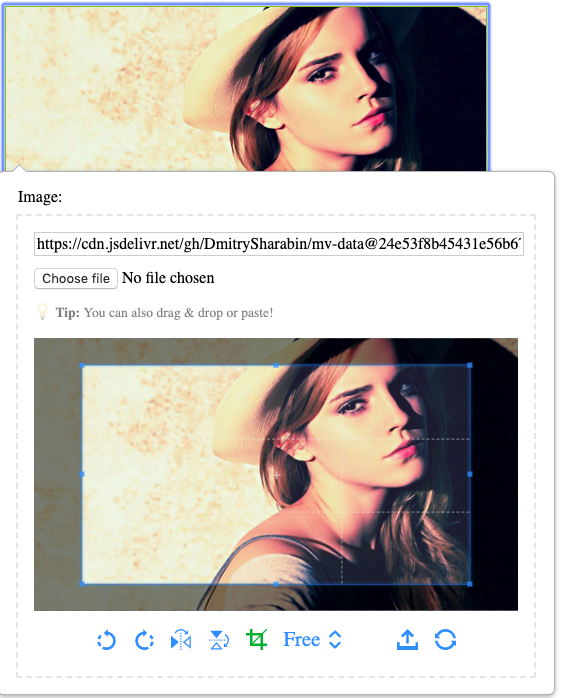
*****Credits*****: The image in the screenshot is taken from [here](https://fengyuanchen.github.io/cropperjs/).
Simply add the plugin to your app to enable Cropper functionality on **every image property**.
Cropper supports:
- cropping
- rotation
- flipping
- zooming (either by wheeling mouse or by touch).
There is a couple of things you should know before starting working with Cropper:
- use `Shift` key while *resizing* existing cropping box to preserve its aspect ratio
- use `Shift` key while *creating* new cropping box to get the square one
- use `double click` to switch between *moving* a crop box and *panning* an image (when it is zoomed in)
## Customize Cropper
Cropper supports [a bunch of options for customizing the way it works](https://github.com/fengyuanchen/cropperjs#options). You can specify these options on a per-property basis by using the `mv-cropper-options` attribute.
The syntax of this attribute is a CSS-like list of declarations, where you can use either commas or semicolons to separate the *option-value pairs*, like so: `mv-cropper-options="autoCrop: false, aspectRatio: 1.6"`. If you want to set an option to `true`, you can just provide no value.
## UI customization: Preview
You may also find useful the `cropper-preview` class for styling the preview area.
## UI customization: Toolbar

You can use these [CSS variables](https://developer.mozilla.org/en-US/docs/Web/CSS/Using_CSS_variables) in your CSS (via `var(--variable-name)`) to customize the toolbar.
| Name | Value |
| ---- | ----- |
| `--rotate-left-btn` | data URI of Cropper rotate left icon |
| `--rotate-right-btn` | data URI of Cropper rotate right icon |
| `--flip-horizontal-btn` | data URI of Cropper flip horizontal icon |
| `--flip-vertical-btn` | data URI of Cropper flip vertical icon |
| `--crop-btn` | data URI of Cropper crop icon |
| `--upload-btn` | data URI of Cropper upload icon |
| `--update-btn` | data URI of Cropper update icon |
| `--select-drop-down-arrow` | data URI of Cropper drop-down list arrow icon |
## UI customization: Text & Localization
Your app needs to be in a different language? No problem! You can customize every bit of Cropper displayed text, whether that is to change the text displayed to your liking or to localize it to a different language.
Here is the list of `id`s of phrases to change/localize and their default values:
| id | Default Value |
|---|---|
| `cropper-image-preview` | Image preview |
| `cropper-upload` | Upload Image |
| `cropper-show` | Show Crop Box |
| `cropper-hide` | Hide Crop Box |
| `cropper-rotate-left` | Rotate Left |
| `cropper-rotate-right` | Rotate Right |
| `cropper-flip-horizontal` | Flip Horizontal |
| `cropper-flip-vertical` | Flip Vertical |
| `cropper-aspect-ratio` | Crop Box Aspect Ratio |
| `cropper-aspect-ratio-free` | Free |
| `cropper-aspect-ratio-custom` | Custom |
| `cropper-update` | Update Preview |