https://github.com/dnouri/sillywalks
sillywalks 🎩👞: a CLI resource monitor
https://github.com/dnouri/sillywalks
Last synced: 4 months ago
JSON representation
sillywalks 🎩👞: a CLI resource monitor
- Host: GitHub
- URL: https://github.com/dnouri/sillywalks
- Owner: dnouri
- Created: 2024-09-01T21:40:43.000Z (almost 2 years ago)
- Default Branch: main
- Last Pushed: 2024-09-11T18:32:56.000Z (almost 2 years ago)
- Last Synced: 2025-03-18T07:43:15.628Z (about 1 year ago)
- Language: Python
- Size: 99.6 KB
- Stars: 2
- Watchers: 1
- Forks: 0
- Open Issues: 0
-
Metadata Files:
- Readme: README.md
Awesome Lists containing this project
README
# sillywalks 🎩👞
## 🦜 About
sillywalks is a command-line tool for monitoring CPU, memory, and I/O
usage of a process and its subprocesses. It provides real-time
statistics and generates time-series plots, offering insights into
resource consumption over time.
Here's a YouTube video that shows usage:
[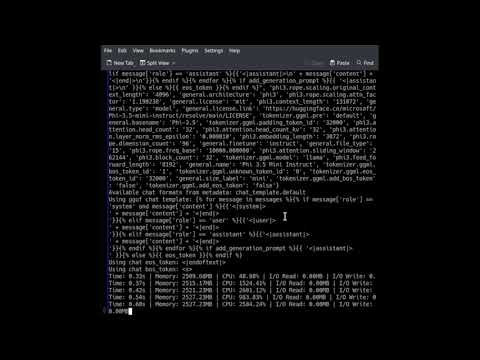](https://www.youtube.com/watch?v=3a7gU9Y_5f4)
## 🧀 Features
- Tracks CPU usage, memory consumption, and I/O rates
- Monitors the main process and its subprocesses
- Provides real-time console updates
- Generates time-series plots for easy visualization
- Offers optional Prometheus metrics output
## 🛋️ Installation
It's recommended to use a virtual environment:
```bash
python3 -m venv venv
source venv/bin/activate
pip install -U pip wheel
```
Install sillywalks from source:
```bash
pip install -e ".[devel]"
```
Or from PyPI (soon):
```bash
pip install sillywalks
```
## 🥥 Usage
Run sillywalks from the command line:
```bash
sillywalks [options] [args...]
```
Replace `` with the program you want to monitor, and
`[args...]` with any arguments for that program.
### 🎛️ Options
- `--frequency FLOAT`: Set the logging frequency in Hz (default: 10.0)
- `--no-console`: Disable console output
- `--prometheus`: Enable Prometheus metrics
- `--port INT`: Set the port for Prometheus metrics server (default: 8000)
### 📚 Examples
1. Monitor a Python script:
```bash
sillywalks python3 my_script.py
```
2. Watch a video encoding process:
```bash
sillywalks ffmpeg -i input.mp4 -c:v libx264 -crf 23 output.mp4
```
3. Track a machine learning training job and enable the Prometheus metrics:
```bash
sillywalks --prometheus python3 train_model.py --epochs 100 --batch-size 32
```
## 📊 Output
sillywalks provides two types of output:
1. Real-time console updates: These appear in your terminal as the
monitored process runs.
2. Time-series plot: A PNG file showing how resource usage changes
over time.
The plot includes separate graphs for memory usage, CPU usage, and I/O
rates (read and write).
## 🔧 Under the Hood
sillywalks uses [psutil](https://psutil.readthedocs.io/) (Python
System and Process Utilities) to collect resource usage data. It
periodically samples the process and its subprocesses, calculating CPU
usage, memory consumption, and I/O rates. The tool uses
[matplotlib](https://matplotlib.org/) to generate the time-series
plots.
Key points:
- CPU usage is calculated as a percentage of total CPU time.
- Memory usage is measured in megabytes (MB) using the Unique Set Size (USS).
- I/O rates are calculated in megabytes per second (MB/s) for both
read and write operations.
## 📊 Prometheus Integration
sillywalks offers integration with
[Prometheus](https://prometheus.io/), a powerful monitoring and
alerting toolkit. This feature allows you to collect and store metrics
over time, enabling advanced querying, visualization, and alerting
capabilities.
### Activating Prometheus Output
To enable Prometheus metrics, use the `--prometheus` flag:
```bash
sillywalks --prometheus your_command
```
By default, the Prometheus metrics server starts on port 8000. Specify
a different port with `--port`:
```bash
sillywalks --prometheus --port 9090 your_command
```
### Available Metrics
sillywalks exposes the following metrics:
- `process_memory_usage_mb`: Memory usage in MB
- `process_cpu_usage_percent`: CPU usage in percent
- `process_io_read_mbps`: I/O read rate in MB/s
- `process_io_write_mbps`: I/O write rate in MB/s
### Using Prometheus with sillywalks
1. Configure Prometheus to scrape metrics from the sillywalks
endpoint. Refer to the [Prometheus configuration
documentation](https://prometheus.io/docs/prometheus/latest/configuration/configuration/)
for details.
2. Use PromQL to query and analyze your data. Check the [PromQL
documentation](https://prometheus.io/docs/prometheus/latest/querying/basics/)
for query examples and best practices.
3. Visualize metrics using [Grafana](https://grafana.com/) or the
Prometheus web UI. The [Grafana
documentation](https://grafana.com/docs/grafana/latest/getting-started/get-started-grafana-prometheus/)
provides guidance on setting up dashboards.
4. Set up alerts based on your metrics. The [Prometheus alerting
documentation](https://prometheus.io/docs/alerting/latest/overview/)
explains how to configure alerting rules.
By integrating sillywalks with Prometheus, you can gain deeper
insights into your process's behavior over time and incorporate this
monitoring into your broader observability infrastructure.
## 🤔 When to Use sillywalks
sillywalks is ideal for high-level resource monitoring of
processes. Use it when you want to:
- Understand the overall resource consumption of a program
- Identify performance bottlenecks at a process level
- Monitor long-running tasks or background processes
For more detailed, code-level insights, consider using a profiler like
[py-spy](https://github.com/benfred/py-spy) in conjunction with
sillywalks.
## 🧹 Linting
We use Ruff and Black to lint and prettify the code. You may want to
install the respective plug-ins for your editor. To run Black and
Ruff in your source checkout, use:
```bash
make lint
```
## 🐟 References
- Daniel [blogged about how I used an LLM to write the code for
sillywalks](https://danielnouri.org/notes/2024/09/02/the-hottest-new-programming-language-is-english/).
The blog post contains lessons learned and advice on how to best
learn the skill of [prompt
engineering](https://huggingface.co/docs/transformers/en/tasks/prompting)
for beginners and others!
- This software uses [psutil](https://psutil.readthedocs.io/) at its
core. psutil is a cross-platform library for retrieving information
on running processes and system utilization (CPU, memory, disks,
network, sensors) in Python.
- Monty Python's [Ministry of Silly Walks on
YouTube](https://youtu.be/iV2ViNJFZC8)
## 🐮 Contributing
Contributions are welcome! Feel free to submit issues or pull requests
on our GitHub repository. Whether you're fixing bugs, adding features,
or improving documentation, your help is appreciated.