https://github.com/dnyarri/batchfiles
Examples of Python scripts for batch processing
https://github.com/dnyarri/batchfiles
batch batch-script compression docx fb2 ffmpeg ffmpeg-gui flac libreoffice ogg optivorbis optivorbis-gui png python python3 rtf translit transliterate-russian transliteration zip
Last synced: about 2 months ago
JSON representation
Examples of Python scripts for batch processing
- Host: GitHub
- URL: https://github.com/dnyarri/batchfiles
- Owner: Dnyarri
- License: unlicense
- Created: 2023-12-24T17:07:34.000Z (over 2 years ago)
- Default Branch: main
- Last Pushed: 2026-05-15T12:22:10.000Z (2 months ago)
- Last Synced: 2026-05-15T14:26:25.883Z (2 months ago)
- Topics: batch, batch-script, compression, docx, fb2, ffmpeg, ffmpeg-gui, flac, libreoffice, ogg, optivorbis, optivorbis-gui, png, python, python3, rtf, translit, transliterate-russian, transliteration, zip
- Language: Python
- Homepage: https://dnyarri.github.io/
- Size: 166 KB
- Stars: 0
- Watchers: 1
- Forks: 0
- Open Issues: 0
-
Metadata Files:
- Readme: README.md
- License: LICENSE
Awesome Lists containing this project
README
# The Toad's Batchroom: Batch scripts for files and dirs processing
Current repository comprizes various batch files created for my personal use and appeared to be so useful that I even update and improve them from time to time.
## Main batch files
Most batchfiles are equipped with GUI, some intended to be used as templates for further editing.
Most frequently used are:
- **dir ffmpeg flac2ogg 48** - converts all .flac within dir and subdirs to .ogg 48 kHz, using [ffmpeg](https://github.com/BtbN/FFmpeg-Builds/).
- **dir OPTIVORBIS ogg** - recompress all .ogg within dir and subdirs, using [OPTIVORBIS](https://github.com/OptiVorbis/OptiVorbis/); saves up to 10% of .ogg size.
- **dir LibreOffice rtf2docx** - batch conversion of .rtf, .doc, .odt and .fb2 files to .docx using [LibreOffice](https://www.libreoffice.org/). Overcomes clumsy LibreOffice idea of exporting all files into one dir.
- **dir COMPACT LZX** - Windows only; makes Windows (ver. 8 and 10) compact.exe recompress selected folder and subfolder using LZX filesystem compression. Great for software installations - for modern bloatware compression ratio is typically 2.0-2.7, sometimes higher. No sense to use it on frequently updated docs and stuff - upon editing and saving file gets decompressed back.
> [!NOTE]
> Windows users may rename forementioned files from .py to .pyw to avoid starting console.
> Programs *dir COMPACT LZX*, *dir OPTIVORBIS ogg* and *dir ffmpeg flac2ogg 48*, beside having Tkinter-based GUI, are capable to accept command line arguments at start time. Argument is supposed to be a name of folder; in this case program GUI opens right in this folder. If argument happen to be a file, GUI will be opened in folder containing it. You may use it for creating shortcuts like
> ``pythonw.exe "dir COMPACT LZX.py.py" "%1"``
> and then simply drag-and-drop folders onto shortcut to open program right where you need it.
> If argument is absent (e.g., you simply double-click program), program simply opens GUI in default directory and wait for you to browse and point to required location.
- **dir AdvZIP docx** - recompressing .docx after *dir LibreOffice rtf2docx* using [AdvZIP](https://github.com/amadvance/advancecomp) gives up to 10% space saving.
- **dir RENAME untranslit** - batch renaming, intended **for Russian users**. Программа для оптового переименования (batch renaming) файлов с транслитерированными именами обратно с латиницы на русский (кириллицу). Не соответствует ISO 9, словари переименования составлены на основе того, с чем я лично сталкиваюсь.
> [!CAUTION]
> **Будьте крайне осторожны**, не направляйте программу **dir RENAME untranslit** на директории типа Windows или Program Files!
- **dir RENAME unflibusta** - batch renaming of files according to patterns, like replacing underscores with spaces, removing digits, and so on. Edit rules pattern to your need.
> [!NOTE]
> *dir RENAME unflibusta.py* was initially created to batch fix silly filename convention for files downloaded from [Flibusta](https://flibusta.is/) and is supposed to be edited at will as you encounter any other silly file naming scheme.
## Sanctifier
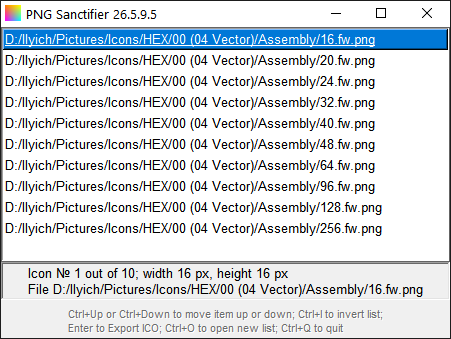
[**Sanctifier**](https://dnyarri.github.io/batch.html#sanctifier "Pure Python program for assembling Windows ICO from PNG files") actually is not a batch script but self-containing pure Python PNG to ICO converter, developed for assembling Windows icon (.ICO) files from PNG files without introducing any changes to the latter. The main idea is that Sanctifier simply inserts compressed PNG data into ICO skeleton *as is*, keeping source compression. This allows you to compress source PNGs to maximum degree first, and then use them to assemble multiple image single file ICO of minimal size, following simple steps below:
1. Create your PNG files and save them into **one** folder.
2. Optimize PNG files thus created ([oxipng](https://github.com/oxipng/oxipng) is highly recommended).
3. Start Sanctifier.py, select PNGs to assemble your ICO, follow hints displayed in info string of GUI.
[](https://dnyarri.github.io/batch.html#sanctifier "Pure Python program for assembling Windows ICO from PNG files")
## Related links
[Dnyarri website - more Python freeware for image processing, 3D, and batch automation](https://dnyarri.github.io "The Toad's Slimy Mudhole - Python freeware for POV-Ray and other 3D, Scale2x, Scale3x, Scale2xSFX, Scale3xSFX, PPM and PGM image support, bilinear and barycentric image interpolation, and batch processing") by the same author.
[The Toad's Batchroom at Github](https://github.com/Dnyarri/batchfiles "Batch files for files conversions and compression")
[The Toad's Batchroom mirror at Gitflic](https://gitflic.ru/project/dnyarri/batchfiles "Batch files for files conversions and compression")