https://github.com/dnyarri/povthread
Converting bitmaps to 3D canvas and embroidery simulation in POV-Ray format.
https://github.com/dnyarri/povthread
canvas cross-stitch cross-stitching embroidery gros-de-naples isosurface linen povray python python3 tabby taffeta textile
Last synced: 4 months ago
JSON representation
Converting bitmaps to 3D canvas and embroidery simulation in POV-Ray format.
- Host: GitHub
- URL: https://github.com/dnyarri/povthread
- Owner: Dnyarri
- License: unlicense
- Created: 2024-10-04T07:23:18.000Z (over 1 year ago)
- Default Branch: main
- Last Pushed: 2026-02-20T06:53:03.000Z (4 months ago)
- Last Synced: 2026-02-20T11:19:07.662Z (4 months ago)
- Topics: canvas, cross-stitch, cross-stitching, embroidery, gros-de-naples, isosurface, linen, povray, python, python3, tabby, taffeta, textile
- Language: Python
- Homepage: https://dnyarri.github.io/povthread.html
- Size: 376 KB
- Stars: 2
- Watchers: 1
- Forks: 0
- Open Issues: 0
-
Metadata Files:
- Readme: README.md
- License: LICENSE
Awesome Lists containing this project
README
# POV-Ray Thread - Bitmap to 3D canvas and cross stitch simulation converter
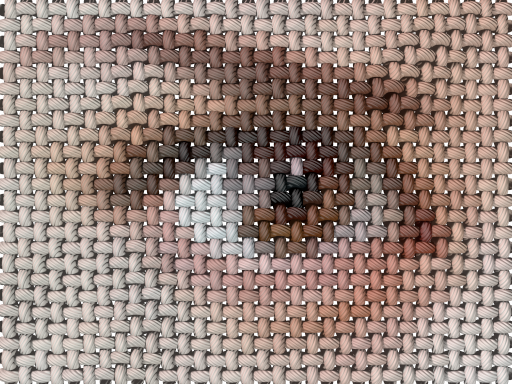
Python program for conversion of bitmap image (in PNG or PPM format) to some sort of solid objects in [POVRay](https://www.povray.org/ "Persistence of Vision Raytracer") 3D format, resembling threads of canvas or cross stitches. Each source image pixel is converted to a 3D object, colored after source pixel.
[](https://dnyarri.github.io/povthread.html "Example of linen canvas POV-Ray Thread export rendering")
## Main program GUI
Main program [**POVRayThread.py**](https://github.com/Dnyarri/POVthread/blob/main/POVRayThread.py) provides general linking between PNG and PPM/PGM reading modules and POV-Ray writing one.
Useful GUI features include mouse event handling:
- After starting program *double click* on preview area is equal to "Open...", right click to "File..." menu;
- After opening an image *Ctrl + Left click* is *"zoom in"*, *Alt + Left click* is *"zoom out"*, similar to Photoshop;
- After filtering an image (pressing "Enter") left click is source\result preview switch.
## Brief effects module description
- **Linen.py** - creates an object, simulating canvas, colored after source image (taffeta, print on canvas, and the like).
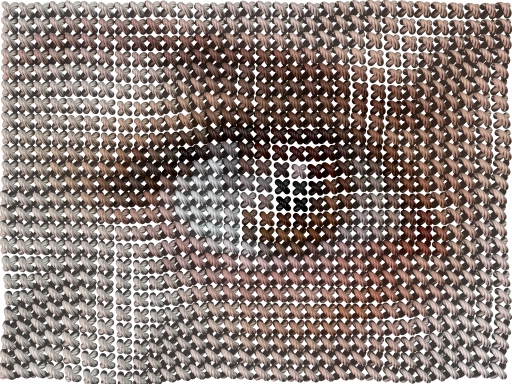
- **Stitch.py** - simulates common cross stitching embroidery appearance.
[](https://dnyarri.github.io/povthread.html "Example of cross-stitch POV-Ray Thread export rendering")
## Prerequisite and Dependencies
1. [Python](https://www.python.org/) 3.11 or above.
2. [PyPNG](https://gitlab.com/drj11/pypng "Pure Python PNG I/O module"). Copy included into current POV-Ray Thread distribution.
3. [PyPNM](https://pypi.org/project/PyPNM/ "Pure Python PNM I/O module"). Copy included into current POV-Ray Thread distribution.
4. Tkinter. Normally included into standard CPython distribution.
> [!NOTE]
> Since POVRayThread 1.21.7.11 and Averager 3.21.7.11 PyPNM version included into distribution updated to [PyPNM "Victory 2" main](https://github.com/Dnyarri/PyPNM "Pure Python PPM and PGM I/O module"), intended to be used with Python 3.11 and above. The only actual limitation is that main version does not have a workaround for displaying 16 bpc images necessary for old Tkinter included into old CPython distributions. If you want bringing old Tkinter compatibility back, download [PyPNM extended compatibility version](https://github.com/Dnyarri/PyPNM/tree/py34 "Pure Python PPM and PGM I/O module for Python 3.4") and plug it in manually.
## Installation and Usage
Programs distribution is rather self-contained and is supposed to run right out of the box. Program is equipped with minimal GUI, so all you have to do after starting a program is use "Open..." dialog to open image file, then use "Export..." to name 3D file to be created, then wait while program does the job, then open resulting file with POV-Ray and render the scene.
## Averager
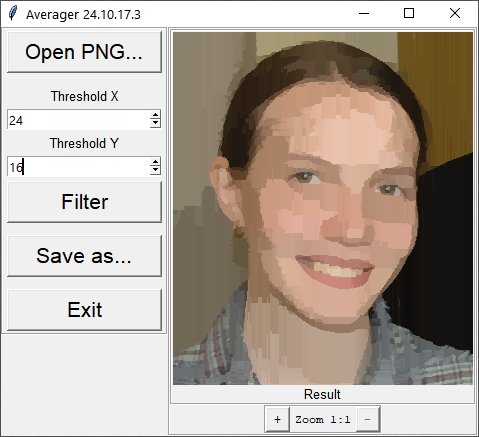
[**Averager.py**](https://github.com/Dnyarri/POVthread/blob/main/Averager.py) was initially created as an accessory for preprocessing source PNG files. It averages image colors (L, LA, RGB, RGBA) within linear or squarish areas between contrast edges, providing color reduction somewhat similar to used in real cross stitch where single thread is used to produce several stitches in a row.
Later this filtering module was added to *POVRayThread*, making *Averager* redundant; however, it is still included into distribution as an illustration of 100% pure Python image filtering program, working at quite acceptable speed without any large third-party C packages.
[](https://dnyarri.github.io/povthread.html#averager "Adaptive Image Averager - image filtering application in pure Python")
### Related
[Dnyarri website - more Python freeware for image processing, 3D, and batch automation](https://dnyarri.github.io "The Toad's Slimy Mudhole - Python freeware for POV-Ray and other 3D, Scale2x, Scale3x, Scale2xSFX, Scale3xSFX, PPM and PGM image support, bilinear and barycentric image interpolation, and batch processing") by the same author.
[POV-Ray Thread page with illustrations](https://dnyarri.github.io/povthread.html "POV-Ray Thread rendering example and Averager preview"), explanations etc.
[Ancestor project: POV‑Ray Mosaic](https://dnyarri.github.io/povzaika.html "POV‑Ray Mosaic: converting bitmap into mosaic of 3D elements packed in hexagonal, square or triangular tiles")
[POV-Ray Thread source at Github](https://github.com/Dnyarri/POVthread "POV-Ray Thread source")
[POV-Ray Thread source at Gitflic mirror](https://gitflic.ru/project/dnyarri/povthread "POV-Ray Thread source")