https://github.com/dobin/dmsr
Does My Shit Run - Linux Monitoring Solution
https://github.com/dobin/dmsr
monitoring
Last synced: 11 months ago
JSON representation
Does My Shit Run - Linux Monitoring Solution
- Host: GitHub
- URL: https://github.com/dobin/dmsr
- Owner: dobin
- License: gpl-3.0
- Created: 2023-04-03T07:16:50.000Z (about 3 years ago)
- Default Branch: main
- Last Pushed: 2023-09-25T19:29:09.000Z (over 2 years ago)
- Last Synced: 2024-04-09T16:16:32.764Z (about 2 years ago)
- Topics: monitoring
- Language: Python
- Homepage:
- Size: 105 KB
- Stars: 9
- Watchers: 2
- Forks: 0
- Open Issues: 0
-
Metadata Files:
- Readme: README.md
- License: LICENSE
Awesome Lists containing this project
README
# DMSR - Does My Shit Run
A minimalistic monitoring solution to see if my shit still works.
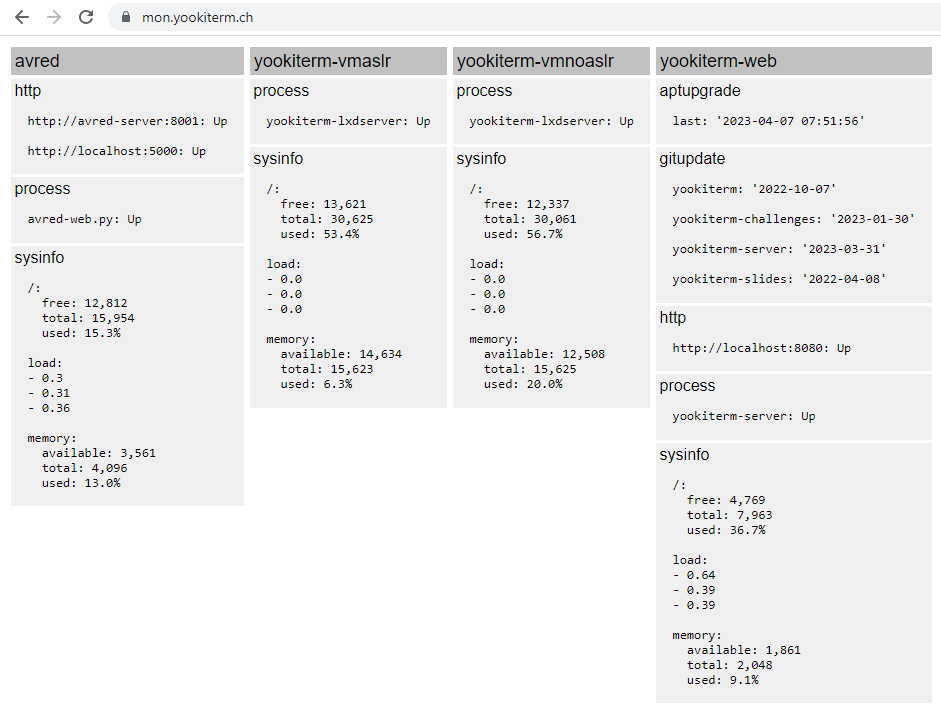
See [mon.yookiterm.ch](https://mon.yookiterm.ch) for how I use it.
* Agent based
* HTTP communication from agent to server
* Simple python plugins
* No history
* No DB, No time series DB
* No query language
* No need to run as root
* No filtering, aggregation, transformation or processing
## How it works
* Agent has plugins
* Agent plugins will generate a JSON and send it to the server with HTTP POST
* Server stores JSON, overwriting previous
* Server will pretty print JSON (from all servers, all plugins)
Thats it.
## Screenshot
## Install
We install it as a dedicated user:
```
$ sudo adduser --disabled-password dmsr
$ cd /home/dmsr/
$ su dmsr
$ git clone https://github.com/dobin/dmsr
$ cd dmsr/
$ pip3 install -r requirements.txt
$ cp agent.yaml.sample agent.yaml # for agent
$ cp server.yaml.sample server.yaml # for server
$ ./server.py &
$ ./agent.py
```
For persistence, use appropriate systemd file (for `/etc/systemd/system`):
* dmsragent.service
* dmsrserver.service
## How to Use
Server:
* configure `password` in `server.yaml`
* start server: `./server.py`
Agent:
* configure `password` and plugins in `agent.yaml`
* start agent: `./agent.py`
## Sample `agent.yaml`
Refreshes are always in seconds.
`agent.yaml.sample`:
```
server: http://localhost:5000
password: password
refresh: 60
plugins:
http:
enabled: true
urls:
- http://localhost:5000
refresh: 120
process:
enabled: true
processes:
- init
- asdf
sysinfo:
enabled: true
disks:
- /
show load: true
show memory: true
systemdunit:
enabled: false
private: true
units:
- ssh
```
## Sample `server.yaml`
`server.yaml.sample`:
```yaml
password: password
adminpw: password
pagerefresh: 60
```
## Admin
Configure `adminpw` in `server.yaml`.
Login with `/admin`.
To make a plugin data private, set `private = true` in `agent.yaml`.
## Alarming
Plugins may return non empty `status`, most often with the string `warn`. They decide by themselves when to send it.
The endpoint `/status` will return HTTP `200` if all status
are ok, and `500` if at least one is not ok.
Use [Desktop Web Scheduler (DWS)](https://github.com/ozzi-/DWS) to get a notification if some shit doesnt run anymore.
## Plugins
Create the plugin file `helloworld.py`:
```sh
$ touch plugins/helloworld.py
```
Implement `helloworld.py`. Class needs to have the same name as the filename.
```python
from typing import Tuple, Dict
from client.plugin import Plugin, PluginStatus
class helloworld(Plugin):
def __init__(self, refresh):
super().__init__(refresh)
# config default for this plugin
self.config['output'] = [ "hello world?" ]
def run(self) -> Tuple[Dict, PluginStatus]:
data = {}
status = PluginStatus.OK
data["message"] = ",".join(self.config['output'])
return data, status
```
update `config.yaml`. Use the filename/classname as name, and enable it:
```yaml
plugins:
helloworld:
enabled: true
output:
- "Hello World!"
```
Test with:
```
$ python3 ./agent.py --test helloworld
Testing plugin helloworld (refresh: 60)
({'message': 'Hello World!'}, '')
```
It will output a tuple where the first element is the data structure
which gets yaml'd as output, and a status code of the plugin (warning, error).
## Design Decisions
There is no history. Stuff is either down currently, or it aint.
There is no persistence. Dont care about the status 5 minute ago.
There is no server side configuration.
* Agent decides what data will be pushed
* Agent decides how the data will look like
* Agent decides what the error conditions are