https://github.com/doccstat/fastcpd
Fast Change Point Detection in R
https://github.com/doccstat/fastcpd
change-point-detection cpp custom-function gradient-descent lasso linear-regression logistic-regression offline pelt penalized-regression poisson-regression pypi-package python python3 quasi-newton r r-package statistics time-series warm-start
Last synced: 4 months ago
JSON representation
Fast Change Point Detection in R
- Host: GitHub
- URL: https://github.com/doccstat/fastcpd
- Owner: doccstat
- License: apache-2.0
- Created: 2022-09-20T02:08:33.000Z (almost 4 years ago)
- Default Branch: main
- Last Pushed: 2025-08-16T18:05:03.000Z (11 months ago)
- Last Synced: 2026-02-12T16:40:10.319Z (5 months ago)
- Topics: change-point-detection, cpp, custom-function, gradient-descent, lasso, linear-regression, logistic-regression, offline, pelt, penalized-regression, poisson-regression, pypi-package, python, python3, quasi-newton, r, r-package, statistics, time-series, warm-start
- Language: C++
- Homepage: https://fastcpd.xingchi.li/
- Size: 101 MB
- Stars: 24
- Watchers: 2
- Forks: 1
- Open Issues: 3
-
Metadata Files:
- Readme: README.Rmd
- Changelog: NEWS.md
- License: LICENSE.md
Awesome Lists containing this project
README
---
output: github_document
---
```{r, include = FALSE}
knitr::opts_chunk$set(
collapse = TRUE,
comment = "#>",
fig.path = "man/figures/README-"
)
options(cli.hyperlink = FALSE, eval = TRUE)
```
# Fast Change Point Detection 
[](https://app.codecov.io/gh/doccstat/fastcpd?branch=main)
[](https://www.codefactor.io/repository/github/doccstat/fastcpd)
[](https://cran.r-project.org/package=fastcpd)
[](https://doi.org/10.48550/arXiv.2404.05933)
[](https://github.com/doccstat/fastcpd/actions)
[](https://doccstat.r-universe.dev)
[](https://pypi.org/project/fastcpd/)
[](https://pypi.org/project/fastcpd/)
## Overview
The fastcpd (**fast** **c**hange **p**oint **d**etection) is a fast
implmentation of change point detection methods in R/Python.
### Documentation
* R documentation: [fastcpd.xingchi.li](https://fastcpd.xingchi.li)
* Python documentation: [fastcpd.xingchi.li/python](https://fastcpd.xingchi.li/python)
## Installation
### R
```{r eval = FALSE}
# install.packages("devtools")
devtools::install_github("doccstat/fastcpd")
# or install from CRAN
install.packages("fastcpd")
```
### Python WIP
``` shell
# python -m ensurepip --upgrade
pip install .
# or install from PyPI
pip install fastcpd
```
## Usage
### R
```{r ar3}
set.seed(1)
n <- 1000
x <- rep(0, n + 3)
for (i in 1:600) {
x[i + 3] <- 0.6 * x[i + 2] - 0.2 * x[i + 1] + 0.1 * x[i] + rnorm(1, 0, 3)
}
for (i in 601:1000) {
x[i + 3] <- 0.3 * x[i + 2] + 0.4 * x[i + 1] + 0.2 * x[i] + rnorm(1, 0, 3)
}
result <- fastcpd::fastcpd.ar(x[3 + seq_len(n)], 3, r.progress = FALSE)
summary(result)
plot(result)
```
### Python WIP
``` python
import fastcpd.segmentation
from numpy import concatenate
from numpy.random import normal, multivariate_normal
covariance_mat = [[100, 0, 0], [0, 100, 0], [0, 0, 100]]
data = concatenate((multivariate_normal([0, 0, 0], covariance_mat, 300),
multivariate_normal([50, 50, 50], covariance_mat, 400),
multivariate_normal([2, 2, 2], covariance_mat, 300)))
fastcpd.segmentation.mean(data)
import fastcpd.variance_estimation
fastcpd.variance_estimation.mean(data)
```
### Comparison
```{r time-comparison-small}
library(microbenchmark)
set.seed(1)
n <- 5 * 10^6
mean_data <- c(rnorm(n / 2, 0, 1), rnorm(n / 2, 50, 1))
ggplot2::autoplot(microbenchmark(
wbs = wbs::wbs(mean_data),
not = not::not(mean_data, contrast = "pcwsConstMean"),
changepoint = changepoint::cpt.mean(mean_data, method = "PELT"),
jointseg = jointseg::jointSeg(mean_data, K = 12),
fpop = fpop::Fpop(mean_data, 2 * log(n)),
mosum = mosum::mosum(c(mean_data), G = 40),
fastcpd = fastcpd::fastcpd.mean(mean_data, r.progress = FALSE, cp_only = TRUE, variance_estimation = 1)
))
```
```{r time-comparison-large}
library(microbenchmark)
set.seed(1)
n <- 10^8
mean_data <- c(rnorm(n / 2, 0, 1), rnorm(n / 2, 50, 1))
system.time(fastcpd::fastcpd.mean(mean_data, r.progress = FALSE, cp_only = TRUE, variance_estimation = 1))
system.time(mosum::mosum(c(mean_data), G = 40))
system.time(fpop::Fpop(mean_data, 2 * log(n)))
system.time(changepoint::cpt.mean(mean_data, method = "PELT"))
ggplot2::autoplot(microbenchmark(
changepoint = changepoint::cpt.mean(mean_data, method = "PELT"),
fpop = fpop::Fpop(mean_data, 2 * log(n)),
mosum = mosum::mosum(c(mean_data), G = 40),
fastcpd = fastcpd::fastcpd.mean(mean_data, r.progress = FALSE, cp_only = TRUE, variance_estimation = 1),
times = 10
))
```
Some packages are not included in the `microbenchmark` comparison due to either
memory constraints or long running time.
```r
# Device: Mac mini (M1, 2020)
# Memory: 8 GB
system.time(CptNonPar::np.mojo(mean_data, G = floor(length(mean_data) / 6)))
#> Error: vector memory limit of 16.0 Gb reached, see mem.maxVSize()
#> Timing stopped at: 0.061 0.026 0.092
system.time(ecp::e.divisive(matrix(mean_data)))
#> Error: vector memory limit of 16.0 Gb reached, see mem.maxVSize()
#> Timing stopped at: 0.076 0.044 0.241
system.time(strucchange::breakpoints(y ~ 1, data = data.frame(y = mean_data)))
#> Timing stopped at: 265.1 145.8 832.5
system.time(breakfast::breakfast(mean_data))
#> Timing stopped at: 45.9 89.21 562.3
```
## Cheatsheet
[](https://github.com/doccstat/fastcpd/blob/main/man/figures/cheatsheets.pdf)
### References
* [fastcpd: Fast Change Point Detection in R](https://doi.org/10.48550/arXiv.2404.05933)
* [Sequential Gradient Descent and Quasi-Newton's Method for Change-Point Analysis](https://proceedings.mlr.press/v206/zhang23b.html)
## FAQ
Should I install suggested packages?
The suggested packages are not required for the main functionality of the
package. They are only required for the vignettes. If you want to
learn more about the package comparison and other vignettes, you could either
check out vignettes on [CRAN](https://CRAN.R-project.org/package=fastcpd) or
[pkgdown generated documentation](https://fastcpd.xingchi.li/articles/).
I countered problems related to gfortran on Mac OSX or Linux!
The package should be able to install on Mac and any Linux distribution without any problems if all the
dependencies are installed. However, if you encountered problems related to
gfortran, it might be because `RcppArmadillo` is not installed previously.
Try [Mac OSX stackoverflow solution](https://stackoverflow.com/a/72997915) or
[Linux stackover solution](https://stackoverflow.com/a/15540919) if you have
trouble installing `RcppArmadillo`.
We welcome contributions from everyone.
Please follow the instructions below to make contributions.
1. Fork the repo.
2. Create a new branch from `main` branch.
3. Make changes and commit them.
1. Please follow the
[Google's R style guide](https://google.github.io/styleguide/Rguide.html)
for naming variables and functions.
2. If you are adding a new family of models with new cost functions with
corresponding gradient and Hessian, please add them to
`src/fastcpd_class_cost.cc` with proper example and tests in
`vignettes/gallery.Rmd` and
`tests/testthat/test-gallery.R`.
3. Add the family name to `src/fastcpd_constants.h`.
4. [Recommended] Add a new wrapper function in `R/fastcpd_wrappers.R` for
the new family of models and move the examples to the new wrapper
function as roxygen examples.
5. Add the new wrapper function to
the corresponding section in `_pkgdown.yml`.
4. Push the changes to your fork.
5. Create a pull request.
6. Make sure the pull request does not create new warnings or errors in
`devtools::check()`.
Trouble installing Python package.
Python headers are required to install the Python package. If you are
using Ubuntu, you can install the headers with:
``` shell
sudo apt install python3-dev
```
Encountered a bug or unintended behavior?
1. File a ticket at
[GitHub Issues](https://github.com/doccstat/fastcpd/issues).
2. Contact the authors specified in
[DESCRIPTION](https://github.com/doccstat/fastcpd/blob/main/DESCRIPTION#L5-L10).
## Stargazers over time
[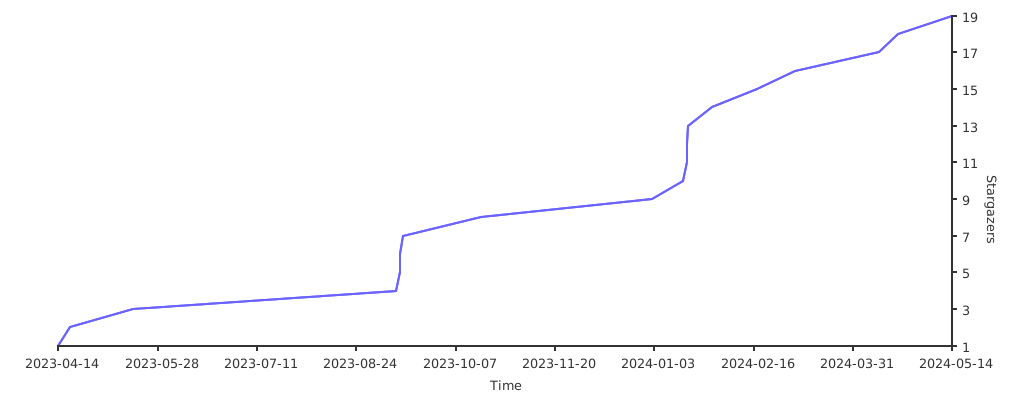](https://starchart.cc/doccstat/fastcpd)
## Acknowledgements
Special thanks to [clODE](https://github.com/patrickfletcher/clODE).