https://github.com/dockur/proxmox-dm
Proxmox Datacenter Manager inside a Docker container.
https://github.com/dockur/proxmox-dm
docker-image proxmox proxmox-cluster proxmox-datacenter-manager proxmox-tools
Last synced: 2 months ago
JSON representation
Proxmox Datacenter Manager inside a Docker container.
- Host: GitHub
- URL: https://github.com/dockur/proxmox-dm
- Owner: dockur
- License: mit
- Created: 2026-06-06T08:44:47.000Z (2 months ago)
- Default Branch: master
- Last Pushed: 2026-06-06T10:20:55.000Z (2 months ago)
- Last Synced: 2026-06-06T10:21:00.146Z (2 months ago)
- Topics: docker-image, proxmox, proxmox-cluster, proxmox-datacenter-manager, proxmox-tools
- Language: Dockerfile
- Homepage:
- Size: 1020 KB
- Stars: 0
- Watchers: 0
- Forks: 0
- Open Issues: 1
-
Metadata Files:
- Readme: readme.md
- License: license.md
Awesome Lists containing this project
README
Proxmox Datacenter Manager

[![Build]][build_url]
[![Version]][tag_url]
[![Size]][tag_url]
[![Pulls]][hub_url]
Proxmox Datacenter Manager inside a Docker container.
## Features ✨
- **Centralized management** — Manage any number of [Proxmox VE](https://github.com/dockur/proxmox/) nodes using a modern web-interface
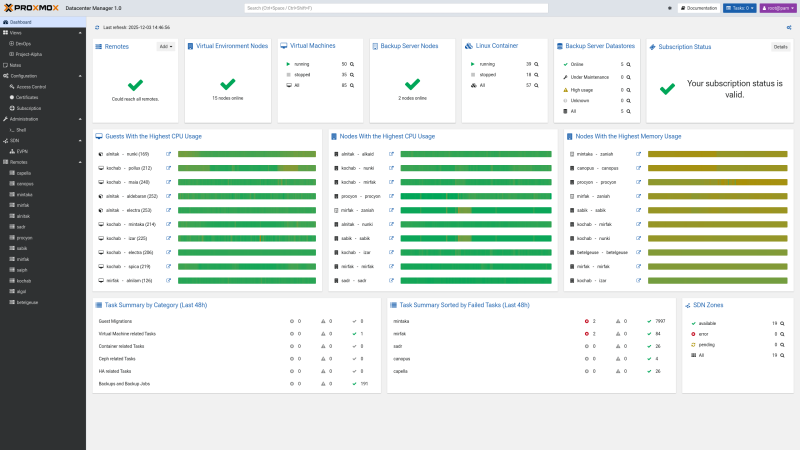
- **Resource monitoring** — A global dashboard visualizes the state of every node, highlighting potential issues
- **Easy backups** — Stores all your configuration in a volume mount, for easy backup and restore
- **Task aggregation** — Centralized access to task logs across the entire infrastructure for auditing and troubleshooting
- **Cross-cluster migration** — Execute live migrations of virtual guests between nodes
- **Update management** — Monitor available updates and security patches across the whole fleet
## Usage 🐳
##### Via Docker Compose:
```yaml
services:
pdm:
hostname: pdm
container_name: pdm
image: dockurr/proxmox-dm
environment:
PASSWORD: "root"
ports:
- 8443:8443
volumes:
- ./config:/etc/proxmox-datacenter-manager
- ./data:/var/lib/proxmox-datacenter-manager
restart: always
privileged: true
stop_grace_period: 2m
```
##### Via Docker CLI:
```bash
docker run -it --rm --name pdm --hostname pdm --privileged -e "PASSWORD=root" -p 8443:8443 -v "${PWD:-.}/config:/etc/proxmox-datacenter-manager" -v "${PWD:-.}/data:/var/lib/proxmox-datacenter-manager" --stop-timeout 120 docker.io/dockurr/proxmox-dm
```
##### Via Github Codespaces:
[](https://codespaces.new/dockur/proxmox-dm)
## Screenshot 📸
## FAQ 💬
### How do I use it?
Very simple! These are the steps:
- Start the container and connect to [port 8443](http://127.0.0.1:8443/) using your web browser.
- Login using the username `root` and the password you specified in the `PASSWORD` environment variable.
Enjoy your time with your brand new Proxmox Datacenter Manager, and don't forget to star this repo!
### How do I change the location of the configuration data?
To change the location of the configuration data, include the following two bind mounts in your compose file:
```yaml
volumes:
- ./config:/etc/proxmox-datacenter-manager
- ./data:/var/lib/proxmox-datacenter-manager
```
Replace the example paths `./config` and `./data` with the desired folders or named volumes.
### Are there containers available for other Proxmox products?
Yes, see our [Proxmox VE](https://github.com/dockur/proxmox) and [Proxmox Backup Server](https://github.com/dockur/proxmox-backup) containers.
## Acknowledgements 🙏
Special thanks to [willmortimer](https://github.com/willmortimer) and [LongQT-sea](https://github.com/LongQT-sea), this project would not exist without their invaluable work.
## Stars 🌟
[](https://starchart.cc/dockur/proxmox-dm)
[build_url]: https://github.com/dockur/proxmox-dm/
[hub_url]: https://hub.docker.com/r/dockurr/proxmox-dm/
[tag_url]: https://hub.docker.com/r/dockurr/proxmox-dm/tags
[pkg_url]: https://github.com/dockur/proxmox-dm/pkgs/container/proxmox-dm
[Build]: https://github.com/dockur/proxmox-dm/actions/workflows/build.yml/badge.svg
[Size]: https://img.shields.io/docker/image-size/dockurr/proxmox-dm/latest?color=066da5&label=size
[Pulls]: https://img.shields.io/docker/pulls/dockurr/proxmox-dm.svg?style=flat&label=pulls&logo=docker
[Version]: https://img.shields.io/docker/v/dockurr/proxmox-dm/latest?arch=amd64&sort=semver&color=066da5
[Package]: https://img.shields.io/badge/dynamic/json?url=https%3A%2F%2Fipitio.github.io%2Fbackage%2Fdockur%2Fproxmox-dm%2Fproxmox-dm.json&query=%24.downloads&logo=github&style=flat&color=066da5&label=pulls