https://github.com/dockur/tor
Tor in a Docker container.
https://github.com/dockur/tor
container docker onion-routing tor
Last synced: 3 months ago
JSON representation
Tor in a Docker container.
- Host: GitHub
- URL: https://github.com/dockur/tor
- Owner: dockur
- License: mit
- Created: 2023-10-05T00:11:57.000Z (almost 3 years ago)
- Default Branch: master
- Last Pushed: 2026-03-26T01:15:51.000Z (4 months ago)
- Last Synced: 2026-03-26T23:22:24.431Z (4 months ago)
- Topics: container, docker, onion-routing, tor
- Language: Dockerfile
- Homepage:
- Size: 316 KB
- Stars: 184
- Watchers: 2
- Forks: 23
- Open Issues: 6
-
Metadata Files:
- Readme: readme.md
- License: license.md
Awesome Lists containing this project
README
Tor for Docker

[![Build]][build_url]
[![Version]][tag_url]
[![Size]][tag_url]
[![Package]][pkg_url]
[![Pulls]][hub_url]
Docker container of the [Tor](https://www.torproject.org/) network proxy daemon.
## Features ✨
- Suitable for relay, exit node or hidden service modes with SOCKSv5 proxy enabled.
- Works well as a single self-contained container or in cooperation with other containers (like nginx) for organizing complex hidden services on the Tor network.
- Includes an extensive healthcheck, plus monitoring via [Nyx](https://nyx.torproject.org/) and the Lyrebird obfs4proxy.
## Usage 🐳
##### Via Docker Compose:
```yaml
services:
tor:
image: dockurr/tor
container_name: tor
ports:
- 9050:9050
- 9051:9051
volumes:
- ./config:/etc/tor
- ./data:/var/lib/tor
restart: always
```
##### Via Docker CLI:
```shell
docker run -it --rm --name tor -p 9050:9050 -p 9051:9051 -v "${PWD:-.}/config:/etc/tor" -v "${PWD:-.}/data:/var/lib/tor" docker.io/dockurr/tor
```
## Configuration 🔧
**Environment Variables:**
- `PASSWORD` - Password for the Tor control port (default: "password")
- Change this for production deployments
- Example: `PASSWORD=example123`
- `CHECK` - Enable health check (default: "false")
- Set to "true" to enable health checks
- Uses external servers from the Tor Project (like [https://check.torproject.org/](https://check.torproject.org/) and [Onionoo](https://onionoo.torproject.org)) to monitor the node status.
- `DEBUG` - Enable debug output (default: "false")
- Set to "true" for troubleshooting
- Shows raw Tor Control Protocol responses
**Custom Configuration:**
The container supports custom Tor configuration via a mounted `torrc` file at `/etc/tor/torrc`, so you can provide your own relay, exit node, and hidden service settings.
**Example custom torrc file:**
```
# Your relay configuration
Nickname MyTorRelay
ContactInfo your@email.com
ORPort 9050
DirPort 9030
ExitRelay 0
ExitPolicy reject *:*
```
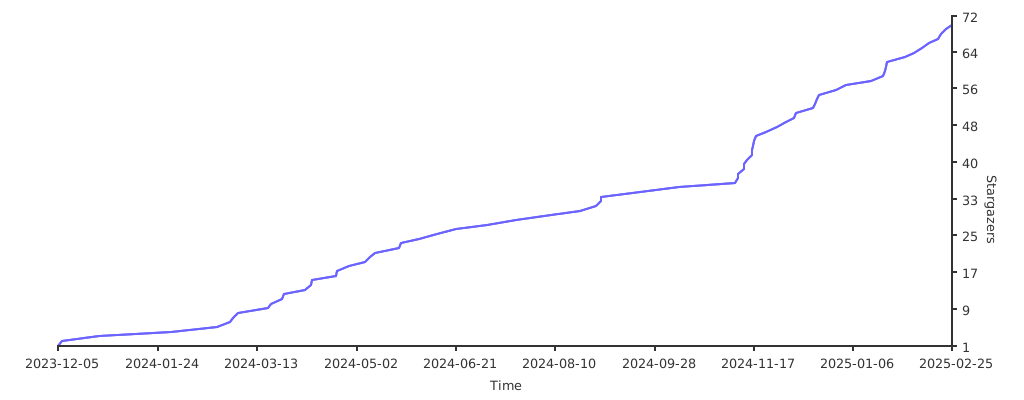
## Stars 🌟
[](https://starchart.cc/dockur/tor)
[build_url]: https://github.com/dockur/tor/
[hub_url]: https://hub.docker.com/r/dockurr/tor/
[tag_url]: https://hub.docker.com/r/dockurr/tor/tags
[pkg_url]: https://github.com/dockur/tor/pkgs/container/tor
[Build]: https://github.com/dockur/tor/actions/workflows/build.yml/badge.svg
[Size]: https://img.shields.io/docker/image-size/dockurr/tor/latest?color=066da5&label=size
[Pulls]: https://img.shields.io/docker/pulls/dockurr/tor.svg?style=flat&label=pulls&logo=docker
[Version]: https://img.shields.io/docker/v/dockurr/tor/latest?arch=amd64&sort=semver&color=066da5
[Package]: https://img.shields.io/badge/dynamic/json?url=https%3A%2F%2Fipitio.github.io%2Fbackage%2Fdockur%2Ftor%2Ftor.json&query=%24.downloads&logo=github&style=flat&color=066da5&label=pulls