https://github.com/dodonki1223/template_sample_rails_6
Rails6環境ですぐに開発を始められるようにするためのテンプレート(Docker、CircleCI、自動デプロイ機能導入済み)
https://github.com/dodonki1223/template_sample_rails_6
circleci circleci-heroku docker docker-compose dockerfile heroku postgresql rails rails6
Last synced: 10 months ago
JSON representation
Rails6環境ですぐに開発を始められるようにするためのテンプレート(Docker、CircleCI、自動デプロイ機能導入済み)
- Host: GitHub
- URL: https://github.com/dodonki1223/template_sample_rails_6
- Owner: dodonki1223
- Created: 2020-02-28T00:55:30.000Z (over 6 years ago)
- Default Branch: master
- Last Pushed: 2023-03-08T20:34:33.000Z (over 3 years ago)
- Last Synced: 2025-01-14T11:20:30.159Z (over 1 year ago)
- Topics: circleci, circleci-heroku, docker, docker-compose, dockerfile, heroku, postgresql, rails, rails6
- Language: Ruby
- Homepage:
- Size: 1.39 MB
- Stars: 7
- Watchers: 2
- Forks: 1
- Open Issues: 17
-
Metadata Files:
- Readme: README.md
Awesome Lists containing this project
README
# tempalte_sample_rails_6
[](https://circleci.com/gh/dodonki1223/template_sample_rails_6/tree/master)
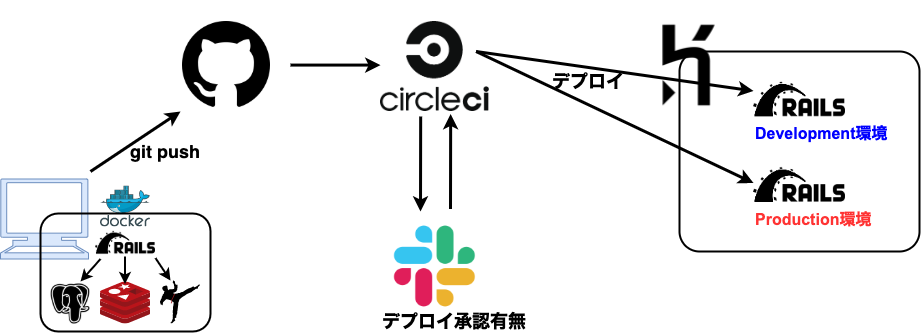
## 概要
Rails6アプリケーションの開発をすぐに始められるように素のRails6アプリケーションを元に自分流にカスタマイズしたものになります
またソースコードに不必要なコメントを大量に書いているので使用する場合は適宜、削除することをオススメします
## tempalte_sample_rails_6を動かす
下記コマンドを実行します
```shell
# ソースコードをcloneする
$ git clone https://github.com/dodonki1223/template_sample_rails_6.git
# cloneしてきたtempalte_sample_rails_6ディレクトリに移動
$ cd template_sample_rails_6/
# tempalte_sample_rails_6を動かす
$ docker-compose up rails
```
こちらのURL:[http://localhost:3000/](http://localhost:3000/) にアクセスすることで動作確認できます
**Dockerがインストールされていないと動かすことはできません**
## 環境について
### バージョン情報
| ソフトウェアスタック | バージョン |
|:---------------------|:-------------:|
| Rails | 6.0.2.1以上 |
| Ruby | 2.6.6 |
| PostgreSQL | 12 |
| Node.js | 12.16.3 |
| Yarn | 1.22.10 |
| Bundler | 2.1.2 |
| Redis | 5.0 |
### ローカルでの開発について
基本的にDockerを使用して開発を行えるようになっているのでPCにDockerがインストールされていれば問題ないです
#### PostgreSQLへの接続情報
| DB情報 | 値 |
|:-------------|:-------------:|
| Host | 127.0.0.1 |
| User | root |
| Password | |
| Port | 5432 |
| DatabaseName | dev_sample_db |
### CI(継続的インテグレーション)/CD(継続的デリバリー)環境 - Lint/Test/Deploy
自動テスト、静的コード解析、WebアプリケーションのデプロイはCircleCIで実装されていてデプロイ先には**Heroku**を使用しているのでCircleCIとHerokuの設定も必要になります
またCircleCIの通知用(デプロイの実行、完了通知)としてSlackも使用しているので自分用のWorkspaceを作成することをオススメします
## 改修箇所
自分が使いやすいようにいくつか改修しました
### Docker化
コマンド1つで開発ができるようにDocker化しました
Docker内ではよく使う [Redis](https://github.com/redis/redis-rb/)、[Sidekiq](https://github.com/mperham/sidekiq)が既に導入済みです
データベースは [PostgreSQL](https://www.postgresql.jp/document/12/html/) を使用します
### RSpec
デフォルトでは [Minitest](https://github.com/seattlerb/minitest) ですが [RSpec](https://github.com/rspec/rspec-rails) のほうが使い慣れているので [RSpec](https://github.com/rspec/rspec-rails) を導入しています
テストデータ作成ツールの [factory_bot](https://github.com/thoughtbot/factory_bot)、コードカバレッジを計測するツールの [SimpleCov](https://github.com/colszowka/simplecov) も導入済みです
### ER図自動生成
[Rails ERD](https://github.com/voormedia/rails-erd) を導入しているのでマイグレーションを実行した時、自動でER図が作成されるようになっています
### デバッグツール
システムを開発するためには効率よくデバッグできることで開発スピードは格段に上がるためRails開発ではおなじみの `binding.pry` を使用できる状態になっています
### 静的コード解析ツール
コードを一定の品質に保つために静的コード解析ツールを以下の4つが導入済みになっています
- [Rubocop](https://github.com/rubocop-hq/rubocop)(Rubyの静的コードアナライザー及びコードフォーマッター)
- [Rails Best Practices](https://github.com/flyerhzm/rails_best_practices)(Railsのベストプラクティスを教えてくれる)
- [Brakeman](https://github.com/presidentbeef/brakeman)(セキュリティの脆弱性チェック)
- [hadolint](https://github.com/hadolint/hadolint)(Dockerfileの静的コード解析)
### CI(継続的インテグレーション)/CD(継続的デリバリー)環境 - Lint/Test/Deploy
CircleCIにて自動テスト、静的コード解析、自動デプロイ(Heroku)を行うように設定ずみ
### コードの状態
- Railsガイドで紹介されている [rails generate scaffold HighScore game:string score:integer](https://railsguides.jp/command_line.html#rails-generate) を叩いた状態
## 開発
開発環境にはRails以外にもRedisやSidekiq、Webpackerが導入されています
起動方法やコマンドの実行方法を解説します
### Railsを起動する
```shell
$ docker-compose up rails
```
※`PostgreSQL` 、 `Redis` も一緒に起動します
### Webpackerを起動する
```shell
$ docker-compose up webpacker
```
### Sidekiqを起動する
```shell
$ docker-compose up sidekiq
```
### Runnerを起動する
Runnerはコマンドを実行するためのサービスになります
rakeコマンドやRSpecを実行するために使用します
```shell
$ docker-compose run --rm runner
```
以下の説明は `docker-compose run runner` 実行後の説明になります
#### RSpecを実行する
起動後のRunnerはデフォルトだと `RAILS_ENV=development` になっているためコマンドで明示的に `RAILS_ENV=test` を指定して実行します
```shell
# bundle exec ありバージョン
$ RAILS_ENV=test bundle exec rspec --format progress
# bundle exec なしバージョン
$ RAILS_ENV=test rspec --format progress
```
#### RuboCopを実行する
```shell
# bundle exec ありバージョン
$ bundle exec rubocop --require rubocop-rspec -D -P
# bundle exec なしバージョン
$ rubocop --require rubocop-rspec -D -P
```
#### Rails Best Practicesを実行する
```shell
# bundle exec ありバージョン
$ bundle exec rails_best_practices .
# bundle exec なしバージョン
$ rails_best_practices .
```
#### Brakemanを実行する
```shell
# bundle exec ありバージョン
$ bundle exec brakeman
# bundle exec なしバージョン
$ brakeman
```
#### rakeコマンドを実行する
```shell
# bin/ ありバージョン
$ bin/rake about
# bin/ なしバージョン
$ rake about
```
#### railsコマンドを実行する
```shell
# bin/ ありバージョン
$ bin/rails g --help
# bin/ なしバージョン
$ rails g --help
```
#### DBに接続する
```shell
# bin/ ありバージョン
$ bin/rails dbconsole
# bin/ なしバージョン
$ rails dbconsole
```
### その他
開発時のTipsを紹介します
やってもやらなくても良いです
#### GitHooksのpre-pushを使用する
[pre-push](https://githooks.com/)を使用してmaster、developmentブランチにpushする前に静的コード解析を実行してCIで落ちないようにします
CIの静的コード解析で落ちて修正するのは時間がかかるのでpush前に検知できた方が良いと思います
ローカルのgitを使用しているのでDockerで開発しているのにローカルの環境も整える必要があり2重管理になってしまうところが悩みどころです……
pre-pushファイルを動作させるためにテンプレートファイルをコピーする
```shell
$ cp .github/hooks/pre-push .git/hooks/pre-push
```
pre-pushのファイルに実行権限ないとhookされないので実行権限を与えてやる
```shell
$ chmod 755 .git/hooks/pre-push
```
## 環境構築
CI(継続的インテグレーション)/CD(継続的デリバリー)環境を実現するために Heroku、CircleCI、Slackの環境構築が必要です
下記ドキュメントを参照してください
- [環境構築手順書](https://github.com/dodonki1223/template_sample_rails_6/blob/master/documents/ENVIRONMENTAL_CONSTRUCTION.md)
## 解説
細かい内容について解説しています
詳しくは下記を参照してください
- [template_sample_rails_6の解説](https://github.com/dodonki1223/template_sample_rails_6/blob/master/documents/EXPLANATION.md)