https://github.com/dogxii/iface
Agent/前端/Golang/Java 面试题库 - 智能刷题工具,自定义 AI 接口,实现高效辅助学习
https://github.com/dogxii/iface
ai backend frontend interview interview-questions
Last synced: 21 days ago
JSON representation
Agent/前端/Golang/Java 面试题库 - 智能刷题工具,自定义 AI 接口,实现高效辅助学习
- Host: GitHub
- URL: https://github.com/dogxii/iface
- Owner: dogxii
- License: mit
- Created: 2026-03-08T16:56:04.000Z (4 months ago)
- Default Branch: main
- Last Pushed: 2026-06-03T08:16:58.000Z (about 1 month ago)
- Last Synced: 2026-06-03T10:11:54.992Z (about 1 month ago)
- Topics: ai, backend, frontend, interview, interview-questions
- Language: TypeScript
- Homepage: https://face.dogxi.me
- Size: 6.19 MB
- Stars: 98
- Watchers: 1
- Forks: 9
- Open Issues: 0
-
Metadata Files:
- Readme: README.md
- License: LICENSE
- Roadmap: docs/ROADMAP.md
- Agents: AGENTS.md
Awesome Lists containing this project
README
# 😎 iFace
**八股面试题库 · 智能刷题工具**
[立即体验](https://face.dogxi.me) · [报告问题](https://github.com/dogxii/iFace/issues) · [功能建议](https://github.com/dogxii/iFace/issues)



---
## 👀 预览
https://face.dogxi.me


## 📚 简介
iFace 是一款专为 前端/Agent/Golang 等工程师备战技术面试打造的本地刷题工具。题库、进度、AI 对话全部存储在浏览器本地,无需注册、无需服务器,打开即用。
**核心理念:** 不只是背题,而是真正理解——通过 AI 教练辅助、进度追踪和薄弱点分析,帮助你在面试中清晰表达。
## ⚡️ 功能特性
- 题库管理:内置高频题库,支持自定义导入
- 智能刷题:按模块、难度、状态灵活练习
- AI 面试教练:辅助拆题、复盘、追问和模拟面试
- 数据与进度:本地保存进度,支持导入导出和备份
## 🚀 快速开始
https://face.dogxi.me
线上版本,实时更新,支持 GitHub 登陆备份数据。
## 本地运行
```bash
# 克隆仓库
git clone https://github.com/dogxii/iFace.git
cd iFace
# 安装依赖(推荐 bun,也可用 npm/pnpm)
bun install
# 启动开发服务器
bun dev
```
访问 [http://localhost:5173](http://localhost:5173)
## 🧭 使用指南
### 导入题库
1. 进入「**导入**」页面
2. 点击「加载内置题库」即可使用开箱即用的题目
3. 或上传自己的 JSON 文件(格式见下方)
自定义题库 JSON 格式
```json
[
{
"question": "请解释 JavaScript 中的事件循环机制",
"answer": "事件循环是 JS 处理异步操作的核心机制...",
"module": "JS基础",
"difficulty": 2,
"tags": ["异步", "事件循环", "宏任务", "微任务"]
}
]
```
| 字段 | 类型 | 必填 | 说明 |
| ------------ | ----------- | ---- | ------------------------------ |
| `question` | string | ✅ | 题目内容 |
| `answer` | string | ✅ | 参考答案(支持 Markdown) |
| `module` | string | ✅ | 所属模块 |
| `difficulty` | 1 \| 2 \| 3 | ✅ | 难度:1 初级 / 2 中级 / 3 高级 |
| `tags` | string[] | — | 标签(用于薄弱点聚合) |
### 配置 AI 助手
1. 点击右上角**齿轮图标**打开设置
2. 切换到「**AI 助手**」tab
3. 填入 API Key 和 Base URL,选择模型,保存
4. 在任意题目详情页即可开始与 AI 对话
> API Key 仅存储在本地浏览器,不会上传到任何服务器。
---
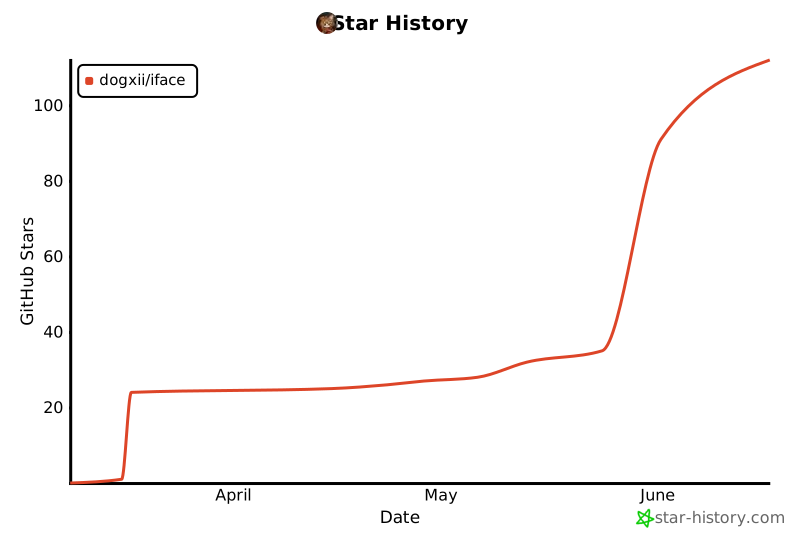
## 📈 项目 Star 历史
## 💰 赞赏项目
如果觉得这个项目对你有帮助,欢迎请我喝咖啡 ☕️
> 采取自愿原则, 收到的赞赏将用于提高开发者积极性和开发环境。


## 🪪 License
[MIT](LICENSE) © 2026 Dogxi