https://github.com/dohliam/aligned-corpus-search
Simple aligned corpus search tool
https://github.com/dohliam/aligned-corpus-search
corpora corpus
Last synced: 12 months ago
JSON representation
Simple aligned corpus search tool
- Host: GitHub
- URL: https://github.com/dohliam/aligned-corpus-search
- Owner: dohliam
- Created: 2018-06-26T17:56:52.000Z (about 8 years ago)
- Default Branch: master
- Last Pushed: 2018-06-26T18:00:41.000Z (about 8 years ago)
- Last Synced: 2025-03-21T14:46:48.387Z (over 1 year ago)
- Topics: corpora, corpus
- Language: Ruby
- Size: 3.91 KB
- Stars: 0
- Watchers: 2
- Forks: 0
- Open Issues: 0
-
Metadata Files:
- Readme: README.md
Awesome Lists containing this project
README
# Aligned Corpus Search - Simple aligned corpus search tool
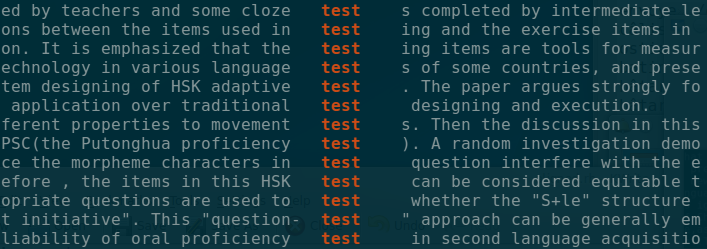
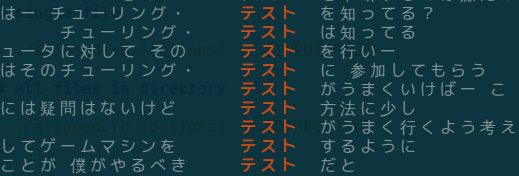
Aligned Corpus Search is an extremely simple no-frills aligned corpus search tool that comes with support for configurable context, colour-highlighted results, regular expressions, and plain text output. It can be used to search through either a single file or an entire directory.
This tool has been designed specifically for the purpose of searching through CJK databases for patterns, but also works fine on other text. For non-CJK corpora, you will probably want to use the `--half-width` spacing option for alignment, and perhaps adjust the context (`-c`) to something wider than 10 characters (e.g., something more approximate to 10 words in the language you are searching in).
## Features
If you're wondering what benefits this might have over just grepping a bunch of files, the answer is really just "alignment" (hence the name) as well as default searching through files in the `data` directory.
Sample output:
## Usage
The easiest way to use Aligned Corpus Search is just to put some data into the `data` folder (one or more text files of any sort), and issue the following command, replacing `[KEYWORD]` with the search term(s) of your choice:
./aligned.rb -k "[KEYWORD]"
This should immediately give you a list of results from your data, aligned so that the keyword is in a separate highlighted column.
### Single file
If your data is somewhere other than the default `data` directory, you can specify to search in a specific file using the `-i` option and the path to your file:
./aligned.rb [options] -i [INPUT_FILE]
### All files in directory
You can also point `aligned.rb` at an entire directory with the `-d` option and it will output results from all files in the directory:
./aligned.rb [options] -d [DIRECTORY]
### Backreferences
Backreferences can be used with parentheses around the initial pattern and two backslashes followed by the number of the reference. It is important to note, however, that backreferences begin from `\\2` (_not_ `\\1`).
For example:
* `-k "一(.)\\2"` will return results (however `"一(.)\\1"` will **not** work)
Note also that when using parentheses, the match and submatch will be displayed in the results on separate lines.
## Options
The following command-line options are available:
* `-c` (`--context CONTEXT`) - _Specify amount of surrounding context (in characters)_
* `-C` (`--count-collocations`) - _Print a count of all collocated characters (together with -N or -P, and optionally -c)_
* `-d` (`--directory DIRECTORY`) - _Specify source directory_
* `-h` (`--half-width`) - _Use half-width spacing for alignment_
* `-H` (`--highlight-color OPTIONS`) - _Specify highlight, foreground, and background text colors_
* `-i` (`--input-file FILE`) - _Specify input file_
* `-k` (`--keyword KEYWORD`) - _Specify keyword to search for_
* `-K` (`--keyword-frequency`) - _Show only matching keywords arranged in order of frequency_
* `-N` (`--collocated-next`) - _Print sorted list of collocations (following)_
* `-p` (`--plain-text`) - _Output plain text without highlighting_
* `-P` (`--collocated-previous`) - _Print sorted list of collocations (preceding)_
In general, lowercase short options (e.g., `-c`, `-k`, `-i`) adjust parameters of the input or output, while uppercase short options (e.g., `-C`, `-N`, `-P`) change the basic type of search performed.
## License
MIT.