https://github.com/dolph/keystone-deploy
Deploy OpenStack Keystone from source.
https://github.com/dolph/keystone-deploy
Last synced: about 1 year ago
JSON representation
Deploy OpenStack Keystone from source.
- Host: GitHub
- URL: https://github.com/dolph/keystone-deploy
- Owner: dolph
- Created: 2014-02-26T18:41:33.000Z (over 12 years ago)
- Default Branch: master
- Last Pushed: 2016-01-21T19:21:27.000Z (over 10 years ago)
- Last Synced: 2025-04-01T00:38:42.411Z (over 1 year ago)
- Language: Python
- Size: 224 KB
- Stars: 6
- Watchers: 4
- Forks: 3
- Open Issues: 5
-
Metadata Files:
- Readme: README.md
Awesome Lists containing this project
README
# Deploy keystone from source
This illustrates a deployment of [OpenStack
keystone](http://keystone.openstack.org/) from
[source](https://github.com/openstack/keystone), primarily geared towards
documenting and testing various configurations.
## Usage
This repository is designed to deploy keystone to an arbitrary host using
ansible. You'll at least need `sudo` access on that host, if not `root`. This
repository is tested with Travis CI, so Ubuntu 12.04 is recommended.
Start by installing the project's dependencies:
pip install -r requirements.txt
Copy the sample Ansible inventory file to create a custom inventory, where you
can specify your host and any custom variables:
cp sample_inventory inventory
Next, install ansible dependencies:
ansible-galaxy install --roles-path=playbooks/roles/ --role-file=ansible-requirements.txt
And then you can deploy keystone:
ansible-playbook -i inventory deploy.yaml
Note that you might need to specify how ansible should authenticate with the
host, and how to obtain root permissions. See `ansible-playbook --help` for
the available options.
## How it works
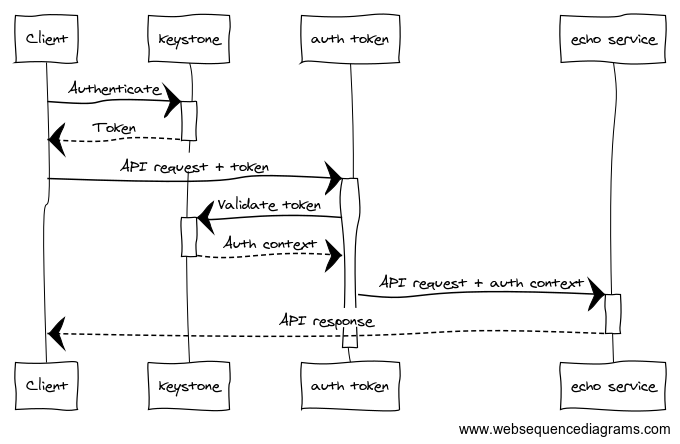
The ansible playbooks deploy both `keystone` and a tiny service protected by
`keystonemiddleware.auth_token` called `echo`. The test suite exercises the
deployment by retrieving tokens from keystone using `keystoneclient`, and
making authenticated API requests to `echo`. `auth_token` intercepts those
requests and validates the authentication and authorization context asserted by
keystone. To live up to it's name, `echo` then echoes the user's auth context
back to the test suite in the HTTP response, where it is validated against the
expected auth context.
## Testing
This repository is divided into several feature branches, wherein each feature
branch demonstrates and tests a deployment variation. The `master` branch
represents a vanilla deployment. All feature branches should be regularly
rebased onto the master branch.
| Branch | Status | Description |
|---------------|-----------------------------------------------------------------------------------------------------------------------------------------------|----------------------------------------------------------|
| master | [](https://travis-ci.org/dolph/keystone-deploy/branches) | Uses Apache httpd, with a MySQL backend and UUID tokens. |
| eventlet | [](https://travis-ci.org/dolph/keystone-deploy/branches) | Uses eventlet instead of Apache httpd. |
| fernet-tokens | [](https://travis-ci.org/dolph/keystone-deploy/branches) | Uses Fernet tokens instead of UUID tokens. |
| pki-tokens | [](https://travis-ci.org/dolph/keystone-deploy/branches) | Uses PKI tokens instead of UUID tokens. |
| pkiz-tokens | [](https://travis-ci.org/dolph/keystone-deploy/branches) | Uses PKIZ tokens instead of PKI tokens. |
| v3-only | [](https://travis-ci.org/dolph/keystone-deploy/branches) | Does not deploy Identity API v2 at all. |
To exercise a deployment, run:
HOST=keystone.example.com python -m unittest discover
## Documentation
The primary goal of this repository is to provide working, tested configuration
documentation, which happens to be in the form of ansible plays.
To see documentation on how to switch from UUID-tokens to fernet-tokens, for
example, use `git diff`:
git diff master fernet-tokens
To switch from PKI tokens to PKIZ tokens:
git diff pki-tokens pkiz-tokens
To disable the Identity API v2 in favor of running v3 only:
git diff master v3-only