https://github.com/dominikwilkowski/log
No dependency better logging for your node app
https://github.com/dominikwilkowski/log
ansi ansi-colors logging logging-framework nodejs
Last synced: 9 months ago
JSON representation
No dependency better logging for your node app
- Host: GitHub
- URL: https://github.com/dominikwilkowski/log
- Owner: dominikwilkowski
- License: gpl-3.0
- Created: 2018-03-24T12:07:36.000Z (over 8 years ago)
- Default Branch: released
- Last Pushed: 2023-03-04T04:07:03.000Z (over 3 years ago)
- Last Synced: 2025-09-28T01:25:19.224Z (10 months ago)
- Topics: ansi, ansi-colors, logging, logging-framework, nodejs
- Language: JavaScript
- Homepage:
- Size: 1.08 MB
- Stars: 4
- Watchers: 1
- Forks: 0
- Open Issues: 2
-
Metadata Files:
- Readme: README.md
- Changelog: CHANGELOG.md
- License: LICENSE
Awesome Lists containing this project
README
LOG [](https://travis-ci.org/dominikwilkowski/log)
===
> No dependency better logging for your node app

## Contents
* [Install](#install)
* [Use](#use)
* [Customize](#customize)
* [Settings](#settings)
* [Tests](#tests)
* [Release History](#release-history)
* [License](#license)
----------------------------------------------------------------------------------------------------------------------------------------------------------------
## Install
```shell
npm install indent-log
```
**[⬆ back to top](#contents)**
----------------------------------------------------------------------------------------------------------------------------------------------------------------
## Use
Run the logger via:
```js
const Log = require('indent-log');
Log.banner( 'My app started' );
Log.info( 'Server running at #', IPandPort );
```
### Vocabulary
You got a bunch of logs to chose from:
```js
Log.banner('Banner log');
Log.ok('Ok log');
Log.error('Error log');
Log.info('Info log');
Log.done('Done log');
Log.verbose('Verbose log');
Log.hr();
Log.time('Time log');
```
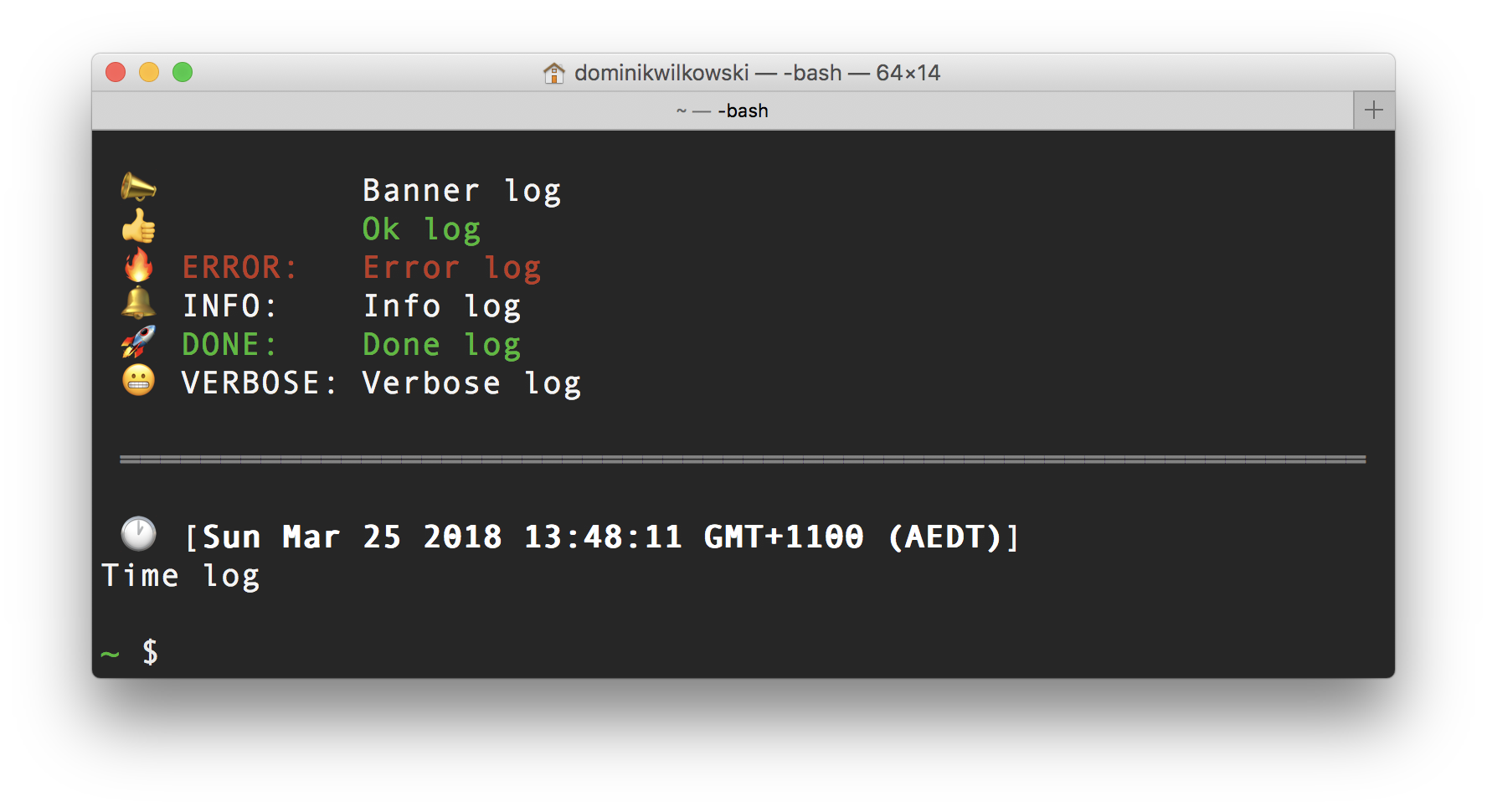
`Log.hr()` will output a line that will fill the terminal and a line break before and after.
### Variables
You can add variables by adding them as arguments. Each placeholder `#` will be replaced one by one with those variables. If you don’t have enough placeholder
the variables will be appended at the end:
```js
Log.info( 'running function in folder # to find #', 'folder', 'needle' );
Log.info( 'running function in folder # to find #', 'folder' );
Log.info( 'running function in folder # to find #', 'folder', 'needle', 42, [ 'one', 'two' ] );
```
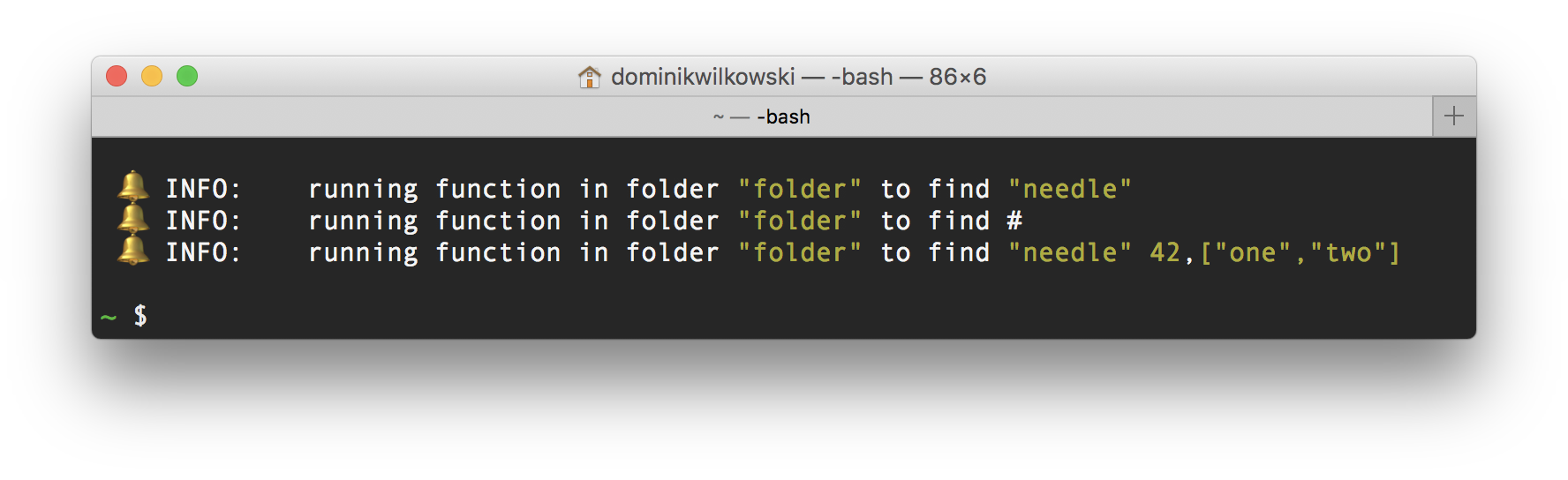
All variables are colored yellow to make reading easier.
### Indentation
Logs that run over the space you have in your terminal will automatically indent on the next line:
```js
Log.info('Lorem ipsum dolor sit amet, consectetur adipisicing elit, sed do eiusmod tempor incididunt ' +
'ut labore et dolore magna aliqua. Ut enim ad minim veniam, quis nostrud exercitation\nullamco laboris ' +
'nisi ut aliquip ex ea commodo consequat. Duis aute irure dolor in reprehenderit in voluptate velit ' +
'esse cillum dolore eu fugiat nulla pariatur. Excepteur sint occaecat cupidatat non proident, sunt in ' +
'culpa qui officia deserunt mollit anim id est laborum.');
```
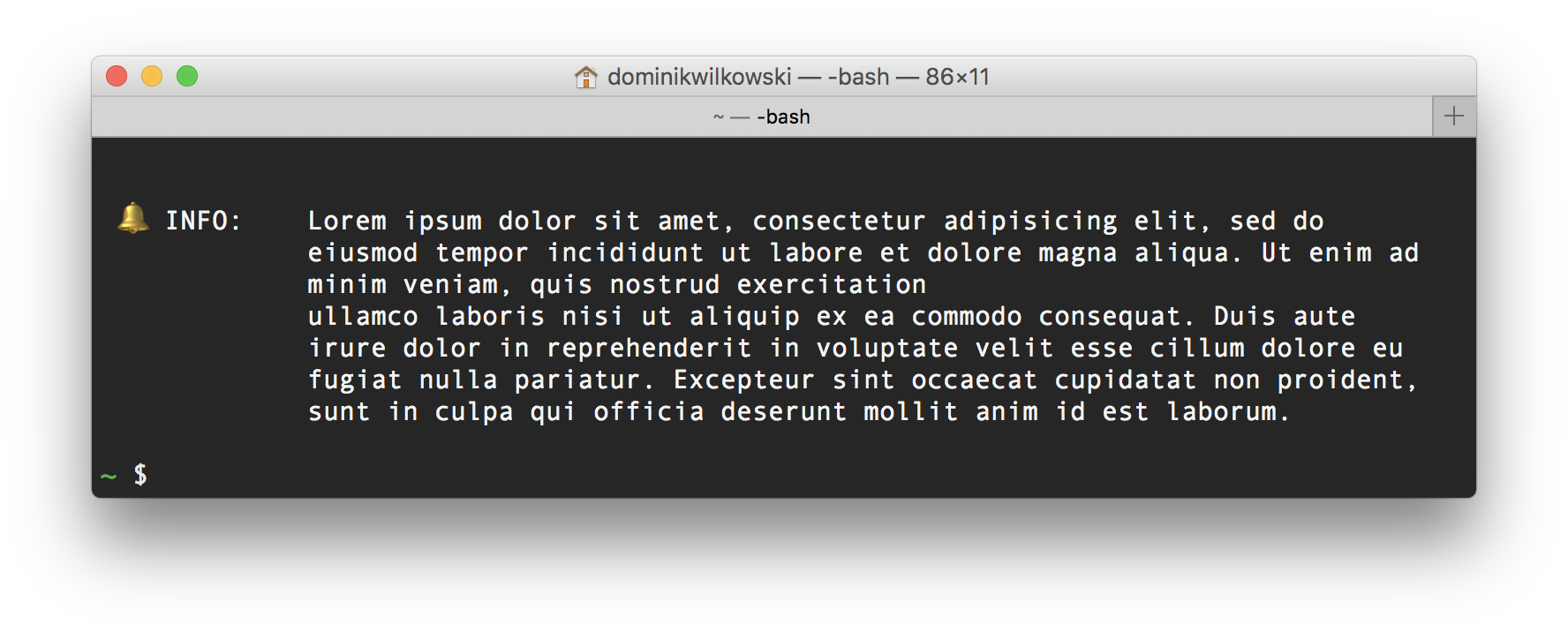
This can be disabled in the [`disableIndent`](#disableindent) setting.
### Callbacks
You can register a callback for one or more log types.
```js
Log.callbacks.error = ( text, vars, type ) => DoSomething( text, vars, type );
```
Now every time you call `Log.error` the `DoSomething` function will also be run. This can be useful for error logging, notifications etc.
**[⬆ back to top](#contents)**
----------------------------------------------------------------------------------------------------------------------------------------------------------------
## Customize
You can extend the vocabulary of the log yourself by adding a flag and wrapping the `Log.Output` function:
```js
Log.flags.monkey = ' 🐒 monkey business: ';
Log.monkey = ( text, ...vars ) => console.log( Log.Style.magenta( Log.Output( 'monkey', text, vars ) ) ),
Log.banner('Monkey business starting now!');
Log.monkey('Hey hey!!!');
```
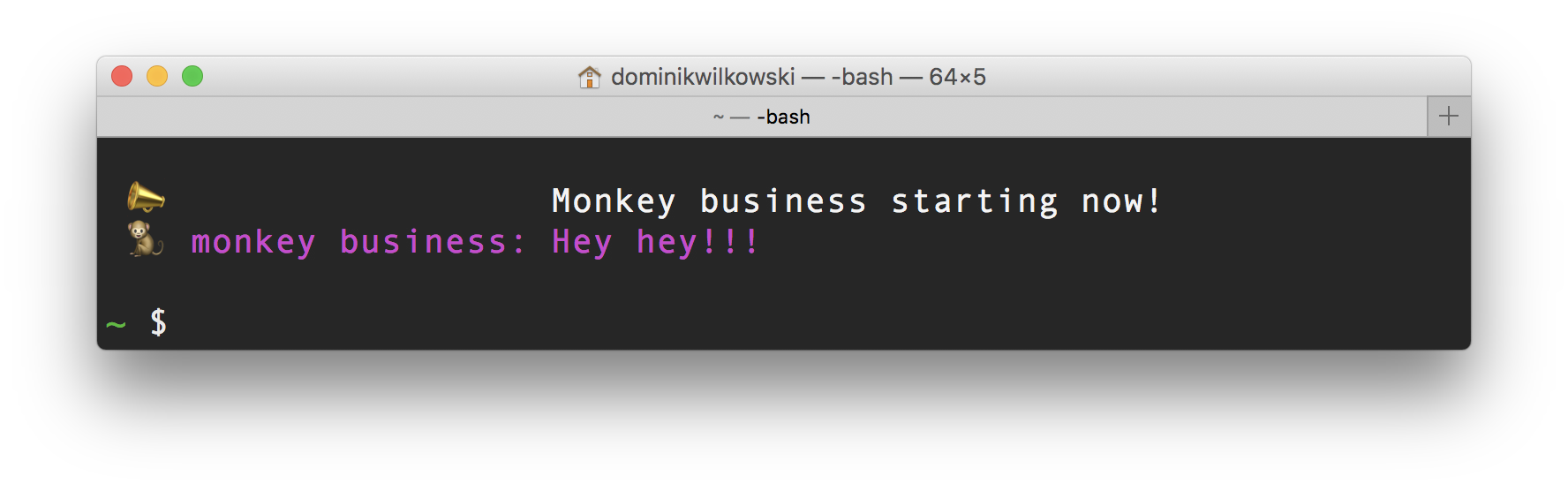
Registering a new flag will now ensure all other flags are indented to the largest flag unless it is disabled via the [`disableIndent`](#disableindent) setting.
**[⬆ back to top](#contents)**
----------------------------------------------------------------------------------------------------------------------------------------------------------------
## Settings
You can change the default settings via:
```js
Log.pretty = true;
```
An example would be:
```js
const Log = require('indent-log');
if( process.argv.includes('-v') || process.argv.includes('--verbose') ) {
Log.verboseMode = true;
}
```
### `verboseMode`
_(boolean)_
default: `false`
Toggle verbose output.
### `verboseFilter`
_(string)_
default: ``
You can filter the verbose output with this regex string. If you want to show only messages with the word `foo` then you’d use:
```js
Log.verboseFilter = 'foo';
```
If you want to filter all messages that begin with `bar` you’d use:
```js
Log.verboseFilter = '^bar';
```
An example script for your cli app would be:
```js
if( process.argv.includes('-v') || process.argv.includes('--verbose') ) {
Log.verboseMode = true;
const flagParam = ( process.argv.indexOf('-v') !== -1 ? process.argv.indexOf('-v') : process.argv.indexOf('--verbose') ) + 1;
const verboseFilter = process.argv[ flagParam ] && process.argv[ flagParam ].startsWith('-') ? undefined : process.argv[ flagParam ];
if( verboseFilter ) {
Log.verboseFilter = verboseFilter;
}
}
```
Now the user can use your app with an optional filter like:
```shell
yourapp -v onlythisstring
```
And Log will filter by this word.
### `disableIndent`
_(array)_
default: `[ 'time' ]`
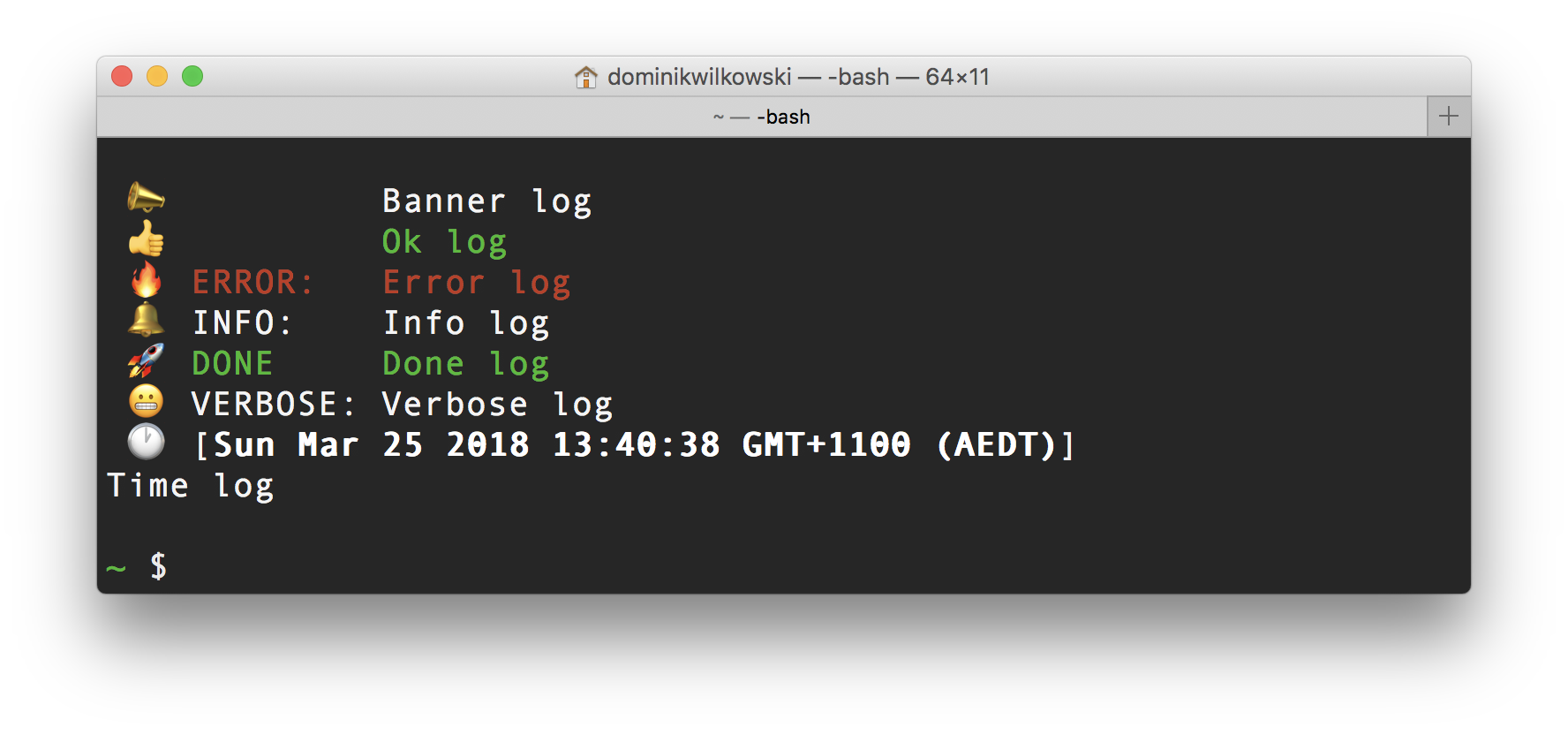
All messages are indented by the largest flag of all types. You can disable a particular type if that type has a very large flag that would make indentation
of all other look ridicules. Below is what it looks like by default because the type `time` has it's indent disabled.
```js
Log.banner('Banner log');
Log.ok('Ok log');
Log.error('Error log');
Log.info('Info log');
Log.done('Done log');
Log.verbose('Verbose log');
Log.time('Time log');
```
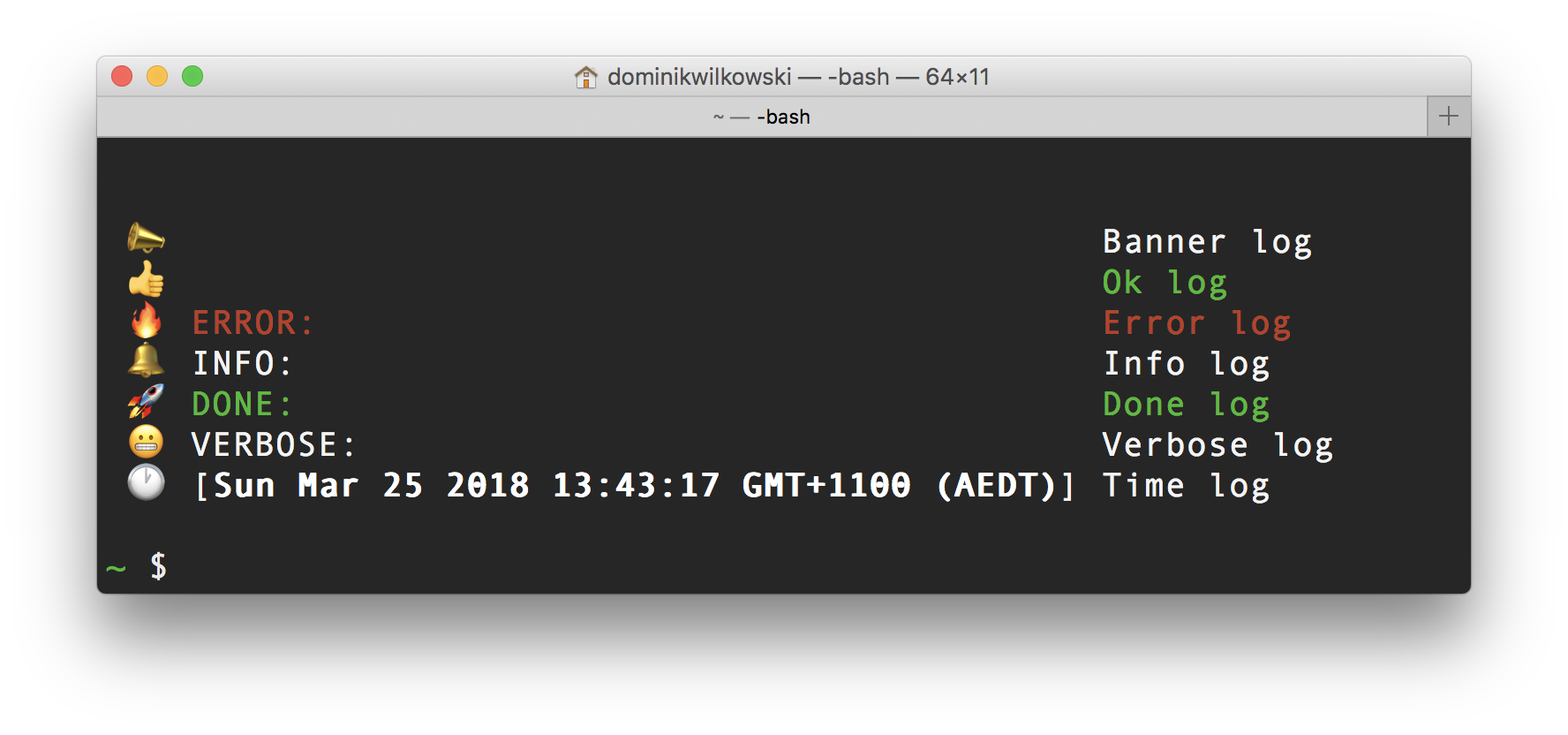
This is what it would look like if you enabled all indentation and included `time`:
```js
Log.disableIndent = [];
Log.banner('Banner log');
Log.ok('Ok log');
Log.error('Error log');
Log.info('Info log');
Log.done('Done log');
Log.verbose('Verbose log');
Log.time('Time log');
```
Enabled:
```
🔔 INFO: Lorem ipsum dolor sit amet, consectetur adipisicing elit, sed do "var!"
eiusmod tempor incididunt ut labore et dolore magna aliqua. Ut enim ad minim
veniam, quis nostrud exercitation.
```
Disabled:
```
🔔 INFO:
Lorem ipsum dolor sit amet, consectetur adipisicing elit, sed do "var!" eiusmod tempor
incididunt ut labore et dolore magna aliqua. Ut enim ad minim veniam, quis nostrud
exercitation.
```
### `pretty`
_(boolean)_
default: `false`
Enable pretty printing of variables.
Enabled:
```
🔥 ERROR: The cause:
{"thing":"because","more":{"evenmore":[{"reason":"buffer"}]}}
```
Disabled:
```
🔥 ERROR: The cause:
{
"thing": "because",
"more": {
"evenmore": [
{
"reason": "buffer"
}
]
}
}
```
### `flags`
_(object)_
The flags are the strings shown in front of each message. The defaults are:
```js
Log.flags = {
banner: ` 📣 `,
error: ` 🔥 ERROR: `,
info: ` 🔔 INFO: `,
ok: ` 👍 `,
done: ` 🚀 DONE: `,
time: ` 🕐 [${ Log.Style.bold('#timestamp#') }]`,
verbose: ` 😬 VERBOSE: `,
};
```
The string `#timestamp#` is replaced with the current timestamp.
Do note that emojis in node have a very complex way of aligning in the character set. Make sure you either use them consistently or not at all. Calculating
the length of a string that contains emojis is difficult and would warrant a dependency like [grapheme-splitter](https://github.com/orling/grapheme-splitter).
I am trying to keep this package dependency free though.
### `callbacks`
_(object)_
The callbacks are a collection of functions for each log. The defaults are empty:
```js
Log.callbacks = {
banner: void( 0 ),
error: void( 0 ),
info: void( 0 ),
ok: void( 0 ),
done: void( 0 ),
time: void( 0 ),
hr: void( 0 ),
verbose: void( 0 ),
};
```
If you want the error log eg to do something special every time it’s run, this is where you can do that. Each function has the following parameter passed to it:
```
@param {string} text - The message
@param {array} vars - All variables passed to the message
@param {string} type - The type of message
```
**[⬆ back to top](#contents)**
----------------------------------------------------------------------------------------------------------------------------------------------------------------
## Tests
To run the tests for this package run `npm test`. [Jest](https://facebook.github.io/jest/) will run unit tests.
There is also a `npm run test:watch` script that can be used while developing.
**[⬆ back to top](#contents)**
----------------------------------------------------------------------------------------------------------------------------------------------------------------
## Release History
See [CHANGELOG](https://raw.githubusercontent.com/dominikwilkowski/log/released/CHANGELOG.md).
**[⬆ back to top](#contents)**
----------------------------------------------------------------------------------------------------------------------------------------------------------------
## License
Copyright (c) Dominik Wilkowski.
Licensed under [GNU-GPLv3](https://raw.githubusercontent.com/dominikwilkowski/log/released/LICENSE).
**[⬆ back to top](#contents)**
# };