https://github.com/don-phdev/ubereats-clone
A full-stack clone of Uber Eats built with Ruby on Rails, PostgreSQL, React and Redux.
https://github.com/don-phdev/ubereats-clone
postgresql react redux ruby-on-rails
Last synced: 4 months ago
JSON representation
A full-stack clone of Uber Eats built with Ruby on Rails, PostgreSQL, React and Redux.
- Host: GitHub
- URL: https://github.com/don-phdev/ubereats-clone
- Owner: Don-PhDev
- License: mit
- Created: 2022-05-05T12:33:17.000Z (over 4 years ago)
- Default Branch: master
- Last Pushed: 2022-05-05T12:33:34.000Z (over 4 years ago)
- Last Synced: 2025-02-10T21:37:47.544Z (over 1 year ago)
- Topics: postgresql, react, redux, ruby-on-rails
- Language: Ruby
- Homepage:
- Size: 14.5 MB
- Stars: 0
- Watchers: 1
- Forks: 0
- Open Issues: 0
-
Metadata Files:
- Readme: README.md
- License: LICENSE
Awesome Lists containing this project
README
UberEats clone
Welcome to UberEats clone, an
UberEats inspired Full-Stack single-page website, where you can browse and order from restaurants local to Union, New Jersey[^1][^2].

Table of Contents
- [Features](#features)
- [Technologies Used](#technologies-used)
- [Future Plans](#future-plans)
Features
### Dynamic Searching
Users can search through available restaurants as shown:
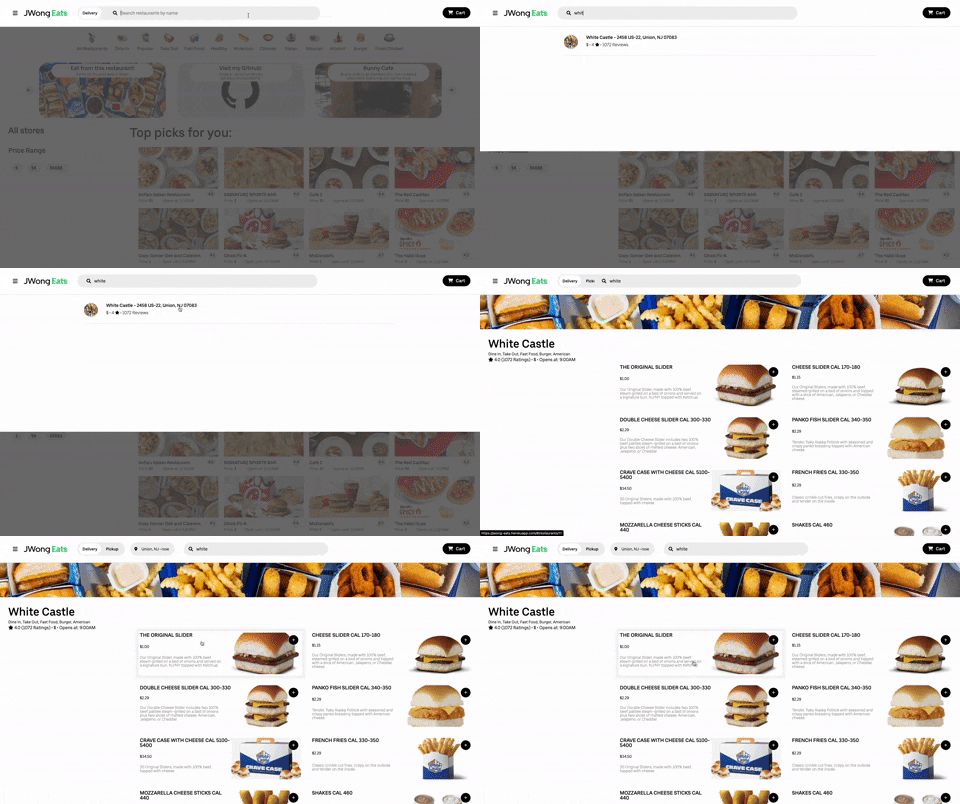
Restaurants are fetched upon the site's initial load, and the searching is handled through JavaScript logic on the front-end. This saves time and computation, since there is no need for any AJAX requests or database queries.
```javaScript
filterResults(value) {
const { restaurants } = this.props;
const filtered = [];
Object.keys(restaurants).forEach(id => {
const restaurant = restaurants[id];
if (restaurant.name.toLowerCase().includes(value)) {
filtered.push(restaurant);
}
})
return filtered;
}
```
This function iterates through the available restaurants, and saves the appropriate ones to a list. This list is then returned, and iterated through in another function to render the search results.
#
### Restaurant Filtering
The filtering of restaurants on the Delivery homepage is handled differently, to show another possible approach.
Users can select icons on the top of the screen that reflect categories that the available restaurants fall into. This is then dynamically rendered onto the page by accessing the database through rails (When a button is pressed, an AJAX request is sent with a category parameter).
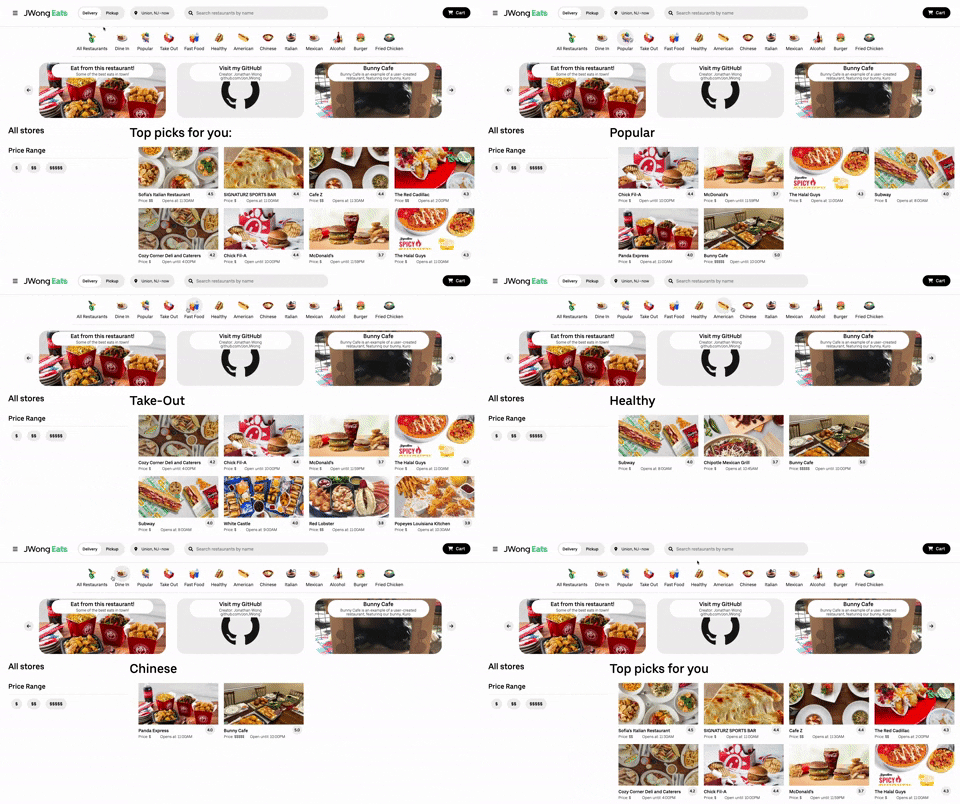
```ruby
def index
if (params[:category])
@restaurants = Restaurant.where("description like ?", "%#{params[:category]}%")
render :index
else
@restaurants = Restaurant.all
render :index
end
end
```
When this controller action hits, it will either send back a JSON object containing the filtered results, or all restaurants. This approach allows one thunk-action to handle multiple scenarios.
The price filter works through the front-end, where the price buttons are toggle-able, to select or de-select a desired price range.
```javaScript
togglePriceRange(option, e) {
e.currentTarget.classList.toggle('delivery-sort-button-selected');
const newState = this.state;
if (!newState.priceRange.some(ele => ele === option)
&& option !== "None") {
newState.priceRange.push(option);
} else if (option === "None") {
newState.priceRange = [];
} else {
newState.priceRange =
newState.priceRange.filter(ele => ele !== option);
}
this.setState(newState);
}
```
The modified state is then used to filter the components accordingly:
```javaScript
sort(restaurants) {
let options;
if (this.state.priceRange.length > 0) {
options = this.state.priceRange
}
const newRestaurants = {};
Object.keys(restaurants).map(id => {
let restaurant = restaurants[id];
if (options?.includes(restaurant.price_rating)) {
newRestaurants[id] = restaurant
}
})
return newRestaurants;
}
```
#
### Order History
Users can see their past orders, as well as a breakdown of prices and quantities through the receipt.
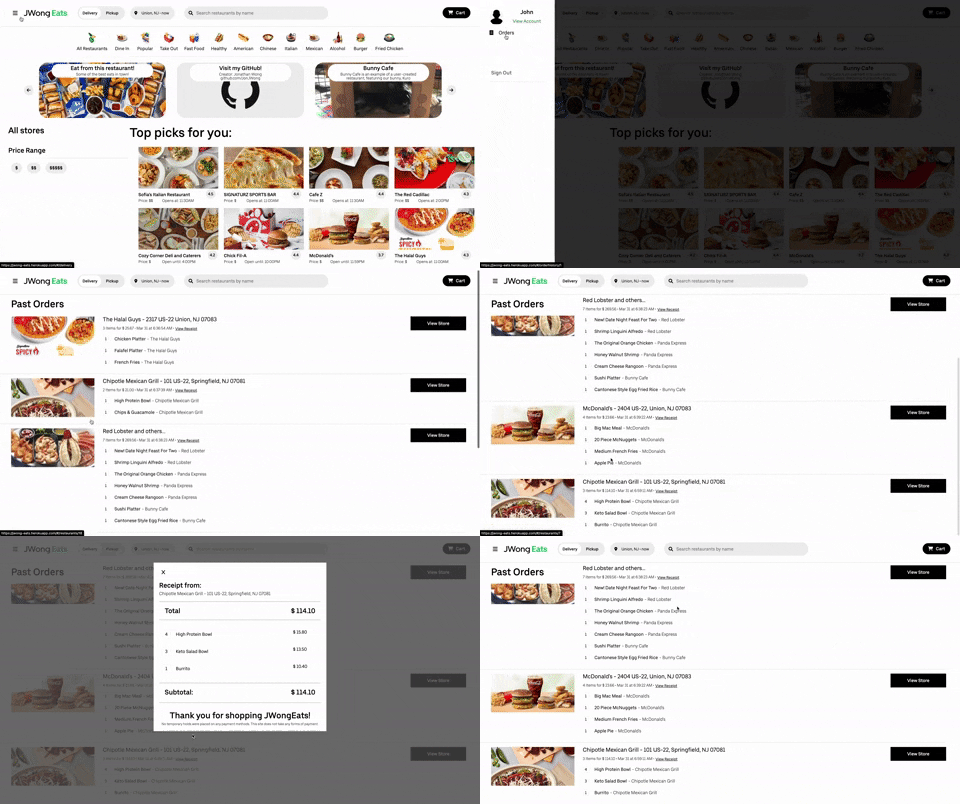
When a user checks out a cart, and a transaction is processed, the current prices of items are saved as a transaction in the database, independent from what the current item's prices are. That way, if the items were ever to change prices in the future, the price change would not affect any orders retroactively, and the integrity of the transaction table would remain.
#
Technologies used
- __Front End__: React.js, Redux
- Supports front-end handling of cart, rendering of pages, and navigation.
- Persists state to `localStorage` on crucial updates, such as adding/removing items from the cart.
- __Back End__: Ruby on Rails, with PostgreSQL database
- Supports back-end server access, and acts as a middleware for the PostgreSQL database, manipulating the database where needed.
- Handles User Authentication via session tokens which are then bootstrapped to the window and sent forward to the front-end.
- __Other__: Google Maps JavaScript API, Google Places API, Amazon AWS S3, JavaScript
- Google Maps and Google Places were used to get accurate information about local restaurants, like name, address, review-count, rating, and pricing.
- The Google Maps JavaScript API is also used to render the map with appropriate markers and infowindows on the Pickup page.
- AWS S3 handles image hosting to allow for a more lightweight and modular implementation of the app. Images changed on the buckets will reflect on the site with no need to change the code.
- Webpack and Babel.js transpile the code
- __Hosting__: JWongEats is hosted on heroku.
#
Future Plans
- Add Google Geocoding, Distance Matrix API support to allow for ETA calculation for delivery.
- Add Omni-auth for Google and Facebook login options.
#
### Credit
- Images sourced from UberEats, Red Lobster, Olive Garden are property of their respective companies.
[^1]: Since there did not seem to be a consistent API to scrape menus and menu items from restaurants, all the menu and item seeding was done manually, which resulted in a limited selection (20 restaurants, 10 items each). Some of the restaurants that were brought up by the Maps API are also not available on UberEats, so the images had to be sourced directly from the restaurant, if they had any.
[^2]: Bunny Cafe is an imaginary restaurant based on my household, and our bunny, Kuro!
#
License & Copyright
© 2022 Don Forrest Usbal
Licensed under the [MIT License](LICENSE)