https://github.com/dorasto/discordbot
Discord bot for live twitch stream embeds
https://github.com/dorasto/discordbot
discord discord-bot discord-js docker docker-compose docker-image embed twitch typescript
Last synced: about 2 months ago
JSON representation
Discord bot for live twitch stream embeds
- Host: GitHub
- URL: https://github.com/dorasto/discordbot
- Owner: dorasto
- License: gpl-3.0
- Created: 2024-07-22T16:17:35.000Z (almost 2 years ago)
- Default Branch: main
- Last Pushed: 2026-02-05T06:17:40.000Z (5 months ago)
- Last Synced: 2026-02-19T11:55:26.292Z (4 months ago)
- Topics: discord, discord-bot, discord-js, docker, docker-compose, docker-image, embed, twitch, typescript
- Language: TypeScript
- Homepage: https://doras.to/posts/discordbot
- Size: 269 KB
- Stars: 2
- Watchers: 0
- Forks: 1
- Open Issues: 0
-
Metadata Files:
- Readme: README.md
- License: LICENSE
Awesome Lists containing this project
README
# Doras Discord Bot
![Typescript][typescript] ![docker][docker] ![discordjs][discordjs]
A simple livestream notification Discord bot, built by the team who brought you [Doras.to](https://doras.to).
[![Contributors][contributors-shield]][contributors-url]
[![Forks][forks-shield]][forks-url]
[![Stargazers][stars-shield]][stars-url]
[![Issues][issues-shield]][issues-url]
[![GPL License][license-shield]][license-url]
[](https://github.com/dorasto/discordbot/actions/workflows/docker-build.yml)
---
## Table of Contents
- [About The Project](#about-the-project)
- [Features](#features)
- [Built With](#built-with)
- [Getting Started](#getting-started)
- [Prerequisites](#prerequisites)
- [Installation](#installation)
- [Usage](#usage)
- [Roadmap](#roadmap)
- [Contributing](#contributing)
- [License](#license)
- [Contact](#contact)
---
## About The Project
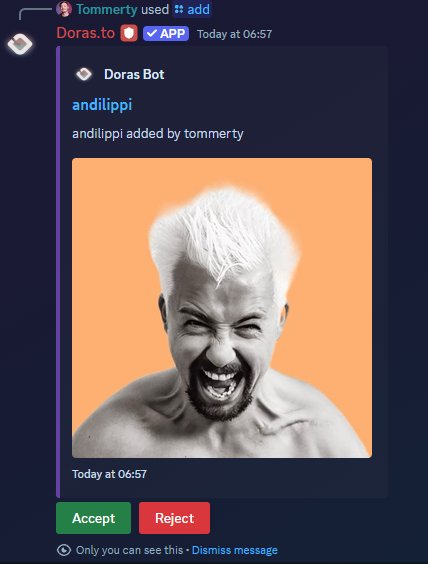
Doras Discord Bot is an open source GPLv3 bot to post live stream notifications & VODs to your Discord servers. It's primarily designed for [Doras] users, but anyone can use it.
### Features
- **Multi-platform support:** Twitch, Kick, YouTube Live, YouTube Latest, YouTube Shorts
- **Live notifications:** Get notified when your favorite streamers go live
- **VOD support:** Post VODs automatically
- **Easy setup:** Slash commands for adding/removing/listing notifications
- **Web dashboard & API**
- **Open source:** Host it yourself or contribute!
---
### Built With
- [TypeScript](https://www.typescriptlang.org/)
- [Docker](https://www.docker.com/)
- [discord.js](https://discord.js.org/)
- [Hono](https://hono.dev/) (API server)
- [Drizzle ORM](https://orm.drizzle.team/)
- [PostgreSQL](https://www.postgresql.org/)
---
## Getting Started
Follow these steps to set up the project locally.
### Prerequisites
- [pnpm](https://pnpm.io/)
- [Docker](https://www.docker.com/)
- Discord bot token ([guide](https://discord.com/developers/applications))
- Twitch API credentials (for event subscriptions)
- **Kick API credentials** (for Kick support):
- You must set up a Kick application and get your credentials at [https://kick.com/settings/developer](https://kick.com/settings/developer)
- PostgreSQL database (Docker Compose included)
> **Note:** You only need to set `TWITCH_EVENTSUB` and `TWITCH_EVENTSUB_SECRET` if you have a lot of Twitch streams being checked. This enables Twitch EventSub for better scaling and efficiency.
### Installation
1. **Clone the repo**
```sh
git clone https://github.com/dorasto/discordbot.git
cd discordbot
```
2. **Install dependencies**
```sh
pnpm install
```
3. **Configure environment**
- Copy `.example.env` to `.env` and fill in the required fields.
4. **Start the database**
```sh
docker-compose up -d postgres
```
---
## Dockerfile vs Dockerfile.Shard
This project provides two Dockerfiles:
- **Dockerfile**: Standard deployment. Use this for running a single instance of the bot (suitable for most servers and small/medium Discord bots).
- **Dockerfile.Shard**: For sharded deployments. Use this if you want to run the bot in sharding mode, which is recommended for large bots or when your bot is in many servers. Sharding is a Discord feature that splits your bot across multiple processes to handle more servers efficiently. See the [Discord.js Sharding Guide](https://discordjs.guide/sharding/) for more info.
Choose the Dockerfile that matches your scale and needs. For most users, the regular `Dockerfile` is sufficient.
---
## Usage
- Use `/add` to add a notification for a streamer/channel
- Use `/remove` to remove a notification
- Use `/list` to see all configured notifications
- Use `/authenticate` to link your Doras account (if needed)
- Use `/uptime` to check bot status
> **Note:** There is no web UI for self-hosted users. If you use the hosted version at [doras.to](https://doras.to), you can access the web dashboard. For self-hosted, use Discord slash commands and the API only.
You can also use the web API (see `server.ts` for endpoints) for advanced integrations.
See [open issues](https://github.com/dorasto/discordbot/issues) for a full list of proposed features and known issues.
---
## Contributing
Contributions are what make the open source community amazing! Any contributions you make are **greatly appreciated**.
1. Fork the repository
2. Create your feature branch (`git checkout -b feature/AmazingFeature`)
3. Commit your changes (`git commit -m 'Add some AmazingFeature'`)
4. Push to the branch (`git push origin feature/AmazingFeature`)
5. Open a pull request
---
## License
Distributed under the GPLv3 License. See [`LICENSE`](LICENSE) for more information.
---
## Contact
The Doras Team
[@doras_to](https://twitter.com/doras_to)
hi@doras.to
Project Link: [https://github.com/dorasto/discordbot](https://github.com/dorasto/discordbot)
---
[typescript]: https://img.shields.io/badge/typescript-3178c6?style=for-the-badge&logo=typescript&logoColor=white
[docker]: https://img.shields.io/badge/docker-2496ec?style=for-the-badge&logo=docker&logoColor=white
[discordjs]: https://img.shields.io/badge/discord.js-2496ec?style=for-the-badge&logo=discord&logoColor=white
[Doras]: https://doras.to
[contributors-shield]: https://img.shields.io/github/contributors/dorasto/discordbot.svg?style=for-the-badge
[contributors-url]: https://github.com/dorasto/discordbot/graphs/contributors
[forks-shield]: https://img.shields.io/github/forks/dorasto/discordbot.svg?style=for-the-badge
[forks-url]: https://github.com/dorasto/discordbot/network/members
[stars-shield]: https://img.shields.io/github/stars/dorasto/discordbot.svg?style=for-the-badge
[stars-url]: https://github.com/dorasto/discordbot/stargazers
[issues-shield]: https://img.shields.io/github/issues/dorasto/discordbot.svg?style=for-the-badge
[issues-url]: https://github.com/dorasto/discordbot/issues
[license-shield]: https://img.shields.io/github/license/dorasto/discordbot.svg?style=for-the-badge
[license-url]: https://github.com/dorasto/discordbot/blob/main/LICENSE