https://github.com/dot-microservices/dot
a minimalist toolkit for building fast, decentralized, scalable and fault tolerant microservices
https://github.com/dot-microservices/dot
autodiscovery fault-tolerant-microservices microservice-framework microservice-toolkit microservices rpc soa
Last synced: 12 months ago
JSON representation
a minimalist toolkit for building fast, decentralized, scalable and fault tolerant microservices
- Host: GitHub
- URL: https://github.com/dot-microservices/dot
- Owner: dot-microservices
- License: mit
- Created: 2018-10-30T17:46:08.000Z (over 7 years ago)
- Default Branch: master
- Last Pushed: 2023-10-20T01:08:56.000Z (almost 3 years ago)
- Last Synced: 2025-08-01T10:52:12.499Z (12 months ago)
- Topics: autodiscovery, fault-tolerant-microservices, microservice-framework, microservice-toolkit, microservices, rpc, soa
- Language: JavaScript
- Homepage: http://dot-microservices.js.org/
- Size: 1.68 MB
- Stars: 10
- Watchers: 5
- Forks: 0
- Open Issues: 3
-
Metadata Files:
- Readme: README.md
- License: LICENSE
Awesome Lists containing this project
README
# dot
**dot** is a minimalist toolkit for building fast, decentralized, scalable and fault tolerant microservices.
Please see [this article](http://umuplus.tumblr.com/post/179665842906/dot-yet-another-microservice-framework) to find out more.
## Install
```bash
npm i --save node-dot
```
You can also clone this repository and make use of it yourself.
```bash
git clone https://github.com/Dvs-Bilisim/dot.git
cd dot
npm i
npm test
```
## Components
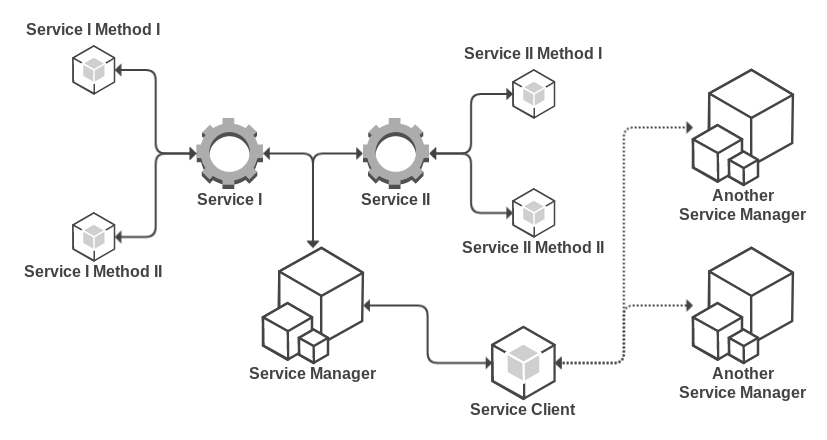
There are 2 simple components:
- **Server :** ~100 LOC, extends Base (~50 LOC)
- **Client :** ~150 LOC, extends Base (~50 LOC)
*Documentation lines are not included to LOC values.*
*Server* will automatically manage routing between client and *Service* instances.
String responses are reserved for errors. If you send a string back, it means that an error occured.
*Client* is for sending requests.
## Configuration
### Server
- **debug :** Debug mode. It's disabled by default.
- **delimiter :** Delimiter between service and method names. It's a single dot(.) by default.
- **discover :** Parameters for node-discover module. Please see official repository for more information.
- **group :** This parameter is for grouping services. If you set a value, client instance connects matched servers only.
- **iface :** optional. name of the network interface to get outer ip from
- **port :** Start point for port range. If you set server instance looks up for its port starting from this number. It's 8000 by default.
- **secret :** Encryption key for auto discovery feature. It's a string "dot" by default.
### Client
- **debug :** Debug mode. It's disabled by default.
- **delimiter :** Delimiter between service and method names. It must be same value in server and client instances. It's a single dot(.) by default.
- **discover :** Parameters for node-discover module. Please see official repository for more information.
- **group :** This parameter is for grouping services. If you set a value, client instance connects matched servers only.
- **secret :** Encryption key for auto discovery feature. It's a string "dot" by default.
- **timeout :** Request timeout. Socket communication has auto recovery feature but in some cases you might want to have a timeout option.
### Error Types
To have a better understanding on error types, there are a few more things to explain.
A service is the name of your *Service* class in camel-case form and each static function in that class is called method.
On client-side, you need to concatenate service name and method with delimiter as *path*. Default delimiter is a single dot(.).
You can configure that by *delimeter* parameter.
- **INVALID_METHOD :** Requested method doesn't exist in your service class
- **INVALID_PATH :** Path parameter is not a valid string
- **INVALID_RESPONSE :** Service sent an invalid response back
- **INVALID_SERVICE :** Requested service doesn't exist
- **LOCKED :** Clean shutdown on progress
- **MISSING_METHOD :** Method is not a valid string
- **REQUEST_TIMEOUT :** Request sent via socket but no response in allowed amount of time
- **SERVICE_TIMEOUT :** No service found to send the request in allowed amount of time
### Example Server
```js
const Server = require('node-dot').Server;
class SampleService {
static test(request, reply) {
reply(request);
}
static async test2(request) {
if (!request) throw new Error('invalid request');
return request;
}
}
const server = new Server();
server.addService(SampleService);
server.start();
```
### Example Client
```js
const Client = require('node-dot').Client;
const client = new Client();
client.send('sampleService.test', request, response => {
console.log(response);
});
```
### Benchmark
Test device specifications.
- Dell XPS 13
- Intel(R) Core(TM) i5-7200U CPU @ 2.50GHz 4 Cores
- 8 GB Ram
First, you should start server instance. Then execute following command:
```bash
node tests/benchmark.js
```
Your results should be similar to following values:
```text
total time spent for 25000 requests is 0.98 seconds
min processing time is 0.20 seconds
max processing time is 0.76 seconds
average processing time is 0.46 seconds
```