https://github.com/dotmake-build/svg-sprite
A dotnet tool and a library for building or extracting of an SVG sprite, i.e. a .svg file with child <symbol> tags.
https://github.com/dotmake-build/svg-sprite
builder cli-tool dotnet dotnet-tool extractor generator spritesheet svg svg-icons svg-sprites
Last synced: 3 months ago
JSON representation
A dotnet tool and a library for building or extracting of an SVG sprite, i.e. a .svg file with child <symbol> tags.
- Host: GitHub
- URL: https://github.com/dotmake-build/svg-sprite
- Owner: dotmake-build
- License: mit
- Created: 2025-10-11T03:57:55.000Z (10 months ago)
- Default Branch: main
- Last Pushed: 2025-11-10T01:28:20.000Z (9 months ago)
- Last Synced: 2026-02-16T07:44:39.385Z (5 months ago)
- Topics: builder, cli-tool, dotnet, dotnet-tool, extractor, generator, spritesheet, svg, svg-icons, svg-sprites
- Language: C#
- Homepage: https://dotmake.build/svg-sprite/
- Size: 972 KB
- Stars: 1
- Watchers: 0
- Forks: 0
- Open Issues: 0
-
Metadata Files:
- Readme: README.md
- License: LICENSE
Awesome Lists containing this project
README

# DotMake Svg-Sprite
A dotnet tool and a library for building or extracting of an SVG sprite, i.e. a `.svg` file with child `` tags.
There was no proper tool for .NET (there are some for npm) for handling SVG sprites so this tool is created.
It could be useful in MSBuild targets or build scripts, especially for web applications.
[](https://www.nuget.org/packages/svg-sprite)
[](https://www.nuget.org/packages/DotMake.SvgSprite)
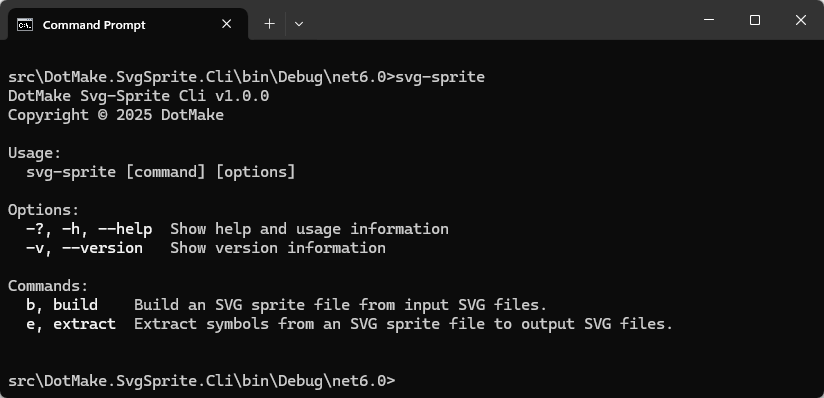
## Getting started
Install the dotnet tool or the library from [NuGet](https://www.nuget.org/).
- For using the dotnet tool: install via dotnet cli:
```console
dotnet tool install --global svg-sprite
```
- For using the library: in your project directory, add via dotnet cli:
```console
dotnet add package DotMake.SvgSprite
```
### Prerequisites
- For using the dotnet tool: .NET SDK 6.0 and later. The .NET CLI (`dotnet` command) is included with the [.NET SDK](https://learn.microsoft.com/en-us/dotnet/core/sdk).
- For using the library: .NET Standard 2.0 and later project.
Note that .NET Framework 4.7.2+ or .NET Core 2.0+ or .NET 5.0+ projects can reference our netstandard2.0 target (automatic in nuget).
## Usage
### Dotnet tool usage
#### Use `build` command to build an SVG sprite file from input SVG files:
```console
svg-sprite build inputs\*.svg -o sprite.svg
svg-sprite build inputs\*.svg inputs2\*.svg -o sprite2.svg
```
Overwrite existing output file:
```console
svg-sprite build inputs\*.svg -o sprite.svg -oe
```
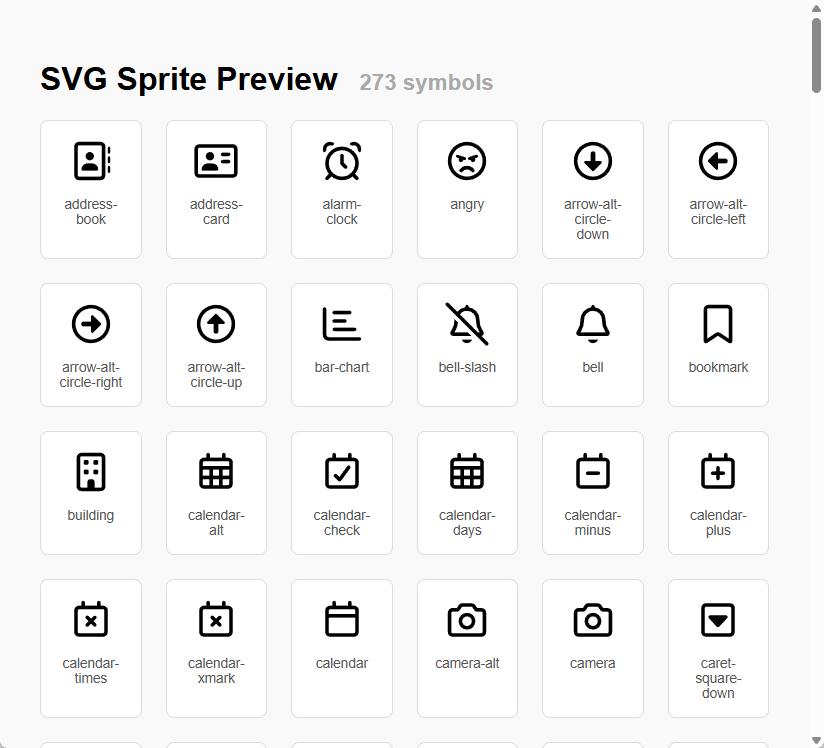
Create an HTML page next to the output SVG sprite file, for previewing/testing the symbols inside the SVG sprite:
```console
svg-sprite build inputs\*.svg -o sprite.svg -hp
```
Note that `` tag does not work cross-origin, including local HTML files (when not viewed from a web server),
so we put/inline the SVG sprite into HTML for the preview page.
Minify the output SVG sprite file, i.e. remove whitespace to reduce file size for web use:
```console
svg-sprite build inputs\*.svg -o sprite.svg -m
```
All options for `build` command:
```console
DotMake Svg-Sprite Cli v1.0.0
Copyright © 2025 DotMake
build: Build an SVG sprite file from input SVG files.
Usage:
svg-sprite build ... [options]
Arguments:
The input SVG files to build an SVG sprite file, i.e. to add as tags to the
output SVG sprite file. Duplicate files (same name and size and date modified) will be
ignored.
Patterns in paths are supported:
- ? matches a single character
- * matches zero or more characters
- ** matches zero or more recursive directories, e.g. a\**\x matches a\x, a\b\x,
a\b\c\x, etc.
- [...] matches a set of characters, syntax is the same as character groups in Regex.
- {group1,group2,...} matches any of the pattern groups. Groups can contain groups and
patterns, e.g. {a\b,{c,d}*}.
[required]
Options:
-o, --output-file The output SVG sprite file which will contain
added tags. [required]
-oe, --overwrite-existing Overwrite existing files. [default: False]
-hp, --html-preview Create an HTML page next to the output SVG sprite
file, for previewing the symbols inside the SVG
sprite. [default: False]
-m, --minify Minify the SVG output, i.e. disable formatting
output, not write individual elements on new lines
and indent. [default: False]
-atd, --attributes-to-discard The attributes to discard when converting
tag to tag or vice versa.
Wildcards can be used: * - Zero or more
characters, ? - Exactly one character.
Attributes that should be usually preserved on
tag:
- viewBox — must be preserved on to
define coordinate system
- id — required for referencing the symbol later
- fill, stroke, opacity, transform — if used for
styling
- class, style — if CSS is applied
- width and height — optional; usually omitted in
sprites
-etd, --elements-to-discard The elements to discard when converting tag
to tag or vice versa.
Wildcards can be used: * - Zero or more
characters, ? - Exactly one character.
Elements that should be usually preserved inside
tag:
- — most common for icons
- , , , ,
— basic shapes
- — groups of elements (preserve if used for
structure or styling)
- — if your icon includes text
- — if referencing other symbols
- — only if it contains reusable elements
like gradients or filters used inside the symbol
-ip, --id-prefix The prefix to add to the id attribute when
converting tag to tag or vice
versa.
-ifm, --id-for-missing The value to use when id attribute is missing or
is not specified when converting tag to
tag or vice versa.
When there are duplicates, this value will be
incremented like symbol-2, symbol-3 etc. [default:
symbol]
-irc, --id-replacement-char The replacement character when sanitizing the id
attribute when converting tag to
tag or vice versa.
Allowed values are '-', '_', '.'. Setting any
other value will disable sanitizing [default: -]
-ilc, --id-lower-cased The value indicating whether to convert the id
attribute to lowercase when converting tag
to tag or vice versa. [default: True]
-vbo, --view-box-override The override value to use for all viewBox
attributes, e.g. "0 0 24 24" when converting
tag to tag or vice versa.
-cp, --comments-preserved The value indicating whether to preserve comments
when converting tag to tag or vice
versa. [default: False]
-?, -h, --help Show help and usage information
```
#### Use `extract` command to extract symbols from an SVG sprite file to individual SVG files:
```console
svg-sprite extract sprite.svg -od outputs\
```
Overwrite existing output SVG files:
```console
svg-sprite extract sprite.svg -od outputs\ -oe
```
Minify the output SVG files, i.e. remove whitespace to reduce file size for web use:
```console
svg-sprite extract sprite.svg -od outputs\ -m
```
All options for `extract` command:
```console
DotMake Svg-Sprite Cli v1.0.0
Copyright © 2025 DotMake
extract: Extract symbols from an SVG sprite file to individual SVG files.
Usage:
svg-sprite extract [options]
Arguments:
The input SVG sprite file to extract symbols from, i.e. to extract tags to
individual SVG files. [required]
Options:
-od, --output-directory The output directory to write extracted SVG files.
[required]
-oe, --overwrite-existing Overwrite existing files. [default: False]
-m, --minify Minify the SVG output, i.e. disable formatting
output, not write individual elements on new lines
and indent. [default: False]
-atd, --attributes-to-discard The attributes to discard when converting
tag to tag or vice versa.
Wildcards can be used: * - Zero or more
characters, ? - Exactly one character.
Attributes that should be usually preserved on
tag:
- viewBox — must be preserved on to
define coordinate system
- id — required for referencing the symbol later
- fill, stroke, opacity, transform — if used for
styling
- class, style — if CSS is applied
- width and height — optional; usually omitted in
sprites
-etd, --elements-to-discard The elements to discard when converting tag
to tag or vice versa.
Wildcards can be used: * - Zero or more
characters, ? - Exactly one character.
Elements that should be usually preserved inside
tag:
- — most common for icons
- , , , ,
— basic shapes
- — groups of elements (preserve if used for
structure or styling)
- — if your icon includes text
- — if referencing other symbols
- — only if it contains reusable elements
like gradients or filters used inside the symbol
-ip, --id-prefix The prefix to add to the id attribute when
converting tag to tag or vice
versa.
-ifm, --id-for-missing The value to use when id attribute is missing or
is not specified when converting tag to
tag or vice versa.
When there are duplicates, this value will be
incremented like symbol-2, symbol-3 etc. [default:
symbol]
-irc, --id-replacement-char The replacement character when sanitizing the id
attribute when converting tag to
tag or vice versa.
Allowed values are '-', '_', '.'. Setting any
other value will disable sanitizing [default: -]
-ilc, --id-lower-cased The value indicating whether to convert the id
attribute to lowercase when converting tag
to tag or vice versa. [default: True]
-vbo, --view-box-override The override value to use for all viewBox
attributes, e.g. "0 0 24 24" when converting
tag to tag or vice versa.
-cp, --comments-preserved The value indicating whether to preserve comments
when converting tag to tag or vice
versa. [default: False]
-?, -h, --help Show help and usage information
```
### Library usage
Refer to [DotMake Svg-Sprite API docs](https://dotmake.build/svg-sprite/api/) for more details.
#### Use `SvgSpriteBuilder.AddSymbol()` method to build an SVG sprite file from input SVG files:
```c#
//Build an SVG sprite file from input SVG files
var svgDocument = new SvgDocument();
var svgSpriteBuilder = new SvgSpriteBuilder(svgDocument);
foreach (var file in Directory.EnumerateFiles(@"inputs\", "*.svg"))
{
var svgDocumentToAdd = new SvgDocument(file);
var symbolId = Path.GetFileNameWithoutExtension(file);
svgSpriteBuilder.AddSymbol(svgDocumentToAdd, symbolId);
}
svgDocument.Save(@"sprite.svg");
```
```c#
//Build an SVG sprite file from input SVG files with custom options
var svgDocument = new SvgDocument();
var svgSpriteBuilder = new SvgSpriteBuilder(svgDocument);
var svgSymbolOptions = new SvgSymbolOptions
{
//These are default values for options
AttributesToPreserve = new[] { "id", "viewBox", "class", "style", "fill", "stroke", "opacity", "transform" },
ElementsToPreserve = new[] { "*" },
IdForMissing = "symbol",
IdReplacementChar = '-',
IdLowerCased = true
};
foreach (var file in Directory.EnumerateFiles(@"inputs\", "*.svg"))
{
var svgDocumentToAdd = new SvgDocument(file);
var symbolId = Path.GetFileNameWithoutExtension(file);
svgSpriteBuilder.AddSymbol(svgDocumentToAdd, symbolId, svgSymbolOptions);
}
svgDocument.Save(@"sprite.svg");
```
#### Use `SvgSpriteBuilder.ExtractSymbol()` method to extract symbols from an SVG sprite file to individual SVG files:
```c#
//Extract symbols from an SVG sprite file to individual SVG files
var svgDocument = new SvgDocument(@"sprite.svg");
var svgSpriteBuilder = new SvgSpriteBuilder(svgDocument);
var outputDirectory = @"outputs\";
foreach (var symbolId in svgSpriteBuilder.GetSymbolIds())
{
var svgDocumentToExtract = svgSpriteBuilder.ExtractSymbol(symbolId);
var svgFile = Path.Combine(outputDirectory, Path.ChangeExtension(symbolId, ".svg"));
Directory.CreateDirectory(outputDirectory);
svgDocumentToExtract.Save(svgFile);
}
```
```c#
//Extract symbols from an SVG sprite file to individual SVG files with custom options
var svgDocument = new SvgDocument(@"sprite.svg");
var svgSpriteBuilder = new SvgSpriteBuilder(svgDocument);
var svgSymbolOptions = new SvgSymbolOptions
{
//These are default values for options
AttributesToPreserve = new[] { "id", "viewBox", "class", "style", "fill", "stroke", "opacity", "transform" },
ElementsToPreserve = new[] { "*" },
IdForMissing = "symbol",
IdReplacementChar = '-',
IdLowerCased = true
};
var outputDirectory = @"outputs\";
foreach (var symbolId in svgSpriteBuilder.GetSymbolIds())
{
var svgDocumentToExtract = svgSpriteBuilder.ExtractSymbol(symbolId, svgSymbolOptions);
var svgFile = Path.Combine(outputDirectory, Path.ChangeExtension(symbolId, ".svg"));
Directory.CreateDirectory(outputDirectory);
svgDocumentToExtract.Save(svgFile);
}
```
#### Use `SvgSpriteBuilder.CreatePreviewPage()` method to create an HTML page for previewing the symbols inside the SVG sprite:
```c#
//Create an HTML page for previewing the symbols inside the SVG sprite
var svgDocument = new SvgDocument(@"sprite.svg");
var svgSpriteBuilder = new SvgSpriteBuilder(svgDocument);
var html = svgSpriteBuilder.CreatePreviewPage();
File.WriteAllText(@"preview.html", html);
```
Note that `` tag does not work cross-origin, including local HTML files (when not viewed from a web server),
so we put/inline the SVG sprite into HTML for the preview page.
## Building
We provide some `.cmd` batch scripts in `build` folder for easier building:
```console
1. Build Cli.cmd
2. Build Nuget Packages.cmd
3. Build Api Docs WebSite.cmd
```
Output results can be found in `publish` folder, for example:
```console
DotMake.SvgSprite.Cli-net6.0
svg-sprite.1.0.0.nupkg
DotMake.SvgSprite.1.0.0.nupkg
```
## Using SVG sprites
Once you have an SVG sprite, for example `sprite.svg` like this:
```xml
```
You can use symbols from this sprite in your HTML pages like this:
```xml
```
Note that `` tag does not work cross-origin, including local HTML files (when not viewed from a web server),
so in that case you should put/inline the SVG sprite into your HTML page and
then you should only include the URL fragment in `href` attribute:
```xml
```
Note that for `` tag, the old attribute `xlink:href` is deprecated and the attribute `href` is used since browser
versions released from 2016-2019.
## Additional documentation
- [DotMake Svg-Sprite API docs](https://dotmake.build/svg-sprite/api/)
- [SVG symbol a Good Choice for Icons](https://css-tricks.com/svg-symbol-good-choice-icons/)
- [Complete guide to SVG sprites](https://medium.com/@hayavuk/complete-guide-to-svg-sprites-7e202e215d34)
- [The `` element](https://developer.mozilla.org/en-US/docs/Web/SVG/Reference/Element/use)
- [The `` element](https://developer.mozilla.org/en-US/docs/Web/SVG/Reference/Element/symbol)
- [The `` element ](https://developer.mozilla.org/en-US/docs/Web/SVG/Reference/Element/svg)