https://github.com/drakonian/data-editor-for-bc
Data Editor Tool is a free, open-source tool for Microsoft Dynamics 365 Business Central that simplifies table data management. It allows users to easily view, edit, import, export, and manipulate table records with an intuitive interface. Designed for flexibility and efficiency.
https://github.com/drakonian/data-editor-for-bc
bcopensource
Last synced: 3 months ago
JSON representation
Data Editor Tool is a free, open-source tool for Microsoft Dynamics 365 Business Central that simplifies table data management. It allows users to easily view, edit, import, export, and manipulate table records with an intuitive interface. Designed for flexibility and efficiency.
- Host: GitHub
- URL: https://github.com/drakonian/data-editor-for-bc
- Owner: Drakonian
- License: mit
- Created: 2021-09-27T02:14:49.000Z (almost 5 years ago)
- Default Branch: master
- Last Pushed: 2025-12-04T11:54:07.000Z (7 months ago)
- Last Synced: 2025-12-07T19:46:43.992Z (7 months ago)
- Topics: bcopensource
- Language: AL
- Homepage: https://vld-bc.com/table-data-editor-general
- Size: 5.17 MB
- Stars: 154
- Watchers: 20
- Forks: 94
- Open Issues: 2
-
Metadata Files:
- Readme: README.md
- Funding: .github/FUNDING.yml
- License: LICENSE
- Code of conduct: CODE_OF_CONDUCT.md
Awesome Lists containing this project
README
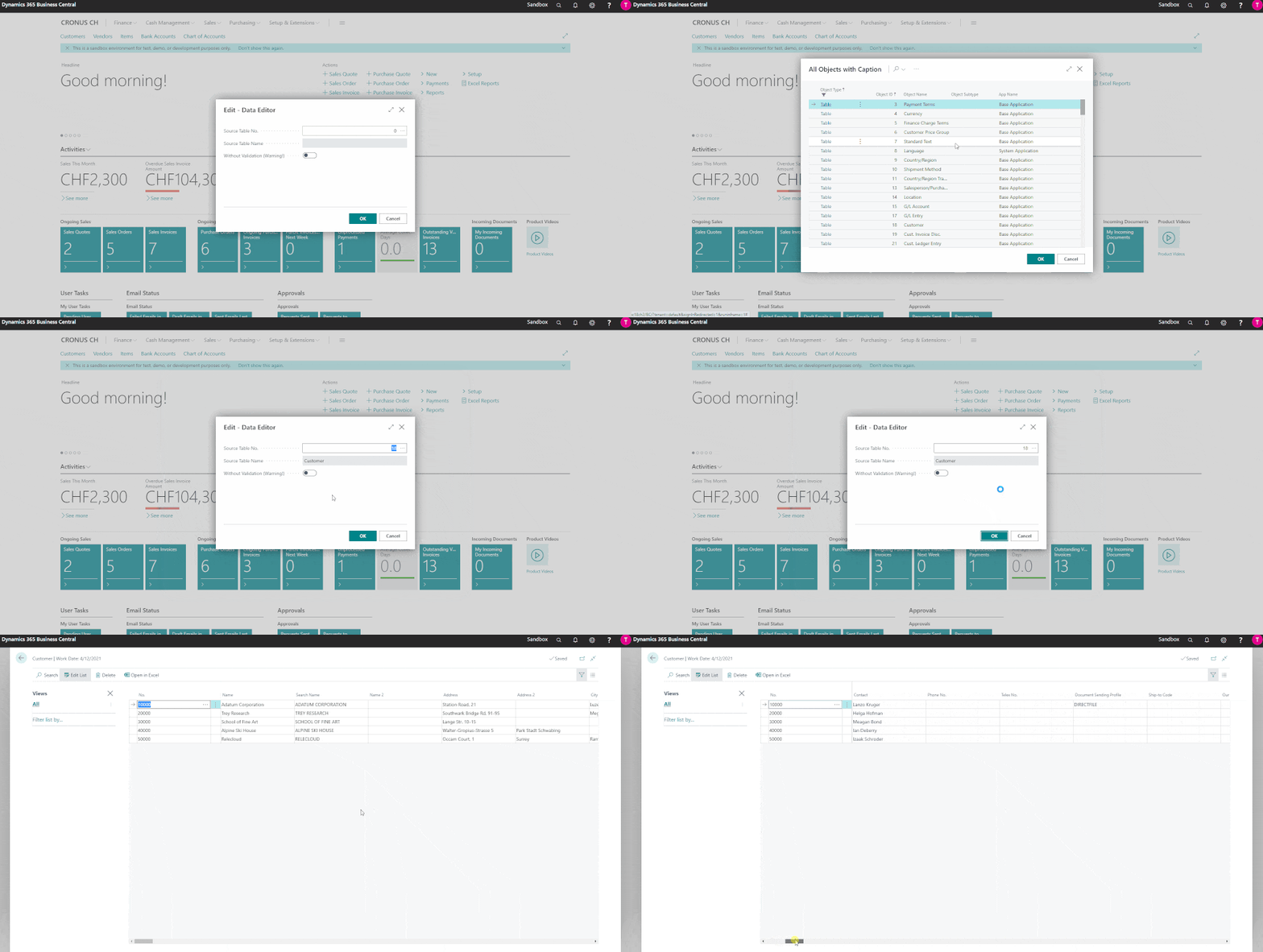
# Table Data Editor Application for Business Central
Table Data Editor is an open-source application for Business Central. This application allows you to easily manipulate data in Business Central tables. Table Data Editor is completely free and open-source, distributed under the MIT license. Anyone can contribute or share their ideas for the development of Table Data Editor on GitHub.
https://vld-bc.com/table-data-editor-general
[Data Editor Tool on AppSource](https://appsource.microsoft.com/en-us/product/dynamics-365-business-central/PUBID.volodver%7CAID.data-editor-tool%7CPAPPID.d295108a-0d45-4896-ba40-434eeed8cff2?tab=Overview)
---
Are you a Business Central administrator or consultant facing complex data corrections? Do you need direct table access for testing scenarios and data migration? Are standard tools limiting your ability to efficiently manage and troubleshoot data issues?
As a Business Central administrator or consultant, you face unique challenges that standard tools can't address. Data migrations stall when validation rules block legitimate imports. Testing requires specific scenarios that are tedious to create manually. Production issues demand immediate fixes that would normally require custom development. Cleanup operations across multiple tables become multi-day projects. When troubleshooting, you lack the visibility and control needed for efficient resolution. These limitations delay project timelines and increase implementation costs.
Data Editor Tool provides administrators and consultants with unrestricted access to Business Central tables, enabling professional data management across all critical scenarios. Execute complex data migrations with validation bypass. Set up test scenarios in minutes. Perform surgical data fixes with full audit trails. Clean up legacy data efficiently. Gain complete visibility into table relationships for troubleshooting. This MIT-licensed tool delivers direct database access with enterprise-grade logging for compliance and change tracking.
Key scenarios
- Data Migration - Import/export with Excel and JSON, bypass validation rules, handle BLOB/Media fields
- Testing & Development - Rapidly create test scenarios, manipulate any table, clone data sets
- Data Cleanup - Bulk updates, find & replace across tables, delete obsolete records
- Production Fixes - Direct editing capabilities, primary key renaming, immediate corrections
- Data Analysis - Complete table visibility, advanced filtering, relationship exploration
- Compliance & Audit - Comprehensive logging of all changes, user tracking, timestamp records
- Performance Tools - Parallel processing, FlowField control, optimized for large datasets
- Bulk Operations - Update columns, copy data between fields, modify filtered record sets
---
# Tips
- Type **Data Editor** in the Business Central search to get started.
- For the extension to work properly you must make sure that your BC user is using the **DET Data Editor Tool** or **SUPER** permission set.
- For OnPrem you must have a license for objects with id 81000+
- Project tested and compiled on latest Cloud BC version.
- Branch for older versions BC 18+ https://github.com/Drakonian/data-editor-for-bc/tree/BC18-19-20-21-22-23
# How to Install a Per Tenant Extension (.app file) in Business Central
This guide provides step-by-step instructions for installing a Per Tenant Extension (PTE) `.app` file in Microsoft Dynamics 365 Business Central via the Extension Management page.
## Prerequisites
- **Permissions**: Ensure you have the permissions to manage extensions in Business Central.
- **.app File**: Have the `.app` file you wish to install ready.
## Installation Steps
### 1. Access the Extension Management Page
- Go to **Extension Management** from the Search.
### 2. Upload the Extension
- Click **Upload Extension** on the Extension Management page.
- Press **Select .app file DrillDown**, navigate to your `.app` file, select it, and click **Open**.
### 3. Install the Extension
- Click **Deploy**
- Accept any terms and conditions, if prompted.
- Confirm the installation by clicking **Yes**.
### 4. Verify Installation
- The installation process may take a few minutes. You can monitor the progress on the Extension Management page, where the status will change to **Installed** once completed.
## Troubleshooting
- **Installation Errors**: Refer to the error message details and consult the extension's documentation or support resources.
- **Permissions Issues**: Confirm you have the necessary permissions to install extensions. Contact your system administrator if you're unsure.
---