https://github.com/drarox/enphasy
Enphasy: A lightweight Enphase data sync tool using the cloud API. Fetches and stores solar production, consumption, import/export data automatically.
https://github.com/drarox/enphasy
api bun cloud enphase enphase-api enphase-envoy enphase-gateway solar
Last synced: 2 months ago
JSON representation
Enphasy: A lightweight Enphase data sync tool using the cloud API. Fetches and stores solar production, consumption, import/export data automatically.
- Host: GitHub
- URL: https://github.com/drarox/enphasy
- Owner: Drarox
- Created: 2025-06-13T09:39:22.000Z (about 1 year ago)
- Default Branch: master
- Last Pushed: 2025-06-13T11:01:02.000Z (about 1 year ago)
- Last Synced: 2025-06-13T12:18:59.609Z (about 1 year ago)
- Topics: api, bun, cloud, enphase, enphase-api, enphase-envoy, enphase-gateway, solar
- Language: TypeScript
- Homepage: https://hub.docker.com/r/drarox/enphasy
- Size: 9.77 KB
- Stars: 0
- Watchers: 0
- Forks: 0
- Open Issues: 0
-
Metadata Files:
- Readme: README.md
Awesome Lists containing this project
README
# ☀️ Enphasy - Enphase Monitoring Server
[](https://hub.docker.com/r/drarox/enphasy/)
[](https://hub.docker.com/r/drarox/enphasy/)
[](https://github.com/Drarox/Enphasy/issues)
[](https://github.com/Drarox/Enphasy/pulls)
[](https://github.com/Drarox/Enphasy/blob/master/LICENSE)
A lightweight API server for fetching, storing, and serving solar energy data from the external Enphase Monitoring API, using SQLite as a local database. The app minimizes API usage by caching responses and scheduling smart fetches.
---
## ❓ Why this project?
Enphasy exists because **local access to the Enphase device is not possible** in my setup.
Although Enphase systems typically allow for local data access (e.g., via the Envoy gateway), my Enphase device is connected to a **separate, isolated network**—one that the main network running this server cannot reach. That means I can't pull data directly from the device over LAN.
To overcome this limitation, **Enphasy uses Enphase’s official cloud API** to fetch production, consumption, import/export, and system summary data. This allows me to gather and archive solar data remotely and reliably, even without direct device access.
---
## 🚀 Features
- Fetches **current system summary** and caches it
- Pulls **lifetime data daily at 3 AM** (production, consumption, import, export)
- Stores all data in a local **SQLite** database
- Refreshes **access token daily at midnight**
- Includes Docker support with volume binding for database persistence
---
## 🖥️ Web Interface and API Docs
Once the service is running, you can access:
- A small **Dashboard** (minimal status view) on `/`
- The **Full API documentation** (made via Scalar) on `/docs`
---
## 🌐 API Endpoints
- `GET /current`
Returns cached current system summary (to avoid API limitations)
- `GET /daily/:date`
Returns stored lifetime data for a specific date (`YYYY-MM-DD`)
- `GET /lifetime`
Returns all the stored lifetime data
- `GET /health`
Returns simple "Server is running" health check response
---
## 🔐 Environment Variables
Create a `.env` file or use environment injection via Docker:
```env
ENPHASE_API_KEY=your_api_key_here
ENPHASE_INITIAL_REFRESH_TOKEN=your_initial_refresh_token
ENPHASE_BASIC_AUTH=base64encoded(client_id:secret)
SYSTEM_ID=your_enphase_system_id (can be found in the Enphase dashboard or mobile app)
REQ_CACHE_MINUTES=60 (optional)
````
See the How to get your Enphase API credentials section for details on how to obtain these values.
---
## 🐳 Docker Usage
### Run with Compose
Use this `docker-compose.yml`:
```yaml
version: "3.9"
services:
enphase-monitor:
image: drarox/enphasy:latest
container_name: enphasy
restart: unless-stopped
ports:
- "3000:3000"
volumes:
- db:/usr/src/app/db
environment:
ENPHASE_API_KEY: your_api_key
ENPHASE_INITIAL_REFRESH_TOKEN: your_refresh_token
ENPHASE_BASIC_AUTH: xxxxx= #base64encoded(client_id:secret)
SYSTEM_ID: 00000000 #can be found in the Enphase dashboard or mobile app
#OR use env_file:
#env_file:
# - .env
volumes:
db:
```
Start:
```bash
docker-compose up -d
```
---
## 📥 How to get your Enphase API credentials (click to expand)
🛠️ Step-by-step guide (Enphase API setup using Watt plan)
### ✅ Using the free tier from Enphase (plan named Watt)
---
#### 1. Create an Enphase Developer Account
Sign up for free at:
🔗 [https://developer-v4.enphase.com/signup](https://developer-v4.enphase.com/signup)
---
#### 2. Create a new app
* Go to the **Applications** tab.
* Click **Create Application**.
* Select the **Watt** free plan.
* Choose a name (e.g. `Enphasy`).
* Under **Access Control**, select **all the permissions**.
---
#### 3. Gather credentials
* Copy your **API Key** → Set as `ENPHASE_API_KEY` in your environment.
* Copy your **Client ID** and **Client Secret**.
* Create your `ENPHASE_BASIC_AUTH` value like this:
```bash
# Replace below with your actual client ID and secret
echo -n "your_client_id:your_client_secret" | base64
```
Use the result in your `.env` or `docker-compose.yml`:
```env
ENPHASE_BASIC_AUTH=
```
---
#### 4. Get the initial refresh token
You’ll only need this **once**—afterward, Enphasy will auto-refresh it.
##### 🔐 Authorize your app with an Enphase consumer account:
Take the **Authorization URL** and append the required redirect URI:
Just add `redirect_uri=https://api.enphaseenergy.com/oauth/redirect_uri` to the end of the URL:
```text
Base: https://api.enphaseenergy.com/oauth/authorize?response_type=code&client_id=YOUR_CLIENT_ID
Final: https://api.enphaseenergy.com/oauth/authorize?response_type=code&client_id=YOUR_CLIENT_ID&redirect_uri=https://api.enphaseenergy.com/oauth/redirect_uri
```
* Open the final URL in your browser (or share it with the Enphase account holder).
* Log in and authorize the app.
* You’ll see something like:
> **Authorization code (XXX) is generated**
* Copy the code and paste it into the `curl` request below.
---
#### 5. Exchange the code for a refresh token
Make this `curl` request to retrieve your first token:
```bash
curl --location --request POST 'https://api.enphaseenergy.com/oauth/token?grant_type=authorization_code&redirect_uri=https://api.enphaseenergy.com/oauth/redirect_uri&code=XXX' \
--header 'Authorization: Basic XXXXXX='
```
* Replace the code `XXX` with the authorization code from the previous step.
* Replace the basic authorization header `XXXXXX=` with your `ENPHASE_BASIC_AUTH` value from earlier.
This will return a JSON like:
```json
{
"refresh_token": "your-refresh-token",
...
}
```
---
#### 6. Add it to your environment
Set it in your `.env` or `docker-compose.yml`:
```env
ENPHASE_INITIAL_REFRESH_TOKEN=your-refresh-token
```
---
🎉 You're done! Enphasy will now handle data syncing and token refreshing automatically.
---
📚 **Further Documentation:**
* [Quick Start Guide](https://developer-v4.enphase.com/docs/quickstart.html#step_1)
* [Full API Reference](https://developer-v4.enphase.com/docs.html)
---
## 🕰️ Scheduled Tasks
| Task | Schedule |
| --------------------- |------------------------|
| Refresh access token | Daily @ 00:00 |
| Sync lifetime data | Daily @ 03:00 |
| Cache current summary | Every hour (on demand) |
---
## 🧪 Dev Server
Note: This project uses [Bun](https://bun.sh). Install it with `curl -fsSL https://bun.sh/install | bash`
```bash
bun install
bun run src/index.ts
```
---
## 📌 Notes
* SQLite writes must have write permissions. When running in Docker, always bind the DB to a host directory.
* The Enphase free tier (Watt) limits API calls to 1000 per month — make sure to set `REQ_CACHE_MINUTES` to a sensible value to avoid hitting rate limits.
* All critical errors are logged in the container console.
---
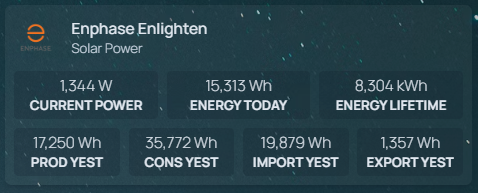
📺 How to add Enphasy as a Homepage widget
To show Enphasy data in your Homepage dashboard, you can use the built-in `customapi` widget. Below is an example configuration that shows:
- Real-time power data
- Lifetime energy metrics
- Yesterday's solar, consumption, import/export data
Add this block to your `homepage/config/services.yaml` file:
```yaml
- Enphase Enlighten:
icon: /img/enphase.png
href: https://enlighten.enphaseenergy.com/web/
description: Solar Power
widgets:
- type: customapi
url: http://enphasy:3000/current
method: GET
mappings:
- field: current_power
label: Current Power
format: number
suffix: "W"
- field: energy_today
label: Energy Today
format: number
suffix: "Wh"
- field: energy_lifetime
label: Energy Lifetime
format: number
scale: 0.001
suffix: "kWh"
- type: customapi
url: http://enphasy:3000/daily/yesterday
method: GET
mappings:
- field: production
label: Prod Yest
format: number
suffix: "Wh"
- field: consumption
label: Cons Yest
format: number
suffix: "Wh"
- field: import
label: Import Yest
format: number
suffix: "Wh"
- field: export
label: Export Yest
format: number
suffix: "Wh"
```
Preview:
---
## 📃 License
[GPL-3.0 license](https://github.com/Drarox/Enphasy/blob/master/LICENSE)