https://github.com/dreamcatcher45/pip-remove
A GUI app to view and remove pip installed packages
https://github.com/dreamcatcher45/pip-remove
gui pip pip-gui pip-remove pip-tool pip-tools python remove tool uninstaller
Last synced: 11 days ago
JSON representation
A GUI app to view and remove pip installed packages
- Host: GitHub
- URL: https://github.com/dreamcatcher45/pip-remove
- Owner: dreamcatcher45
- License: mit
- Created: 2024-04-06T15:07:29.000Z (about 2 years ago)
- Default Branch: main
- Last Pushed: 2025-08-02T04:14:36.000Z (11 months ago)
- Last Synced: 2025-11-23T12:02:58.462Z (7 months ago)
- Topics: gui, pip, pip-gui, pip-remove, pip-tool, pip-tools, python, remove, tool, uninstaller
- Language: Python
- Homepage: https://dreamcatcher45.github.io/Pip-Remove/
- Size: 70.3 KB
- Stars: 1
- Watchers: 2
- Forks: 0
- Open Issues: 1
-
Metadata Files:
- Readme: README.md
- License: LICENSE
Awesome Lists containing this project
README
# Pip Remove
Pip Remove is a Python GUI application designed to provide an easy and efficient way to view and remove pip-installed packages. It supports batch operations, making it a powerful tool for managing your Python environment.
## Features
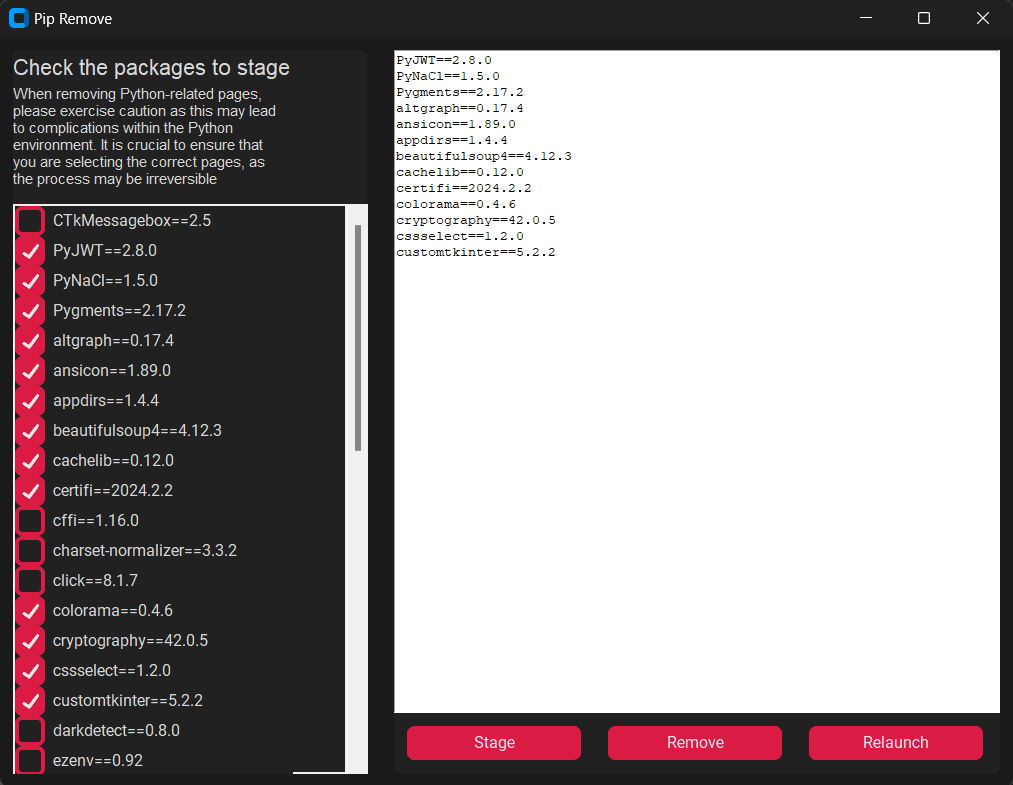
- View installed packages
- Remove packages individually or in batch
- Batch removal of packages
## Prerequisites
- Python 3.6 or higher
- pip (Python package installer)
## Installation
1. Clone the repository:
```
git clone https://github.com/dreamcatcher45/pip-remove.git
```
2. Navigate to the project directory:
```
cd pip-remove
```
3. Install the required packages:
```
pip install -r requirements.txt
```
## Usage
1. Run the application:
```
python app.py
```
2. Use the GUI to view installed packages and remove them as needed.
## Screenshot
## Contributing
Contributions are welcome! Please feel free to submit a pull request or open an issue.
## License
This project is licensed under the MIT License. See the [LICENSE](LICENSE) file for details.