https://github.com/drivebase/drivebase
Drivebase is a cloud-agnostic file management platform for people and teams using multiple storage providers. 🚀
https://github.com/drivebase/drivebase
bun docker dropbox e2e file-management file-manager ftp google-drive nodejs react s3 self-hosted storage vite
Last synced: 4 months ago
JSON representation
Drivebase is a cloud-agnostic file management platform for people and teams using multiple storage providers. 🚀
- Host: GitHub
- URL: https://github.com/drivebase/drivebase
- Owner: drivebase
- License: mit
- Created: 2025-03-09T15:29:10.000Z (over 1 year ago)
- Default Branch: main
- Last Pushed: 2026-03-07T07:01:03.000Z (4 months ago)
- Last Synced: 2026-03-07T07:38:06.177Z (4 months ago)
- Topics: bun, docker, dropbox, e2e, file-management, file-manager, ftp, google-drive, nodejs, react, s3, self-hosted, storage, vite
- Language: TypeScript
- Homepage: https://drivebase.io
- Size: 6.44 MB
- Stars: 85
- Watchers: 3
- Forks: 16
- Open Issues: 7
-
Metadata Files:
- Readme: README.md
- Changelog: CHANGELOG.md
- Contributing: CONTRIBUTING.md
- Funding: .github/FUNDING.yml
- License: LICENSE
- Agents: AGENTS.md
Awesome Lists containing this project
README




Drivebase is a cloud-agnostic file management platform for people and teams using multiple storage providers. It gives you one unified file and folder workspace across providers, with Vault for end-to-end encrypted uploads and Smart Uploads for rule-based file routing. The goal is to reduce provider lock-in while keeping storage ownership and control in your hands.


---
## Table of Contents
- [Table of Contents](#table-of-contents)
- [Getting Started](#getting-started)
- [Quickstart (Recommended)](#quickstart-recommended)
- [Manual Installation](#manual-installation)
- [Prerequisites](#prerequisites)
- [Steps](#steps)
- [Supported Providers](#supported-providers)
- [Contributing](#contributing)
- [License](#license)
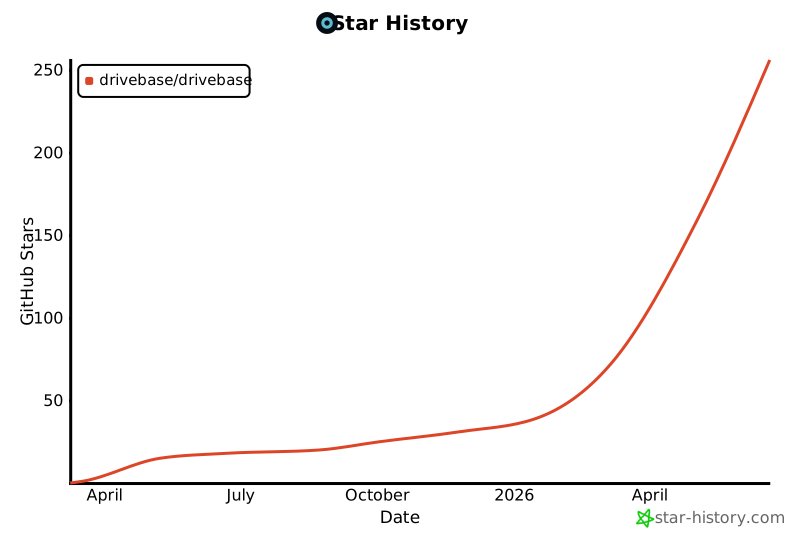
- [Star History](#star-history)
## Getting Started
You can get started with Drivebase in multiple ways:
## Quickstart (Recommended)
Run the following command to install Drivebase using our automated installer. It uses Docker Compose to set up your environment and generate secure keys automatically.
```bash
curl -fsSL https://drivebase.io/install | bash
```

After you start the containers, open [http://localhost:3000](http://localhost:3000) in your browser to access the Drivebase dashboard.
Login with the default credentials:
- Email: `admin@drivebase.local`
- Password: `admin123`
## Manual Installation
If you prefer to run the application manually without Docker Compose, you can follow the steps below.
### Prerequisites
- Bun - https://bun.sh/
- Postgres + Redis (if running app locally without full Docker app container)
### Steps
1. Clone the repository:
```bash
git clone https://github.com/drivebase/drivebase.git
cd drivebase
```
2. Install dependencies:
```bash
bun install
```
3. Update `.env.local` with required values:
```bash
cp .env.example .env.local
```
4. Start the application:
```bash
bun run dev
```
5. Open:
- App: `http://localhost:3000`
- GraphQL: `http://localhost:4000/graphql`
## Supported Providers
Drivebase supports the following cloud providers:
- [x] S3
- [x] Local Storage
- [x] Google Drive
- [x] Dropbox
- [x] FTP
- [x] WebDAV
- [x] Telegram
- [x] Nextcloud
- [x] Darkibox
- [ ] sFTP
- [ ] Box
- [ ] OneDrive
## Support
Have questions or need help? Here's how you can reach us:
- [Discord](https://discord.gg/5hPZwTPp68)
- [Telegram](https://t.me/+fWEMYD3gp61lYWZl)
## Contributing
Please read [CONTRIBUTING.md](CONTRIBUTING.md) for details on our code of conduct, and the process for submitting pull requests to us.
## License
This project is licensed under the MIT License - see the [LICENSE](LICENSE) file for details.
## Star History