https://github.com/drop-stones/fzf-lua-grep-context
🔍 Enhance fzf-lua with persistent, reusable grep filters.
https://github.com/drop-stones/fzf-lua-grep-context
fzf-lua neovim-plugin
Last synced: about 2 months ago
JSON representation
🔍 Enhance fzf-lua with persistent, reusable grep filters.
- Host: GitHub
- URL: https://github.com/drop-stones/fzf-lua-grep-context
- Owner: drop-stones
- License: mit
- Created: 2025-04-12T06:31:50.000Z (about 1 year ago)
- Default Branch: main
- Last Pushed: 2025-09-20T05:13:08.000Z (8 months ago)
- Last Synced: 2025-09-20T05:39:28.519Z (8 months ago)
- Topics: fzf-lua, neovim-plugin
- Language: Lua
- Homepage:
- Size: 83 KB
- Stars: 4
- Watchers: 1
- Forks: 0
- Open Issues: 0
-
Metadata Files:
- Readme: README.md
- License: LICENSE
Awesome Lists containing this project
README
# fzf-lua-grep-context
A Neovim plugin that extends [`fzf-lua`](https://github.com/ibhagwan/fzf-lua) with reusable, persistent grep context and a fuzzy-selectable UI for switching between them.
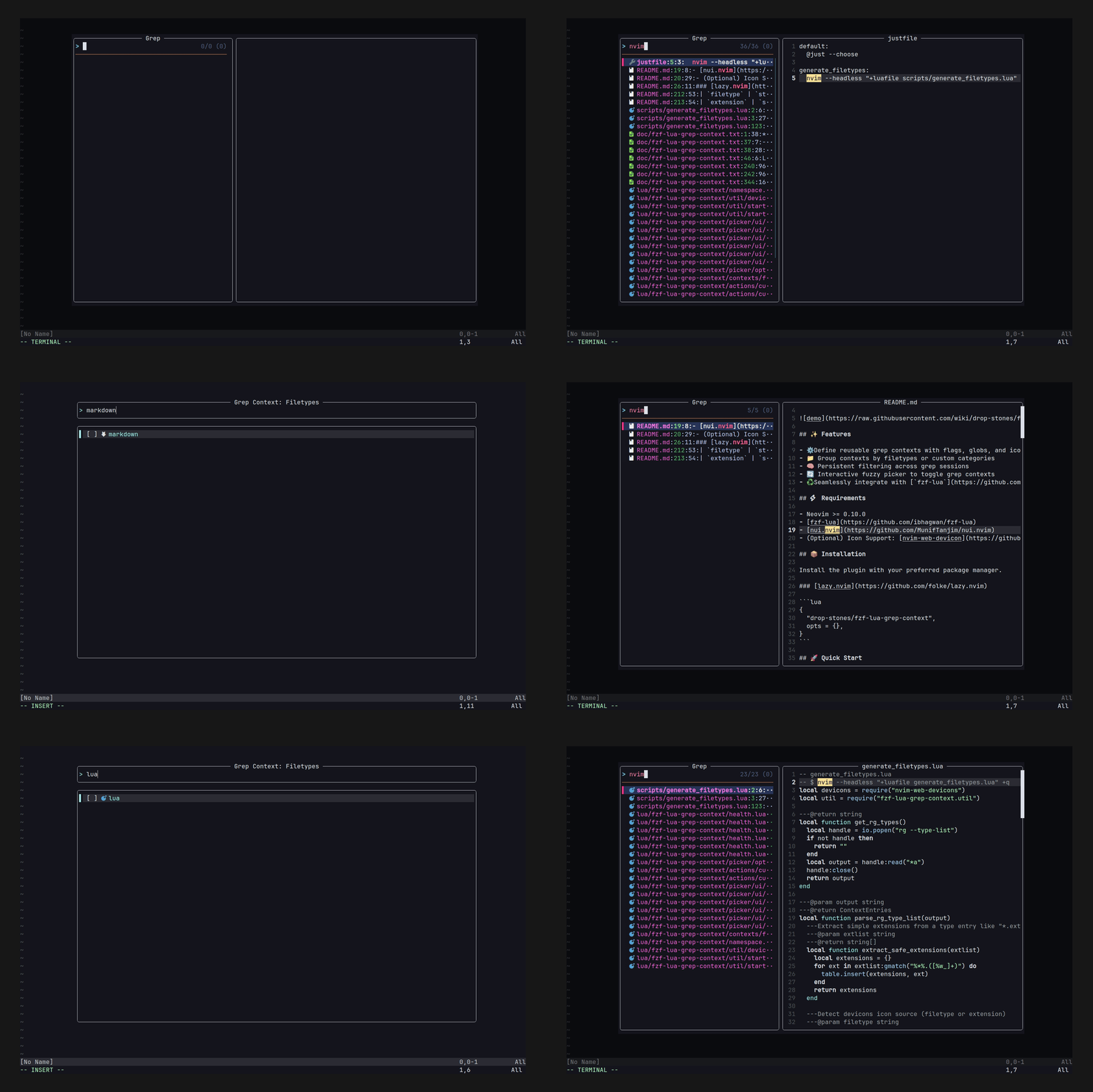
## ✨ Features
- ⚙️ Define reusable grep contexts with flags, globs, and icons
- 📁 Group contexts by filetypes or custom categories
- 🧠 Persistent filtering across grep sessions
- 🔄 Interactive fuzzy picker to toggle grep contexts
- ♻️ Seamlessly integrate with [`fzf-lua`](https://github.com/ibhagwan/fzf-lua) to transform your grep command dynamically
## ⚡️ Requirements
- Neovim >= 0.10.0
- [fzf-lua](https://github.com/ibhagwan/fzf-lua)
- [nui.nvim](https://github.com/MunifTanjim/nui.nvim)
- (Optional) Icon Support: [nvim-web-devicon](https://github.com/nvim-tree/nvim-web-devicons)
## 📦 Installation
Install the plugin with your preferred package manager.
### [lazy.nvim](https://github.com/folke/lazy.nvim)
```lua
{
"drop-stones/fzf-lua-grep-context",
opts = {},
}
```
## 🚀 Quick Start
This plugin lets you filter grep targets interactively with a fuzzy-selectable UI.
1. Disable fzf-lua's automatic glob injection via `rg_glob = false`
2. Inject grep context flags/globs using `fn_transform_cmd`
3. Assign a key (e.g., ``) to launch the context picker
4. Optionally set the built-in `filetypes` group as the default
```lua
{
"ibhagwan/fzf-lua",
dependencies = { "drop-stones/fzf-lua-grep-context" },
opts = {
grep = {
rg_glob = false, -- 1. Disable automatic --iglob injection by fzf-lua
fn_transform_cmd = function(query, cmd, _)
-- 2. Load grep-context module in runtime
-- This ensures the plugin is available when used from inside fzf-lua sessions
vim.opt.rtp:append(vim.env.FZF_LUA_GREP_CONTEXT)
return require("fzf-lua-grep-context.transform").rg(query, cmd)
end,
actions = {
-- 3. Open grep context picker with
["ctrl-t"] = function() require("fzf-lua-grep-context").picker() end,
},
},
},
},
```
```lua
{
"drop-stones/fzf-lua-grep-context",
opts = {
picker = {
default_group = "filetypes", -- 4. Built-in filetype-aware filtering
},
},
}
```
> [!NOTE]
> The plugin sets `vim.env.FZF_LUA_GREP_CONTEXT` automatically on startup.
> Make sure to call `fn_transform_cmd` **after** the plugin is loaded.
## ⚙️ Configuration
You can customize the plugin behavior using the `contexts` and `picker` options.
Expand to see the list of all the default options below.
Default Options
```lua
{
border = "rounded", -- Border style for the picker window
contexts = {
default = {
title = "Default",
entries = {},
},
filetypes = {
title = "Filetypes",
entries = { ... }, -- See full list by `:lua print(vim.inspect(require("fzf-lua-grep-context.contexts.filetypes")))`
},
},
picker = {
default_group = "default",
title_fmt = " Grep Context: %s ",
keymaps = {
{ "", function() require("fzf-lua-grep-context.actions").move_down() end, mode = { "n", "i" } },
{ "", function() require("fzf-lua-grep-context.actions").move_up() end, mode = { "n", "i" } },
{ "", function() require("fzf-lua-grep-context.actions").move_down() end, mode = { "n", "i" } },
{ "", function() require("fzf-lua-grep-context.actions").move_up() end, mode = { "n", "i" } },
{ "", function() require("fzf-lua-grep-context.actions").half_page_down() end, mode = { "n", "i" } },
{ "", function() require("fzf-lua-grep-context.actions").half_page_up() end, mode = { "n", "i" } },
{ "", function() require("fzf-lua-grep-context.actions").toggle_select() end, mode = { "n", "i" } },
{ "", function() require("fzf-lua-grep-context.actions").confirm() end, mode = { "n", "i" } },
{ "", function() require("fzf-lua-grep-context.actions").exit() end, mode = { "n", "i" } },
{ "j", function() require("fzf-lua-grep-context.actions").move_down() end, mode = "n" },
{ "k", function() require("fzf-lua-grep-context.actions").move_up() end, mode = "n" },
{ "gg", function() require("fzf-lua-grep-context.actions").move_top() end, mode = "n" },
{ "G", function() require("fzf-lua-grep-context.actions").move_bottom() end, mode = "n" },
{ "q", function() require("fzf-lua-grep-context.actions").exit() end, mode = "n" },
},
checkbox = {
mark = "x",
hl = { fg = "#3CB371" },
},
},
}
```
### 🧱 Grep Contexts
The `contexts` table defines reusable grep filters grouped by name.
#### 🔹 Single Group Shortcut
If you only need one group, define `contexts` directly with `title` and `entries`:
```lua
contexts = {
title = "Default",
entries = { ... },
}
```
This is equivalent to:
```lua
contexts = {
default = {
title = "Default",
entries = { ... },
},
}
```
Call with:
```lua
require("fzf-lua-grep-context").picker()
-- or
require("fzf-lua-grep-context").picker("default")
```
#### 🔸 Multiple named groups
Define multiple named context groups:
```lua
contexts = {
group1 = {
title = "Group 1",
entries = { ... },
},
group2 = {
title = "Group 2",
entries = { ... },
}
}
```
To launch a specific group in the picker:
```lua
require("fzf-lua-grep-context").picker("group1")
```
#### ➕ Extending Built-in Filetypes
You can also add your own entries to the built-in `filetypes` group:
```lua
contexts = {
filetypes = {
entries = {
custom = {
label = "My Custom",
filetype = "mytype",
globs = { "*.mytype" },
},
},
},
}
```
### 📄 Context Entries
Each entry in `entries` defines how grep commands should behave for a specific target.
| Key | Type | Description |
| --- | ---- | ----------- |
| `label` | `string` | Display name shown in the picker |
| `filetype` | `string?` | Used to fetch icon from `nvim-web-devicon` |
| `extension` | `string?` | Used to fetch icon from `nvim-web-devicon` |
| `icon` | `{ [1]: string, [2]: string}?` | Override the icon symbol (`[1]`) and its highlight group (`[2]`) |
| `flags` | `string[]?` | Extra flags passed to all commands unless overridden |
| `globs` | `string[]?` | Glob patterns to filter files |
| `commands` | `table?` | Per-command override for `flags` and `globs` |
> [!WARNING]
> If both `icon` and `filetype`/`extension` are provided, the `icon` takes precedence.
Example:
```lua
entries = {
lua = {
label = "Lua",
filetype = "lua",
-- extension = "lua",
-- icon = { "", "DevIconLua" },
commands = {
rg = { flags = { "--type", "lua" } },
git_grep = { globs = { "*.lua" } },
},
},
}
```
### 🎛 Picker Options
The `picker` table controls the context selection UI.
You can customize the default group, title format, and keymaps:
```lua
picker = {
default_group = "default", -- the group to show by default
title_fmt = " Grep Context: %s ", -- Display format where `%s` is replaced with the group `title`
keymaps = {
{ "", function() require("fzf-lua-grep-context.actions").toggle_select() end, mode = { "n", "i" } },
{ "", function() require("fzf-lua-grep-context.actions").confirm() end, mode = { "n", "i" } },
{ "", function() require("fzf-lua-grep-context.actions").exit() end, mode = { "n", "i" } },
-- more keymaps...
},
checkbox = {
-- Customize the checkmark character and highlight used in the picker
mark = "x", -- You can use any symbol, such as "✓", "✔" or "✗"
hl = { fg = "#3CB371" }, -- Highlight settings for the mark (e.g., color, bold, italic)
},
}
```
### 🔌 fzf-lua Integration
To use grep contexts during `fzf-lua` searches, inject filters using `fn_transform_cmd`.
#### ✅ ripgrep (`rg`)
```lua
grep = {
rg_glob = false, -- disable fzf-lua’s default glob injection
fn_transform_cmd = function(query, cmd, _)
-- ensure grep contexts are available during runtime
vim.opt.rtp:append(vim.env.FZF_LUA_GREP_CONTEXT)
return require("fzf-lua-grep-context.transform").rg(query, cmd)
end
}
```
#### ✅ git grep
```lua
fn_transform_cmd = function(query, cmd, _)
vim.opt.rtp:append(vim.env.FZF_LUA_GREP_CONTEXT)
return require("fzf-lua-grep-context.transform").git_grep(query, cmd)
end
```
### 🎨 Border Option
The plugin introduces a `border` option to handle cases when `fzf-lua` profiles (e.g., `border-fused`) return a **function** instead of a value that [`nui.nvim`](https://github.com/MunifTanjim/nui.nvim) accepts.
By default, the fallback border style is `"rounded"`.
Accepted values are the same as `nui.nvim` border styles ().
You can override this with your own preference:
```lua
border = "single", -- fallback if fzf-lua provides a function
```
## 🩺 Troubleshooting
Run `:checkhealth fzf-lua-grep-context` to check runtime path and dependencies.
## 🪪 License
This project is licensed under the MIT License - see the [LICENSE](LICENSE) file for details.