https://github.com/drumath2237/argeorecorder
Geospatial API enabled AR Session Recorder for Android
https://github.com/drumath2237/argeorecorder
arcore augmented-reality geospatial-api unity
Last synced: about 1 year ago
JSON representation
Geospatial API enabled AR Session Recorder for Android
- Host: GitHub
- URL: https://github.com/drumath2237/argeorecorder
- Owner: drumath2237
- License: apache-2.0
- Created: 2022-05-17T10:33:32.000Z (about 4 years ago)
- Default Branch: main
- Last Pushed: 2023-02-14T17:57:12.000Z (over 3 years ago)
- Last Synced: 2025-04-12T06:53:58.989Z (about 1 year ago)
- Topics: arcore, augmented-reality, geospatial-api, unity
- Language: C#
- Homepage:
- Size: 94.7 KB
- Stars: 8
- Watchers: 1
- Forks: 0
- Open Issues: 0
-
Metadata Files:
- Readme: README.md
- Funding: .github/FUNDING.yml
- License: LICENSE.md
Awesome Lists containing this project
README
# ARGeoRecorder
https://user-images.githubusercontent.com/11372210/170836866-368213d9-225f-4d0c-a8b5-314fe388fd12.mp4
## About
ARCore Geospatial API に対応した ARSession を ARCore Recording & Playback API で記録・再生する Android アプリ。
## Tested Environment
- Unity 2021.3.4f1
- ARFoundation 4.2.7
- ARCore Extensions 1.35.0
- Android 12(Google Pixel 4a 5G)
## Settings & Usage
### Geospatial API 設定
Project Settings > ARCore Extensions > Optional Features から
Geospatial にチェックを入れます。
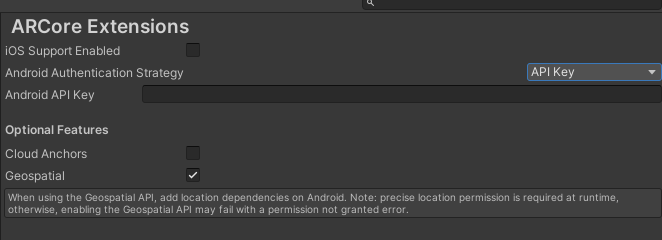
また、GCP で有効化した Android API Key を入力します。
Geospatial API の詳細な設定については[公式ドキュメント](https://developers.google.com/ar/develop/unity-arf/geospatial/developer-guide-android?hl=ja)をご覧ください。
### ビルド
Build Settings にて、プラットフォームが Android になっていない場合は切り替えて、ビルドをしてください。
`Assets\ARRecoreder\Scenes\main.unity`がメインのシーンになります。
### AR Session の記録
Recording を停止すると自動的にセッションをローカルファイルに記録します。
ファイルは Android 端末内の、`Android\data\com.drumath2237.ARRecorder\files`
に保存されます。
## Author
[にー兄さん / Kaito Tsutsumi](https://twitter.com/ninisan_drumath)