https://github.com/dschoon/react-pii-mask
React component for automatically masking Personally Identifiable Information (PII) on the client
https://github.com/dschoon/react-pii-mask
Last synced: 5 months ago
JSON representation
React component for automatically masking Personally Identifiable Information (PII) on the client
- Host: GitHub
- URL: https://github.com/dschoon/react-pii-mask
- Owner: dschoon
- License: mit
- Created: 2025-01-23T03:34:38.000Z (over 1 year ago)
- Default Branch: main
- Last Pushed: 2025-01-23T04:09:06.000Z (over 1 year ago)
- Last Synced: 2025-06-18T05:54:50.915Z (about 1 year ago)
- Language: TypeScript
- Size: 7.81 KB
- Stars: 3
- Watchers: 1
- Forks: 0
- Open Issues: 0
-
Metadata Files:
- Readme: README.md
- License: LICENSE
Awesome Lists containing this project
README
# React PII Mask
A React component for automatically masking Personally Identifiable Information (PII) in your application.
## Features
- 🔒 Automatic PII detection and masking
- 🎯 Class-based targeting for known PII elements
- 🔄 Real-time DOM observation for dynamic content
- 🎨 Built-in styling with visual indicators
- 📱 TypeScript support
## Installation
```bash
npm install react-pii-mask
# or
yarn add react-pii-mask
# or
pnpm add react-pii-mask
```
## Run Example
To run the examples locally:
```bash
git clone https://github.com/dschoon/react-pii-mask.git
cd react-pii-mask
pnpm install
cd examples
pnpm install
pnpm dev
```
Then open [http://localhost:5173](http://localhost:5173) to see the examples in action.
## Usage
### Basic Setup
Wrap your app with the PIIFilter component:
```tsx
import { PIIFilter } from 'react-pii-mask';
function App() {
return (
{/* Your app content */}
);
}
```
### Class-based Masking
Add PII classes to elements you want to mask:
```tsx
user@example.com
123-456-7890
John Doe
Sensitive Data
```
### Automatic Detection
The component automatically detects and masks:
- Email addresses
- Phone numbers
- Social Security Numbers
- Full names
### Custom Styling
Import the default styles or create your own:
```tsx
import 'react-pii-mask/styles.css';
```
## API
### PIIFilter Component
The main component that handles PII masking:
```tsx
import { PIIFilter } from 'react-pii-mask';
interface PIIFilterProps {
// Optional array of HTML tags to skip when masking
skipTags?: string[];
// Whether to preserve format characters (@ . - etc) when masking
preserveFormat?: boolean;
// Character to use for masking (default: '*')
maskCharacter?: string;
// Whether to automatically detect and mask PII (default: true)
autoDetect?: boolean;
// Array of RegExp patterns to ignore when masking
ignorePatterns?: RegExp[];
}
// Default skipTags: ['H1', 'H2', 'H3', 'H4', 'H5', 'H6', 'BUTTON', 'LABEL']
```
## Examples
Basic usage with default settings:
```tsx
This heading won't be masked
This email@example.com will be masked as ****************
```
Disable auto-detection (only mask elements with PII classes):
```tsx
test@email.com won't be masked
This will be masked
```
Ignore specific patterns:
```tsx
ID: 12345 won't be masked
Public Information won't be masked
test@email.com will be masked
```
Format-preserving masking:
```tsx
test@gmail.com will be masked as ****@*****.***
123-456-7890 will be masked as ***-***-****
```
Custom mask character:
```tsx
test@gmail.com will be masked as XXXX@XXXXX.XXX
Without preserveFormat: XXXXXXXXXXXXXXX
```
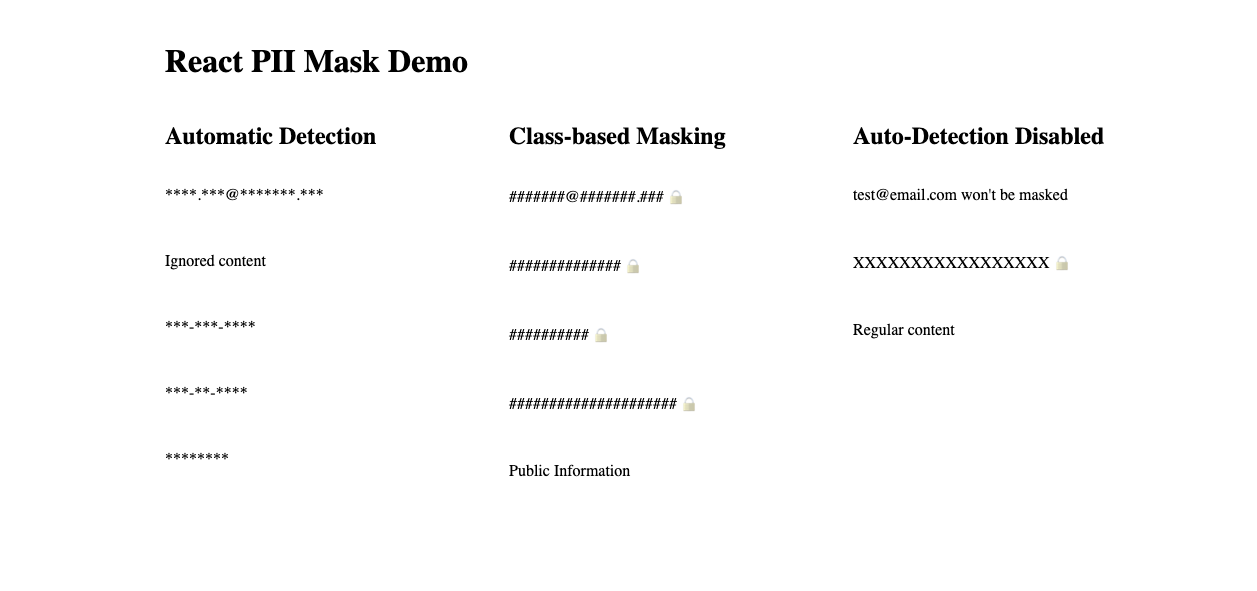
### Screenshot of Example
## Utility Functions
```tsx
import { maskPII, containsPII } from 'react-pii-mask';
// Mask text
maskPII('sensitive text'); // Returns: '************'
// Check for PII
containsPII('test@email.com'); // Returns: true
```
## Types
```tsx
import type { PIIClass, PIIPattern } from 'react-pii-mask';
// Available PII classes
type PIIClass = 'name' | 'email' | 'phone' | 'pii';
// Pattern types
type PIIPattern = 'email' | 'phone' | 'id' | 'name';
```
## License
MIT © [SchoonLabs](https://www.schoonlabs.com)