https://github.com/dstackai/dstack-templates
https://github.com/dstackai/dstack-templates
Last synced: about 2 months ago
JSON representation
- Host: GitHub
- URL: https://github.com/dstackai/dstack-templates
- Owner: dstackai
- Created: 2026-02-10T16:11:02.000Z (6 months ago)
- Default Branch: main
- Last Pushed: 2026-02-27T15:18:02.000Z (5 months ago)
- Last Synced: 2026-05-14T14:54:50.074Z (3 months ago)
- Size: 10.7 KB
- Stars: 2
- Watchers: 0
- Forks: 2
- Open Issues: 0
-
Metadata Files:
- Readme: README.md
Awesome Lists containing this project
README
# Templates
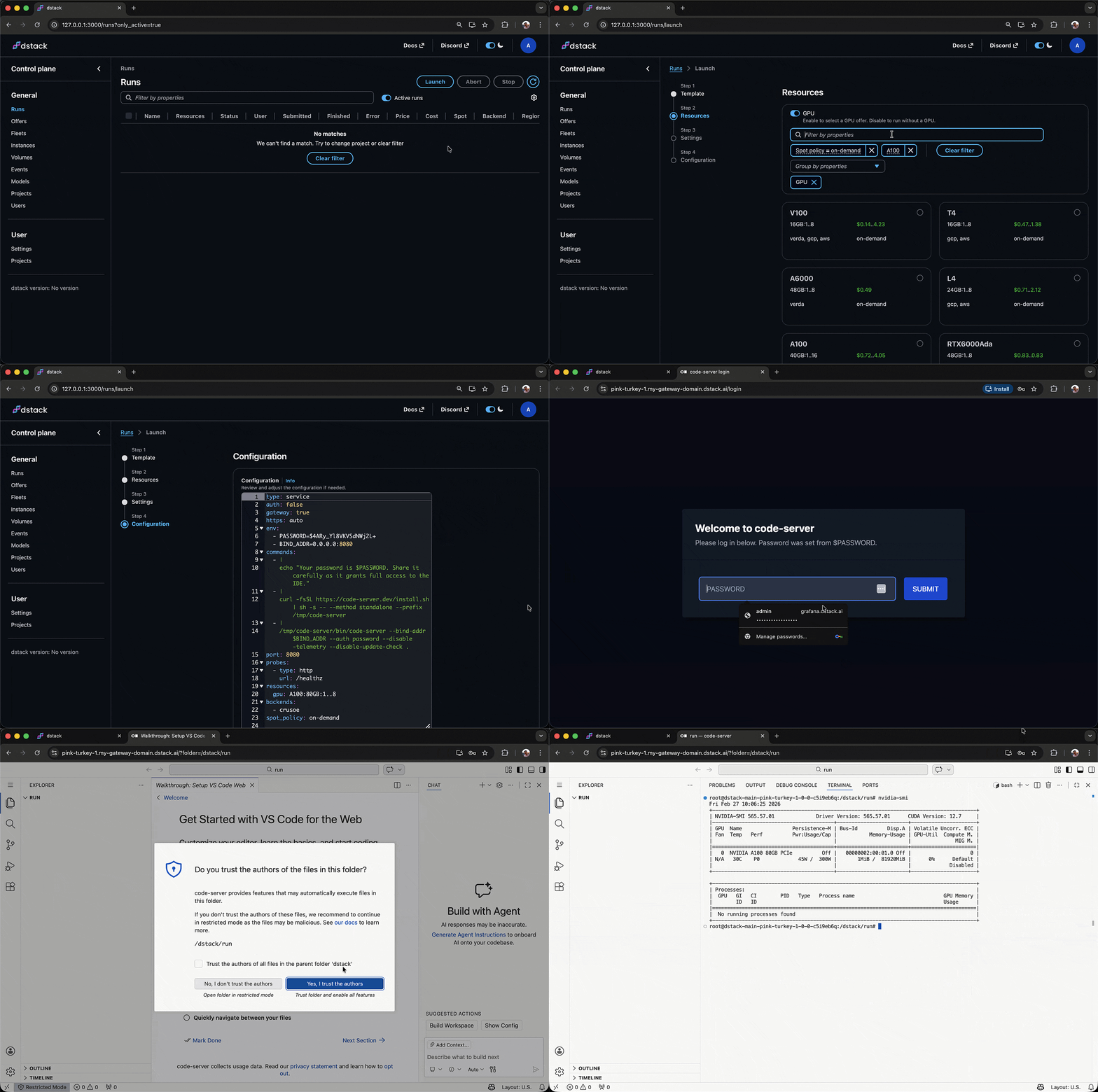
Templates let users create `dstack` runs from the UI via a launch wizard — select a template,
pick GPU resources, adjust settings, and review the final configuration.
While `dstack` is typically used via the CLI, templates make it easy to launch runs
directly from the UI through a guided experience.
## Using templates
> [!NOTE]
> Templates require `dstack` server version 0.20.12 or newer.
To enable the launch wizard, point the server to a Git repository containing templates
via the `DSTACK_SERVER_TEMPLATES_REPO` environment variable:
```shell
$ DSTACK_SERVER_TEMPLATES_REPO=https://github.com/dstackai/dstack-templates dstack server
```
Once configured, the **Launch** button on the **Runs** page will show the available templates.
Select a template, configure the parameters, and click **Apply** to create the run.
> [!NOTE]
> The launch wizard is an experimental feature. Currently, templates are configured per server.
> Per-project templates configuration is coming soon.
## Creating custom templates
To define your own templates, fork this repository or create a new one following the same layout.
Templates are YAML files placed under the `.dstack/templates/` directory in the repository.
Each file defines a single template.
## Template format
Each template file has the following top-level fields:
- `type` — always `template`
- `name` — unique identifier within the repository
- `title` — human-readable label shown in the UI
- `description` — short description shown in the UI
- `parameters` — list of configurable [parameters](#parameters)
- `configuration` — a standard `dstack` run configuration ([`dev-environment`](https://dstack.ai/docs/concepts/dev-environments), [`service`](https://dstack.ai/docs/concepts/services), or [`task`](https://dstack.ai/docs/concepts/tasks))
### Exmaples
#### Desktop IDE
A simple template that launches a dev environment accessible from a desktop IDE:
```yaml
type: template
name: desktop-ide
title: Desktop IDE
description: Access the instance from your desktop VS Code, Cursor, or Windsurf.
parameters:
- type: name
- type: ide
- type: resources
- type: python_or_docker
- type: repo
- type: working_dir
configuration:
type: dev-environment
```
#### In-browser IDE
A template that deploys in-browser VS Code as a service:
```yaml
type: template
name: in-browser-ide
title: In-browser IDE
description: Access the instance using VS Code in the browser.
parameters:
- type: name
- type: resources
- type: python_or_docker
- type: repo
- type: working_dir
- type: env
title: Password
name: PASSWORD
value: $random-password
configuration:
type: service
env:
- BIND_ADDR=0.0.0.0:8080
commands:
- |
echo "Your password is $PASSWORD. Share it carefully as it grants full access to the IDE."
- |
curl -fsSL https://code-server.dev/install.sh | sh -s -- --method standalone --prefix /tmp/code-server
- |
/tmp/code-server/bin/code-server --bind-addr $BIND_ADDR --auth password --disable-telemetry --disable-update-check .
port: 8080
probes:
- type: http
url: /healthz
gateway: true
https: auto
auth: false
```
The `env` parameter with `value: $random-password` tells the UI to auto-generate a random
password and pass it to the run configuration.
## Parameters
Parameters are special constructs supported by the `dstack` UI. Each parameter type maps to
a dedicated UI widget that provides context-aware configuration (e.g. showing available GPU offers,
listing Git repos, etc.).
| Type | Description |
|--------------------|-----------------------------------------------------------------------------------------------------------------|
| `name` | Configure an optional run name. |
| `ide` | Pick a desktop IDE (VS Code, Cursor, Windsurf). |
| `resources` | Configure GPU/CPU resources based on available offers in the project. |
| `python_or_docker` | Select a Python version (to use the `dstack` base image) or specify a Docker image. |
| `repo` | Configure a Git repo to clone into the run. |
| `working_dir` | Configure a working directory. |
| `env` | Define a custom environment variable. Supports `title`, `name`, and `value` properties. The special value `$random-password` tells the UI to auto-generate a random password. |
## TODO
- Per-project templates configuration (currently templates are configured per server)
## What's next?
1. Check the [dstack docs](https://dstack.ai/docs)
2. Learn about [dev environments](https://dstack.ai/docs/concepts/dev-environments), [tasks](https://dstack.ai/docs/concepts/tasks), and [services](https://dstack.ai/docs/concepts/services)
3. Browse [examples](https://dstack.ai/docs/examples)