https://github.com/dts4/code-challenge-wk3
https://github.com/dts4/code-challenge-wk3
Last synced: about 1 year ago
JSON representation
- Host: GitHub
- URL: https://github.com/dts4/code-challenge-wk3
- Owner: DTS4
- Created: 2024-10-13T16:15:43.000Z (over 1 year ago)
- Default Branch: main
- Last Pushed: 2024-10-17T16:18:09.000Z (over 1 year ago)
- Last Synced: 2024-10-20T00:01:44.089Z (over 1 year ago)
- Language: JavaScript
- Size: 800 KB
- Stars: 0
- Watchers: 1
- Forks: 0
- Open Issues: 0
-
Metadata Files:
- Readme: README.md
Awesome Lists containing this project
README
# Flatdango
Flatiron Movie Theater is open for business! You will be building out an
application, Flatdango, that allows a user to purchase movie tickets from the
theater.
## Demo
Use this gif as an example of how the app should work.
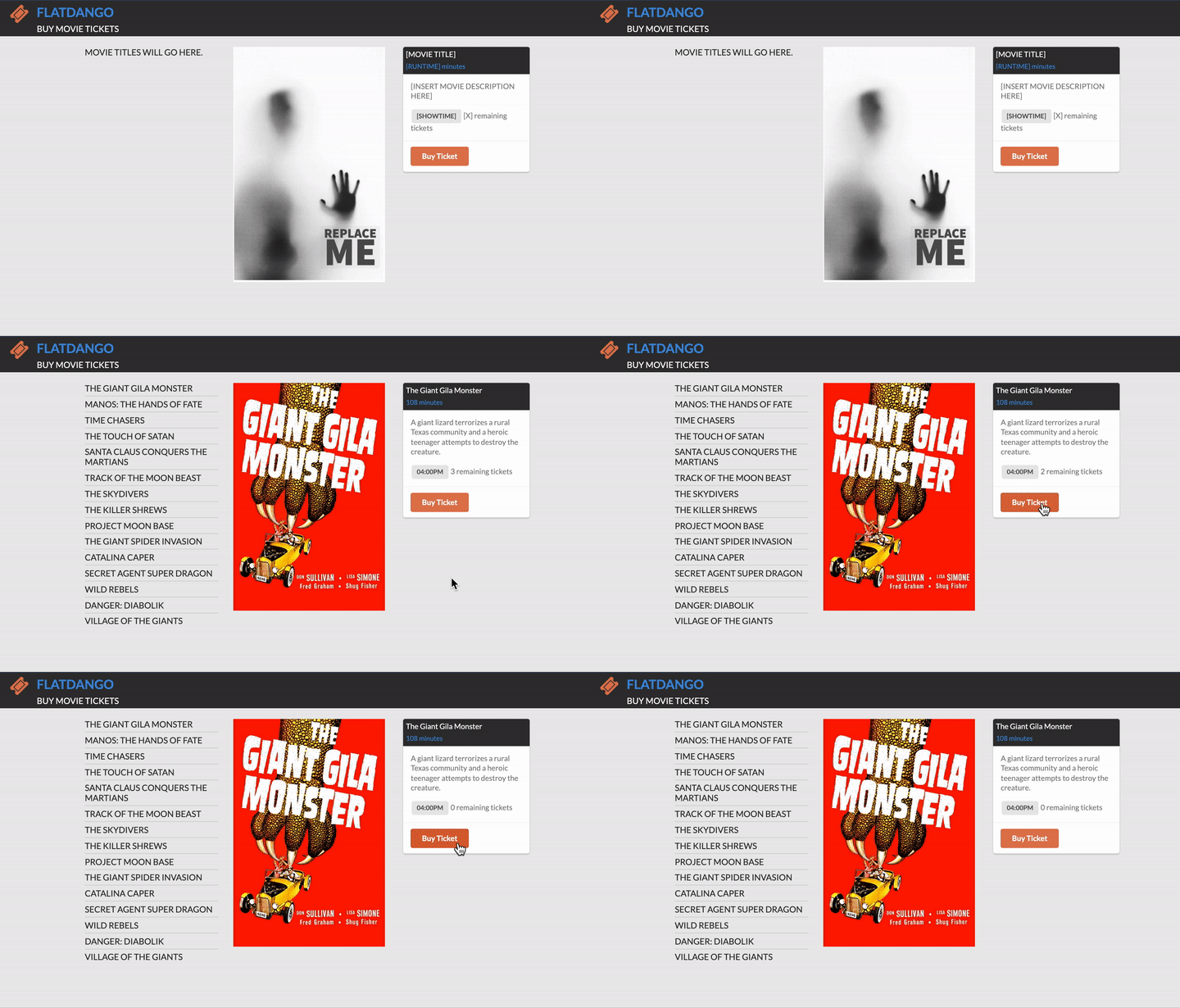
> To view in VSCode, right click on the README.md file and select "Open Preview".
## Setup
Run this command to get the backend started:
```console
$ json-server --watch db.json
```
Test your server by visiting this route in the browser:
[http://localhost:3000/films](http://localhost:3000/films)
Then, open the `index.html` file on your browser to run the application.
Write your code in the `src/index.js` file. The base URL for your API will be
[http://localhost:3000](http://localhost:3000).
## Core Deliverables
As a user, I can:
1. See the first movie's details, including its **poster, title, runtime,
showtime, and available tickets** when the page loads. The number of
available tickets will need to be derived by subtracting the number of
`tickets_sold` from the theater's `capacity`. You will need to make a GET
request to the following endpoint to retrieve the film data:
```json
GET /films/1
Example Response:
{
"id": "1",
"title": "The Giant Gila Monster",
"runtime": "108",
"capacity": 30,
"showtime": "04:00PM",
"tickets_sold": 27,
"description": "A giant lizard terrorizes a rural Texas community and a heroic teenager attempts to destroy the creature.",
"poster": "https://www.gstatic.com/tv/thumb/v22vodart/2157/p2157_v_v8_ab.jpg"
}
```
2. See a menu of all movies on the left side of the page in the `ul#films`
element when the page loads. (_optional_: you can style each film in the list
by adding the classes `film item` to each `li` element.) There is a
placeholder `li` in the `ul#films` element that is hardcoded in the HTML —
feel free to remove that element by editing the HTML file directly, or use
JavaScript to remove the placeholder element before populating the list. You
will need to make a GET request to the following endpoint to retrieve the
film data:
```json
GET /films
Example response:
[
{
"id": "1",
"title": "The Giant Gila Monster",
"runtime": "108",
"capacity": 30,
"showtime": "04:00PM",
"tickets_sold": 27,
"description": "A giant lizard terrorizes a rural Texas community and a heroic teenager attempts to destroy the creature.",
"poster": "https://www.gstatic.com/tv/thumb/v22vodart/2157/p2157_v_v8_ab.jpg"
},
{
"id": "2",
"title": "Manos: The Hands Of Fate",
"runtime": "118",
"capacity": 50,
"showtime": "06:45PM",
"tickets_sold": 44,
"description": "A family gets lost on the road and stumbles upon a hidden, underground, devil-worshiping cult led by the fearsome Master and his servant Torgo.",
"poster": "https://www.gstatic.com/tv/thumb/v22vodart/47781/p47781_v_v8_ac.jpg"
}
]
```
3. Buy a ticket for a movie. After clicking the "Buy Ticket" button, I should
see the number of available tickets decreasing on the frontend. I should not
be able to buy a ticket if the showing is sold out (if there are 0 tickets
available). **A persistence mechanism is needed for this feature. Read the following paragraph for more details**.
When a ticket is purchased, you need to do the following
- Persist the updated number of `tickets_sold` on
the server. Remember, the frontend shows the number of available tickets
based on the `tickets_sold` and the `capacity`, so only the `tickets_sold`
should be updated on the backend when a ticket is purchased. You will need to
make a request that follows this structure:
```json
PATCH /films/:id
Request Headers: {
Content-Type: application/json
}
Request Body: {
"tickets_sold": 28
}
----
Example Response:
{
"id": "1",
"title": "The Giant Gila Monster",
"runtime": "108",
"capacity": 30,
"showtime": "04:00PM",
"tickets_sold": 28,
"description": "A giant lizard terrorizes a rural Texas community and a heroic teenager attempts to destroy the creature.",
"poster": "https://www.gstatic.com/tv/thumb/v22vodart/2157/p2157_v_v8_ab.jpg"
}
```
- POST the new ticket to the tickets endpoint in the database
```json
POST /tickets
Request Body: {
"film_id": "28"
"number_of_tickets": 5
}
Example Response:
{
"id": "1"
"film_id": "28"
"number_of_tickets": 5
}
```
5. Delete a film from the server. Add a delete button next to each film in the
`ul#films` menu. When the button is clicked, remove the film from the list
and also delete the film on the server:
```json
DELETE /films/:id
Example Response:
{}
```
6. When a movie is sold out (when there are no available tickets remaining),
indicate that the movie is sold out by changing the button text to "Sold
Out". Also update the film item in the `ul#films` menu by adding a class of
`sold-out` to the film. For reference, here's what the contents of the
`ul#films` element should look like with a sold out film:
```html
```
### Bonus Deliverables
These bonus deliverables are here if you want an extra challenge and won't
affect your score. **Make sure to commit your work to save your progress before
attempting the bonus deliverables!**
1. Click on a movie in the menu to replace the currently displayed movie's
details with the new movie's details. Note that you may have to make an
additional GET request to access the movie's details.