https://github.com/dubsopenhub/agent-orchestra
Multi-agent fleet conductor for the GitHub Copilot CLI.
https://github.com/dubsopenhub/agent-orchestra
Last synced: 2 days ago
JSON representation
Multi-agent fleet conductor for the GitHub Copilot CLI.
- Host: GitHub
- URL: https://github.com/dubsopenhub/agent-orchestra
- Owner: DUBSOpenHub
- License: mit
- Created: 2026-05-05T20:45:28.000Z (3 months ago)
- Default Branch: main
- Last Pushed: 2026-05-06T23:33:42.000Z (3 months ago)
- Last Synced: 2026-07-07T22:21:29.219Z (23 days ago)
- Language: Shell
- Homepage: https://dubsopenhub.github.io/agent-orchestra/
- Size: 10.7 MB
- Stars: 2
- Watchers: 0
- Forks: 1
- Open Issues: 0
-
Metadata Files:
- Readme: README.md
- Changelog: CHANGELOG.md
- Contributing: CONTRIBUTING.md
- License: LICENSE
- Security: SECURITY.md
- Agents: AGENTS.md
Awesome Lists containing this project
README
**🎼 Agent Orchestra**: Multi-agent fleet conductor for the GitHub Copilot CLI.
🌐 Open the live Agent Orchestra site →
**Multi-agent fleet conductor for the GitHub Copilot CLI.
Launch multiple visible Terminal Stampede commander groups, let them collaborate in real time, score output quality with sealed [Shadow Score](https://github.com/DUBSOpenHub/shadow-score-spec/blob/main/SPEC.md) gates, and judge run repeatability with [Fleet Scorecard](https://github.com/DUBSOpenHub/fleet-scorecard-spec/blob/main/SPEC.md).**
[](https://docs.github.com/copilot/concepts/agents/about-copilot-cli)
[](https://dubsopenhub.github.io/agent-orchestra/)
[](LICENSE)
[](SECURITY.md)
> ### ⚡ One Command. That's It.
>
> **Never used the CLI before? No problem.** Follow these 3 steps:
>
> **1. Open your terminal**
> - 🍎 **Mac:** Press `⌘ + Space`, type **Terminal**, hit Enter
> - 🪟 **Windows:** Open **Git Bash** or **WSL** (the installer uses `bash`)
> - 🐧 **Linux:** Press `Ctrl + Alt + T`
>
> **2. Paste this line and press Enter:**
> ```bash
> curl -fsSL https://raw.githubusercontent.com/DUBSOpenHub/agent-orchestra/main/quickstart.sh | bash
> ```
> *Already have the CLI? No worries — this detects what is present and installs the local Agent Orchestra helpers.*
>
> **3. Watch the fleet:** `agent-orchestra-pulse`
>
> That's it — raise the baton. 🎼
>
> *Requires an active [Copilot subscription](https://github.com/features/copilot/plans) for live Copilot CLI fleet runs.*
---
## 🚀 30-Second Overview
Agent Orchestra is for work that is too big, risky, or cross-cutting for one agent thread:
- **Need multiple strategies at once?** It launches commander-led groups in visible terminal panes.
- **Need live collaboration, not isolated answers?** Commanders propose, review, improve, converge, and broadcast learnings through append-only ledgers.
- **Need real observability?** Agent Pulse and the Stampede monitor read concise run telemetry as the work happens.
- **Need quality gates?** [Shadow Score](https://github.com/DUBSOpenHub/shadow-score-spec/blob/main/SPEC.md) criteria are sealed before launch and applied only after commander bundles finish.
- **Need a run decision?** [Fleet Scorecard](https://github.com/DUBSOpenHub/fleet-scorecard-spec/blob/main/SPEC.md) answers what changed, what won, what failed, and whether to run it again.
- **Need honest partials?** A partial launch stays partial; Agent Orchestra never silently upgrades incomplete work to success.
No server. No message broker. No dashboard daemon. Just Copilot CLI skills, Terminal Stampede, tmux, and filesystem IPC.
---
## 📡 Watch Every Run Live with Agent Pulse
Agent Orchestra is best experienced with [**Agent Pulse**](https://github.com/DUBSOpenHub/copilot-cli-agent-pulse), the real-time terminal dashboard for Copilot CLI sessions and swarm runs.
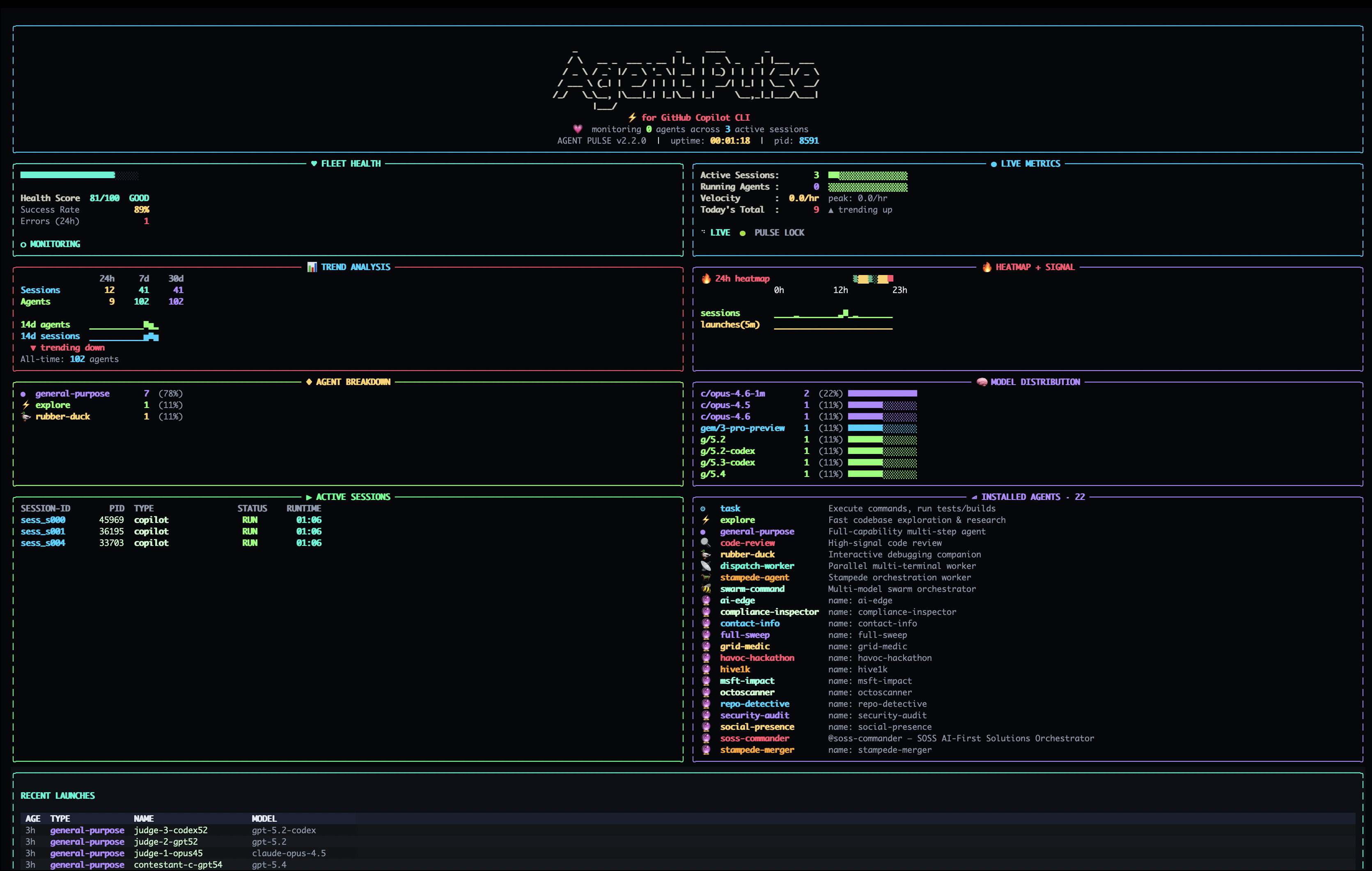
Agent Pulse makes Agent Orchestra observable while it runs:
| What you see live | Why it matters |
|---|---|
| Commander status | Know which commander groups are running, partial, failed, or complete |
| Sub-agent counts | Track live, completed, failed, and seen sub-agents without ledger spelunking |
| Terminal Stampede runs | See active `.stampede/run-*` work across repos |
| Telemetry confidence | Distinguish authoritative live counts from recent/historical events |
| Recent launches | Spot bursts, stuck runs, and platform-cap pressure |
Install it alongside Agent Orchestra:
```bash
curl -fsSL https://raw.githubusercontent.com/DUBSOpenHub/copilot-cli-agent-pulse/main/quickstart.sh | bash
agentpulse
```
---
## 🐝 Dogfooded at Swarm Scale
Agent Orchestra follows the same swarm-scale operating model that shaped Agent Conductor: visible commander groups, bounded sub-agent fan-out, collaboration ledgers, live dashboard telemetry, Shadow Score sealing, Fleet Scorecard run decisions, install flow checks, and repo-readiness validation.
Those signals come from local Stampede run artifacts and compatibility ledgers, so the system can be tested without adding a server, queue, or hosted control plane.
---
## 🤔 What Is This?
Agent Orchestra coordinates multiple commander-led agent groups against the same mission. Each commander gets its own namespace, bounded sub-agent hierarchy, collaboration bus access, and final bundle contract. The orchestrator then synthesizes the best findings from commander bundles, collaboration ledgers, live telemetry, sealed [Shadow Score](https://github.com/DUBSOpenHub/shadow-score-spec/blob/main/SPEC.md) results, and [Fleet Scorecard](https://github.com/DUBSOpenHub/fleet-scorecard-spec/blob/main/SPEC.md) run decisions.
```text
You
↓
Agent Orchestra
↓
Terminal Stampede commander panes
↓
Bounded sub-agent groups
↓
Collaboration bus + live telemetry
↓
Shadow Score + Fleet Scorecard + final synthesis
```
Use it for final release reviews, architecture audits, migration plans, repo-readiness passes, and high-stakes implementation design where one model answer is not enough.
---
## ⚡ Quick Start
### Install from GitHub
```bash
curl -fsSL https://raw.githubusercontent.com/DUBSOpenHub/agent-orchestra/main/quickstart.sh | bash
```
The quick installer:
1. Checks for required local tools.
2. Verifies `python3` and `git` are available.
3. Installs the Stampede launcher, monitor, Fleet Scorecard, and Agent Orchestra helper launcher to `~/bin/`.
4. Runs the local smoke gate.
5. Leaves the repo ready for Agent Pulse observability and fleet validation.
### Install from a local clone
```bash
git clone https://github.com/DUBSOpenHub/agent-orchestra.git
cd agent-orchestra
./install.sh
```
### Run
```text
agent conductor on ~/dev/my-repo : evaluate auth architecture and propose fixes
agent conductor premium max on ~/dev/my-repo : final release readiness review
agent conductor standard small on ~/dev/my-repo : review docs and onboarding gaps
agent-orchestra-pulse
```
Agent Orchestra uses the Agent Conductor command surface for fleet missions and Agent Pulse for live visibility.
---
## 🧭 Command Reference
| Command | Purpose |
|---|---|
| `agent conductor` | Ask only for missing mission/repo; default to Premium Max + Agent Pulse + Stampede monitor |
| `agent conductor on REPO : MISSION` | Launch with Premium Max + Agent Pulse + Stampede monitor |
| `agent conductor premium max on REPO : MISSION` | Launch 5 premium commander groups with Agent Pulse + Stampede monitor |
| `agent conductor standard small on REPO : MISSION` | Launch 5 standard-tier commander groups with Agent Pulse + Stampede monitor |
| `agent conductor status [RUN_ID]` | Show concise stats, results, and collaboration counts |
| `agent conductor teardown RUN_ID` | Stop the underlying Stampede tmux session |
| `agent-orchestra-pulse` | Open Agent Pulse against this repo's fleet telemetry |
| `bin/fleet-scorecard --repo . --run-id RUN_ID` | Regenerate a Fleet Scorecard for a completed run |
> Note: scale words like `small`, `standard`, and `max` affect tier/policy, not commander count.
> Agent Orchestra follows the same five-commander fleet contract.
---
## 📊 Live Stats
The Stampede monitor and [Agent Pulse](https://github.com/DUBSOpenHub/copilot-cli-agent-pulse) read `.stampede/{run_id}/orchestrator-commentary.json` for concise, dashboard-safe stats:
```text
cmd 3/5 active · sub-agents 112 running / 480 done / 620 seen · q 0 · claimed 3 · results 2/5
collab p5 r18 i11 c8 b7
commander-004 launching_workers · squads 32/50 · sub-agents 160/250 · run 42 done 118 fail 0
```
In chat, Agent Orchestra uses swarm-style commentary: a short phase banner, commander progress table, totals, and a clear decision line (`wait`, `stop`, `synthesize partial`, or `relaunch`). Startup failures are called out as `failed_startup` instead of being described as merely still running.
Agent Orchestra distinguishes:
- **Running now** — live commander, squad lead, and worker telemetry.
- **Seen** — historical sub-agent launches recorded in the compatibility ledger.
- **Completed/failed** — terminal outcomes from commander telemetry.
- **Partial** — incomplete launches or degraded runs that must not be called success.
> 📡 **Best real-time view:** keep **Agent Pulse** open beside **Agent Orchestra** so commander status, sub-agent counts, recent launches, and telemetry confidence stay visible while the run is active.
---
## 👻 Shadow Score
Agent Orchestra creates a sealed [Shadow Score](https://github.com/DUBSOpenHub/shadow-score-spec/blob/main/SPEC.md) envelope before launch. Commanders and sub-agents see only the seal hash, never the hidden criteria. The orchestrator verifies the seal and evaluates final bundles only after the run completes.
Shadow Score focuses on:
| Dimension | Question |
|---|---|
| Requirement coverage | Did the final synthesis answer the mission? |
| Collaboration quality | Did commanders review, improve, and adopt useful findings? |
| Evidence quality | Are claims backed by files, logs, tests, or ledgers? |
| Validation impact | Did the run improve measurable confidence? |
| Synthesis usefulness | Did it combine the best work instead of picking vibes? |
---
## 📋 Fleet Scorecard
Every run also gets a [Fleet Scorecard](https://github.com/DUBSOpenHub/fleet-scorecard-spec/blob/main/SPEC.md)
overlay. The launcher follows the Fleet Scorecard Spec by sealing a lightweight
four-question rubric before commanders start, then teardown verifies the seal and
writes `.fleet-scorecards/{run_id}/scorecard.md`.
Fleet Scorecard answers:
| Question | Purpose |
|---|---|
| What changed? | Captures repo diffs, artifacts, decisions, and useful knowledge |
| What won? | Names the best commander output, idea, or recommendation |
| What failed? | Preserves partials, missing bundles, weak evidence, and teardown caveats |
| Would I run it again? | Gives a clear rerun decision and next-run modification |
This is intentionally different from cost accounting. It is the final
human-readable judgment layer that turns many commander outputs into one
repeatable run decision.
Agent Orchestra is the first **FSS-L4 reference implementation**: run card,
sealed rubric, evidence index, automatic teardown emission, and source run link.
Regenerate a scorecard manually:
```bash
bin/fleet-scorecard --repo . --run-id run-YYYYMMDD-HHMMSS
```
---
## 🏗️ Project Structure
```text
agent-orchestra/
├── agent-pulse-current/ # Agent Pulse observability source
├── .fleet-scorecards/ # Ignored Fleet Scorecard overlays
├── run-artifacts/ # Local fleet run artifact corpus
├── skills/SKILL.md # Copilot CLI skill source
├── agents/ # Worker, commander, and merger agent definitions
├── schemas/ # Bundle and collaboration record schemas
├── bin/ # Terminal Stampede and Agent Orchestra launchers
├── tests/smoke.sh # Local smoke gate
├── install.sh # Local installer
├── quickstart.sh # One-command installer
├── scripts/activate-security.sh # Repository security activation helper
├── AGENTS.md # Contributor/agent guide
└── archived-workflows/root/workflows/ # CI and CodeQL workflow templates
```
---
## 🧪 Validate Locally
```bash
bash tests/smoke.sh
```
The smoke test checks shell syntax, hardened runtime markers, fleet metadata,
commander bundle/schema integrity, Fleet Scorecard generation, Agent Pulse
import/poll behavior, and workflow activation safety.
---
## 🤝 Contributing
See [CONTRIBUTING.md](CONTRIBUTING.md). The short version:
1. Keep the orchestration flow self-contained.
2. Preserve sealed Shadow Score isolation.
3. Preserve Fleet Scorecard seal verification and the four-question output.
4. Use **sub-agents** in user-facing language.
5. Keep live commentary concise.
6. Run `bash tests/smoke.sh` before opening a PR.
## License
MIT — see [LICENSE](LICENSE).
---
🐙 Created with 💜 by [@DUBSOpenHub](https://github.com/DUBSOpenHub) with the [GitHub Copilot CLI](https://docs.github.com/copilot/concepts/agents/about-copilot-cli).
Let's orchestrate! 🎼✨