https://github.com/dumbmachine/code-nov20-ratinkumar
https://github.com/dumbmachine/code-nov20-ratinkumar
Last synced: 8 months ago
JSON representation
- Host: GitHub
- URL: https://github.com/dumbmachine/code-nov20-ratinkumar
- Owner: DumbMachine
- Created: 2020-11-20T15:59:12.000Z (over 5 years ago)
- Default Branch: main
- Last Pushed: 2020-11-21T00:29:44.000Z (over 5 years ago)
- Last Synced: 2025-04-05T11:35:23.415Z (about 1 year ago)
- Language: Python
- Size: 18.6 KB
- Stars: 0
- Watchers: 0
- Forks: 0
- Open Issues: 0
-
Metadata Files:
- Readme: README.md
Awesome Lists containing this project
README
# code-nov20-ratinkumar
This document will detail the choices and the solution
# Testing Criteria:
1. production-grade python program:
- [X] calculate BMI
- [X] get the "BMI Category" for each row/patient
- [X] get the "Heatlh risk" for each row/patient
- [X] Provided Solution Scalable? Immensly
2. overweight statistics check:
- [X] number of overweight (manually checked): Only 1 (`29.4` is the one that is Overweight)
- [X] Cross-check if the same value is obtained by the program.
```bash
# to run the this test:
❯ cd server
❯ uvicorn main:app --reload
# making the request to server with the given data
❯ curl -X POST "http://127.0.0.1:8000/native" -H "accept: application/json" -H "Content-Type: application/x-www-form-urlencoded" -d "items=[{\"Gender\":\"Male\",\"HeightCm\":171,\"WeightKg\":96},{\"Gender\":\"Male\",\"HeightCm\":161,\"WeightKg\":85},{\"Gender\":\"Male\",\"HeightCm\":180,\"WeightKg\":77},{\"Gender\":\"Female\",\"HeightCm\":166,\"WeightKg\":62},{\"Gender\":\"Female\",\"HeightCm\":150,\"WeightKg\":70},{\"Gender\":\"Female\",\"HeightCm\":167,\"WeightKg\":82}]"
```

3. Automate setup, build, package:
- [X] The Python package installable via the setup.py or importing by copying the files.
- [X] I have also added a automated pipeline for hosting the service ( from the `server` folder directly on the heroku server ) with the `Procfile`.
- [X] Tests? All the functions used in this program are tested for ( find the tests in the `tests` folder ), using `pytest`.
```bash
❯ bash run_test.sh
```
- [X] To run the code as a serverless `AWS Lambda Function`, one would only have to zip the `utils.py` file and upload it to the `AWS console`.
# Getting the BMI
Extracting the BMI information (and the other columns that include the "BMI Category" and "Health Risk"),
inlvolve arithmetics among the given columns of each row and then application of conditionals.
The following 2 methods can be employed here:
1. Simple Native Python Loops over Data:
Simple loop over each data point in the given sample and calculate the required information.
Advantage of this approach? Easy to implement. This implementation is coded as the functions `parse_bmi_native`, where the `native`
key is indictaive of the usage of native python loops.
Disadvantage of this approach? Usage of native loops, since solution involves arithmetic ops usage of `numpy` makes alot of sense.
2. Numpy Vectorization of the Problem
Using the in-built numpy ops to perform rowise operation would mean that the problem is effectively vectorized and would enjoy the benefits of years and years of matrix optimizations.
To put the speed difference in perspective look that the below screenshot:
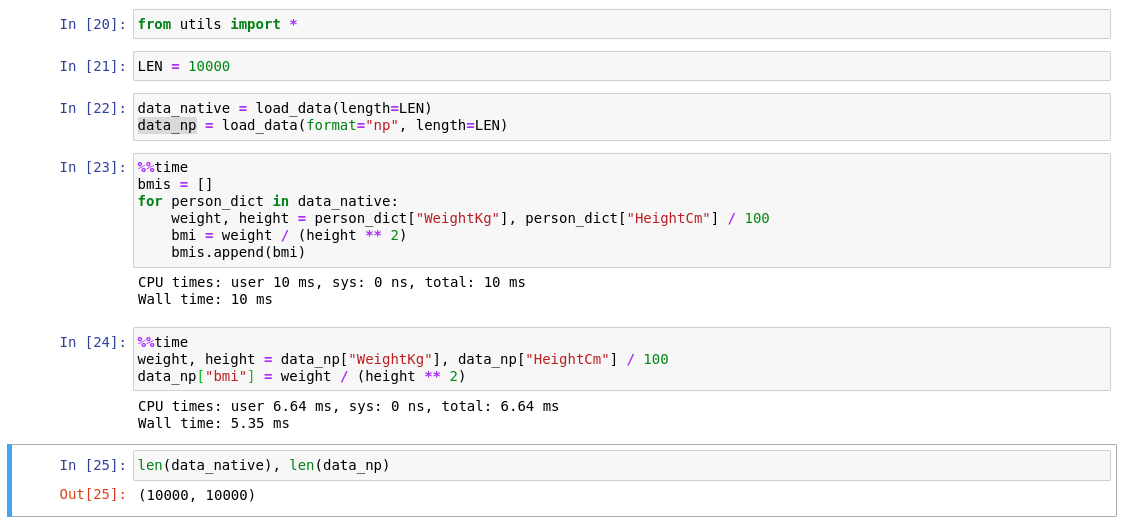
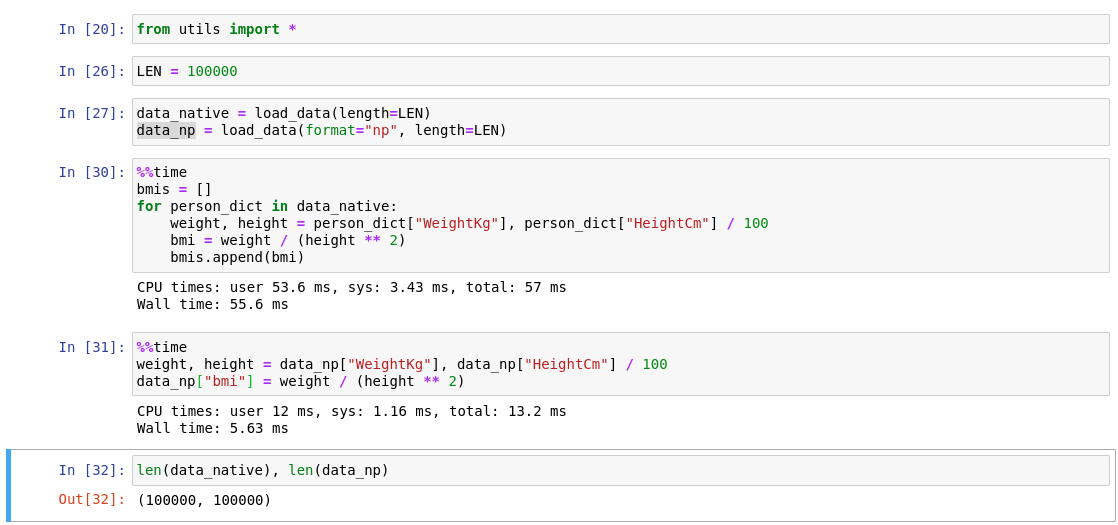
Though the performance benefits gained from the a arithmetic ops boost is downsided by the requirement that each row also has to have the
"BMI Category" and "Health Risk" computed as well. But even then for most uses cases, where the input data is large (>100K records) use of numpy is more faster and scalble.
As expected: the numpy method surpases the native loops method when the input size is large:
```bash
❯ bash run_bench.sh
Time taken by native python loop: 1.8524301052093506
Time taken by numpy matrix: 1.5414109230041504
Numpy is faster than native loops by: 1.2017756443551313
```
As expected: the numpy method surpases the native loops method when the input size is small:
```bash
# Here numpy is much slower
❯ python perf_test.py 1000
Time taken by native python loop: 0.0016388893127441406
Time taken by numpy matrix: 0.02517867088317871
Numpy is faster than native loops by: 0.06509038226632705
```
The slowness is due to the added overhead of traversing each element of the numpy array (for getting the BMI Category and Health risk) when the total elements are itself low.
# How to use the code?
For on-premise environments, two options are available as the scalable options to deploy this "product" that calculates BMI.
1. REST-LIKE Interface:
Use of server to open an endpoint that would take input as the data (like the given `dict`) and after performing the tasks return the data back to either be used elsewhere to stored in a datalake.
This would be usefull when thinking of this product as a SAS product. Providing API for it's users to calculate BMI.
2. Python-Package:
Call the function directly from another service by importing the processor functions. This would make sense in a in-house setting.
For cloud-like environment:
Since this program solves a single problem it can easily be hosted in serverless manner. Making use of an AWS Lambda function or Cloud function from the GCP are a good possible solutions