https://github.com/dupontcyborg/zpickle
Drop-in pickle replacement with transparent compression - smaller files, same API
https://github.com/dupontcyborg/zpickle
bz2 compress compression decompress gzip lz4 lzma pickle python xz zlib zstd
Last synced: 3 months ago
JSON representation
Drop-in pickle replacement with transparent compression - smaller files, same API
- Host: GitHub
- URL: https://github.com/dupontcyborg/zpickle
- Owner: dupontcyborg
- License: mit
- Created: 2025-03-15T00:33:28.000Z (about 1 year ago)
- Default Branch: main
- Last Pushed: 2025-12-06T18:25:36.000Z (6 months ago)
- Last Synced: 2025-12-08T01:58:52.064Z (6 months ago)
- Topics: bz2, compress, compression, decompress, gzip, lz4, lzma, pickle, python, xz, zlib, zstd
- Language: Python
- Homepage:
- Size: 594 KB
- Stars: 1
- Watchers: 1
- Forks: 0
- Open Issues: 0
-
Metadata Files:
- Readme: README.md
- License: LICENSE
- Codeowners: CODEOWNERS
Awesome Lists containing this project
README
# zpickle






**Transparent, drop-in compression for Python's pickle — smaller files, same API.**
[`zpickle`](https://pypi.org/project/zpickle/) adds high-performance compression to your serialized Python objects using multiple state-of-the-art algorithms without changing how you work with pickle.
```python
# Replace this:
import pickle
# With this:
import zpickle as pickle
# Everything else stays the same!
```
## Features
- **Drop-in replacement** for the standard `pickle` module
- **Transparent compression** — everything happens automatically
- **Multiple algorithms** — choose `zstd`, `brotli`, `zlib`, `lzma`, `bzip2`, or `lz4` (powered by [`compress_utils`](https://github.com/dupontcyborg/compress-utils))
- **Configure once, use everywhere** — set global defaults for your entire app
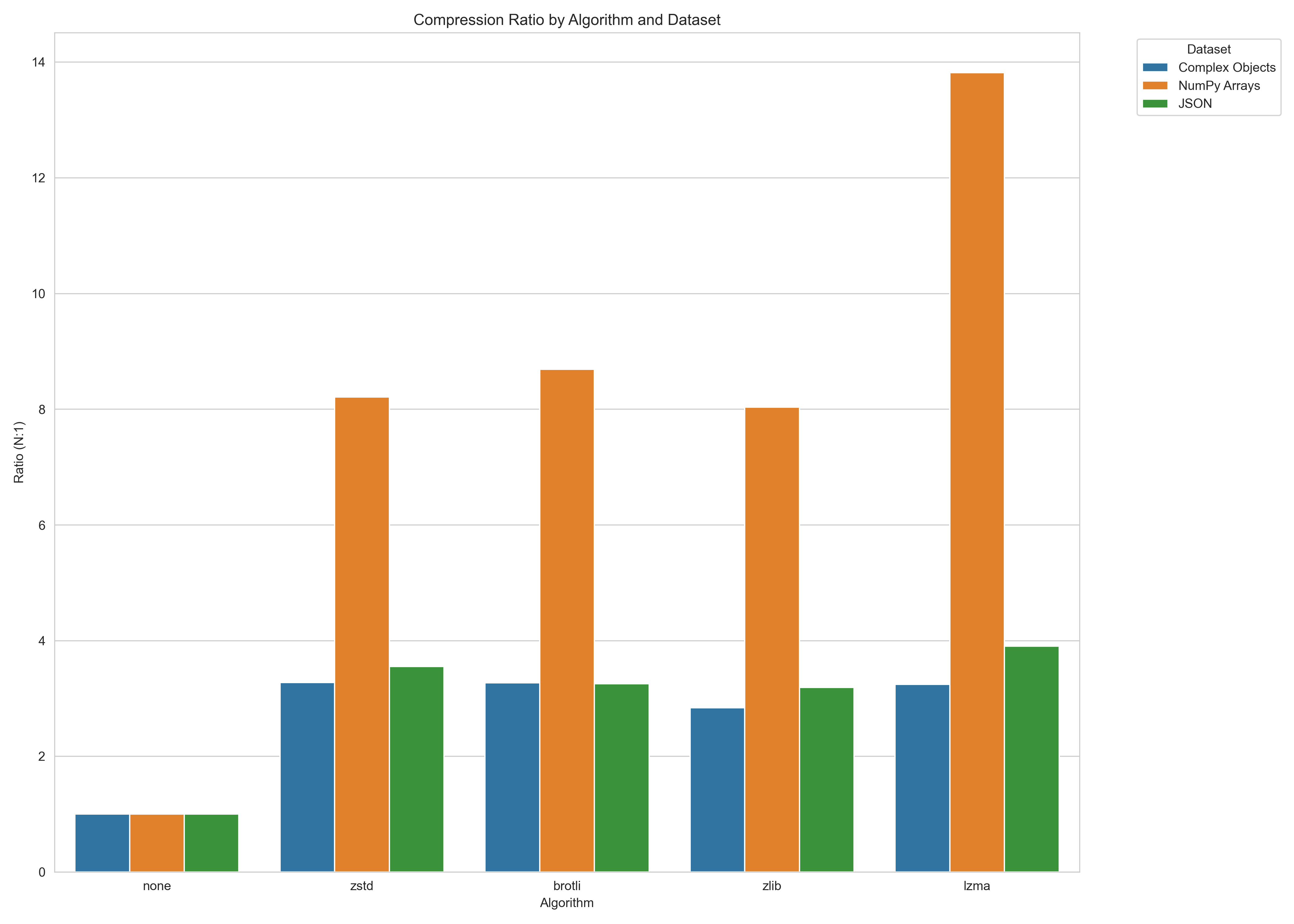
- **Smaller data** — 2-10× smaller serialized data (depending on content and algorithm)
- **Backward compatible** — automatically reads both compressed and regular pickle data
- **Complete API compatibility** — all pickle functions work as expected
## Installation
```bash
pip install zpickle
```
## Quick Start
### Basic Usage
```python
import zpickle as pickle
# Serializing works exactly like pickle
data = {"complex": ["nested", {"data": "structure"}], "with": "lots of repetition"}
serialized = pickle.dumps(data) # Automatically compressed!
# Deserializing works the same way
restored = pickle.loads(serialized) # Automatically decompressed!
# File operations work too
with open("data.zpkl", "wb") as f:
pickle.dump(data, f)
with open("data.zpkl", "rb") as f:
restored = pickle.load(f)
```
### Custom Configuration
```python
import zpickle
# Configure global settings
zpickle.configure(algorithm='brotli', level=9) # Higher compression
# Or configure for a single operation
data = [1, 2, 3] * 1000
compressed = zpickle.dumps(data, algorithm='zstd', level=6)
```
## Performance
Compression ratios versus standard `pickle` (higher is better):
Serialization speed (MB/s, higher is better):
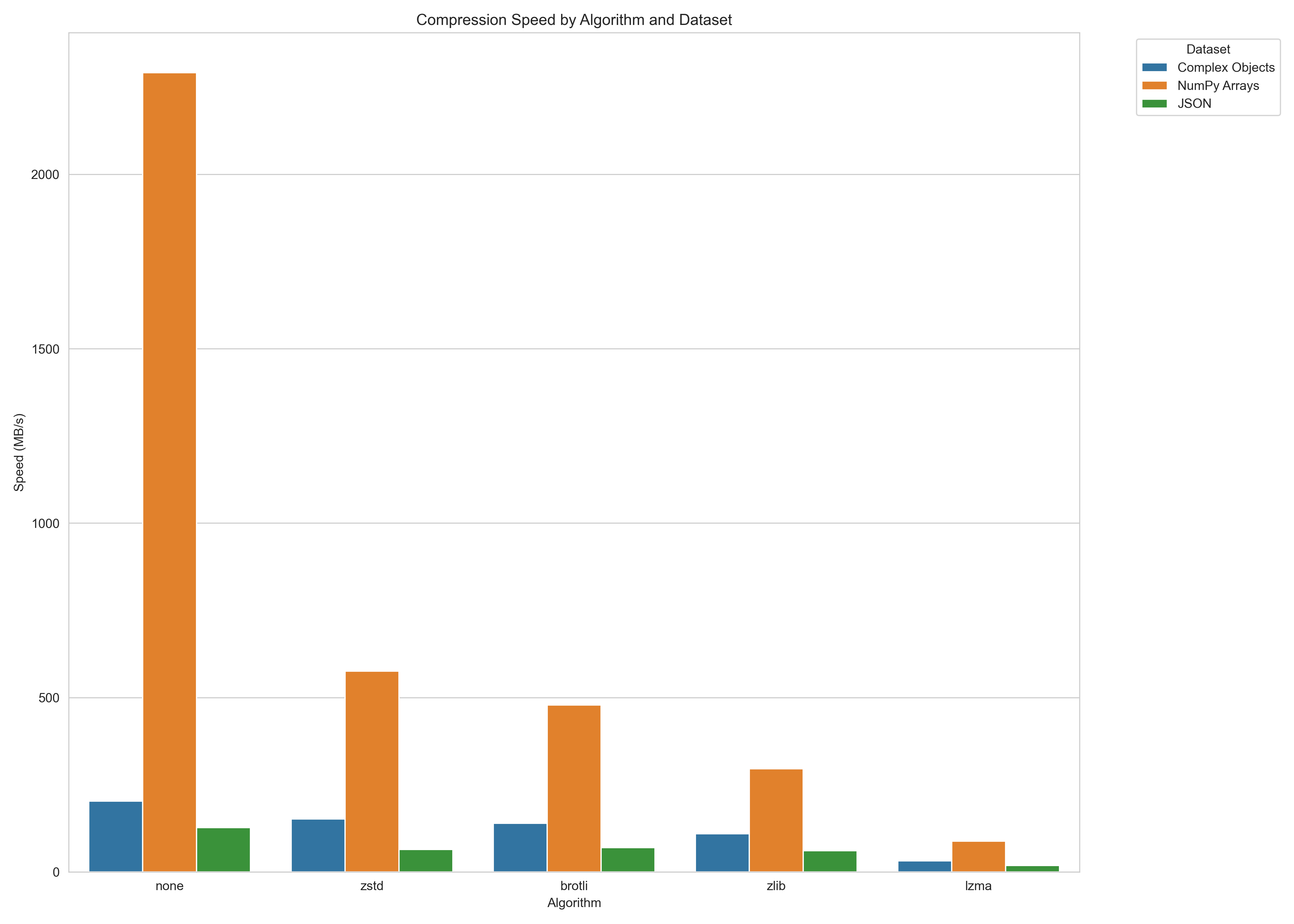
*Note: Performance varies by data characteristics. Run benchmarks on your specific data for accurate results.*
To run your own benchmarks, you can use:
```bash
python -m benchmarks.benchmark
```
## How It Works
`zpickle` applies compression with minimal overhead:
1. Objects are first serialized using standard pickle
2. The pickle data is compressed using the selected algorithm
3. A small header (8 bytes) is added to identify the format and algorithm
4. When deserializing, `zpickle` auto-detects the format and decompresses if needed
## API Reference
`zpickle` maintains complete API compatibility with the standard pickle module:
### Core Functions
- `dumps(obj, protocol=None, ..., algorithm=None, level=None)` - Serialize and compress object
- `loads(data, ...)` - Deserialize and decompress object
- `dump(obj, file, protocol=None, ..., algorithm=None, level=None)` - Serialize to file
- `load(file, ...)` - Deserialize from file
### Configuration
- `configure(algorithm=None, level=None, min_size=None)` - Set global defaults
- `get_config()` - Get current configuration
### Classes
- `Pickler(file, ...)` - Subclass of pickle.Pickler with compression
- `Unpickler(file, ...)` - Subclass of pickle.Unpickler with decompression
## Alternatives
- **Standard `pickle`**: No compression, but native to Python
- **`compressed_pickle`**: Similar concept, but less configurable
- **`joblib`**: More focused on large NumPy arrays and parallel processing
- **`msgpack`, `protobuf`**: Different serialization formats (not pickle-compatible)
## License
This project is distributed under the MIT License. [Read more >](LICENSE)
## Links
- [GitHub Repository](https://github.com/dupontcyborg/zpickle)
- [PyPI Package](https://pypi.org/project/zpickle/)
- [Issue Tracker](https://github.com/dupontcyborg/zpickle/issues)
- [compress-utils](https://github.com/dupontcyborg/compress-utils) - The underlying compression library