https://github.com/dutchcodingcompany/filament-developer-logins
This plugin allows you to enable one-click logins for your local Filament panels, which is useful when developing a Filament project with multiple users and various roles.
https://github.com/dutchcodingcompany/filament-developer-logins
Last synced: about 1 year ago
JSON representation
This plugin allows you to enable one-click logins for your local Filament panels, which is useful when developing a Filament project with multiple users and various roles.
- Host: GitHub
- URL: https://github.com/dutchcodingcompany/filament-developer-logins
- Owner: DutchCodingCompany
- License: mit
- Created: 2024-04-25T12:24:30.000Z (about 2 years ago)
- Default Branch: main
- Last Pushed: 2025-02-26T19:30:44.000Z (over 1 year ago)
- Last Synced: 2025-03-28T23:03:42.608Z (about 1 year ago)
- Language: PHP
- Homepage:
- Size: 195 KB
- Stars: 43
- Watchers: 2
- Forks: 12
- Open Issues: 2
-
Metadata Files:
- Readme: README.md
- Changelog: CHANGELOG.md
- Contributing: CONTRIBUTING.md
- License: LICENSE.md
- Security: SECURITY.md
Awesome Lists containing this project
README
# Filament Developer Logins
[](https://packagist.org/packages/dutchcodingcompany/filament-developer-logins)
[](https://github.com/dutchcodingcompany/filament-developer-logins/actions?query=workflow%3Arun-test+branch%3Amain)
[](https://github.com/dutchcodingcompany/filament-developer-logins/actions?query=workflow%3A"Fix+PHP+code+styling"+branch%3Amain)
[](https://packagist.org/packages/dutchcodingcompany/filament-developer-logins)
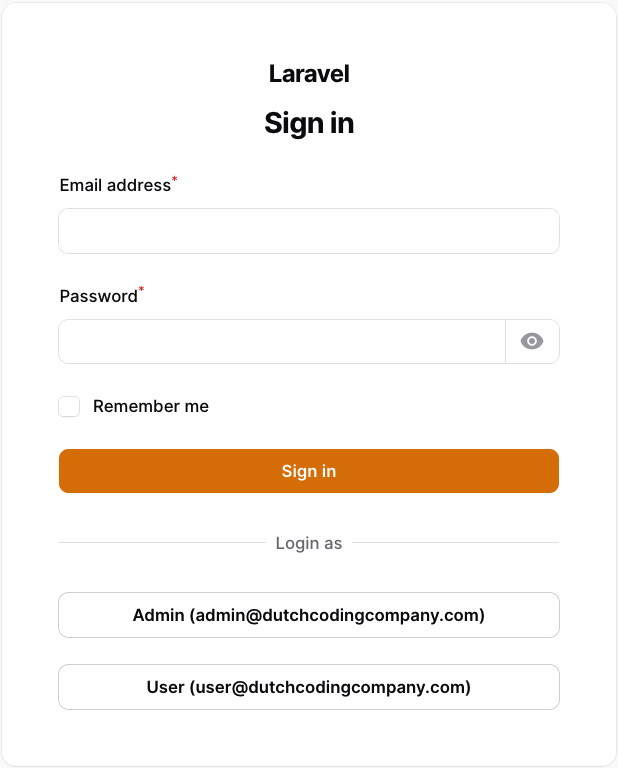
This plugin allows you to enable one-click logins for your local Filament panels, which is useful when developing a Filament project with multiple users and various roles.
## Installation
You can install the package via composer.
```bash
composer require dutchcodingcompany/filament-developer-logins
```
## Usage
Register the plugin in the Filament panel provider (the default file is `app/Providers/Filament/AdminPanelProvider.php`).
In the `users` method you can define the users (note: the users must exist), the key is used as a label on the login button and the value is used to search the user in the database.
```php
// ...
->plugins([
FilamentDeveloperLoginsPlugin::make()
->enabled()
->users([
'Admin' => 'admin@example.com',
'User' => 'user@example.com',
])
]);
```
The users() method can also be passed a closure to compute the users list at render time, for example from the database.
```php
// ...
FilamentDeveloperLoginsPlugin::make()
->users(fn () => User::pluck('email', 'name')->toArray())
]);
```
## Customization
### enabled()
By default, the plugin is disabled. You can enable it by calling the enabled() method. I strongly suggest enabling
this plugin only in the local environment. You can achieve this by using the app()->environment() method. Additionally,
the enabled() method also accepts a closure if you wish to enable the plugin based on a custom condition.
Example:
```php
// ...
FilamentDeveloperLoginsPlugin::make()
->enabled(app()->environment('local'))
```
### columns()
To customize the grid layout, you can use the columns() method. This method allows you to configure the grid layout based on your needs.
By default, the columns() method sets the grid to 2 columns. You can adjust the default column count or specify different column counts for different screen sizes by passing an array.
Example:
```php
// ...
FilamentDeveloperLoginsPlugin::make()
->columns() // default 2
```
or you can use an array like this
```php
// ...
FilamentDeveloperLoginsPlugin::make()
->columns([
'sm' => 3,
'xl' => 6,
'2xl' => 8,
])
```
### switchable()
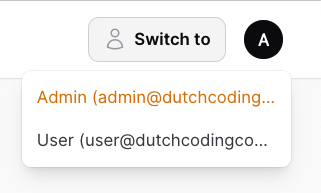
By default, a "Switch to" button is shown in the top right corner of the screen, so you can easily switch between the provided users.
If you want to disable this feature, you can use the switchable() method.
```php
// ...
FilamentDeveloperLoginsPlugin::make()
->switchable(false) // This also accepts a closure.
```
### column()
By default, the user column is set to `email`. If you want to use a different column, you can use the column() method.
Example:
```php
FilamentDeveloperLoginsPlugin::make()
->column('name')
```
### modelClass()
By default, the model class is set to `App\Models\User`. If you want to use a different model, you can use the modelClass() method.
Example:
```php
FilamentDeveloperLoginsPlugin::make()
->modelClass(Admin::class)
```
### redirectTo()
By default, the user will be redirected using the `Filament::getUrl()` method, which directs them to the dashboard. In the case of multi-tenancy, the user will also be redirected to the correct tenant. If you prefer to use a different url, you can utilize the redirectTo() method.
```php
FilamentDeveloperLoginsPlugin::make()
->redirectTo('/custom-url')
```
Since the routes are not yet registered when the plugin is created, you need to use a closure to redirect to a named route.
```php
FilamentDeveloperLoginsPlugin::make()
->redirectTo(fn () => route('custom.route'))
```
## Testing
```bash
composer test
```
## Changelog
Please see [CHANGELOG](CHANGELOG.md) for more information on what has changed recently.
## Contributing
Please see [CONTRIBUTING](CONTRIBUTING.md) for details.
## Security Vulnerabilities
Please review [our security policy](../../security/policy) on how to report security vulnerabilities.
## Credits
- [Bram Raaijmakers](https://github.com/bramr94)
- [All Contributors](../../contributors)
## License
The MIT License (MIT). Please see [License File](LICENSE.md) for more information.