https://github.com/dvelasquez/lighthouse-plugin-crux
A Lighthouse plugin that gathers field data from the Chrome User eXperience Report
https://github.com/dvelasquez/lighthouse-plugin-crux
crux lighthouse lighthouse-plugin real-user-monitoring score typescript
Last synced: about 1 year ago
JSON representation
A Lighthouse plugin that gathers field data from the Chrome User eXperience Report
- Host: GitHub
- URL: https://github.com/dvelasquez/lighthouse-plugin-crux
- Owner: dvelasquez
- License: mit
- Created: 2020-12-18T07:07:00.000Z (over 5 years ago)
- Default Branch: master
- Last Pushed: 2025-04-10T13:30:35.000Z (about 1 year ago)
- Last Synced: 2025-04-11T18:04:37.501Z (about 1 year ago)
- Topics: crux, lighthouse, lighthouse-plugin, real-user-monitoring, score, typescript
- Language: TypeScript
- Homepage:
- Size: 3.9 MB
- Stars: 17
- Watchers: 3
- Forks: 0
- Open Issues: 2
-
Metadata Files:
- Readme: README.md
- License: LICENSE
Awesome Lists containing this project
README
# lighthouse-plugin-crux
> A Lighthouse plugin that displays the field performance of your page.
> It uses real-world data from Chrome UX Report and Core Web Vitals to estimate the score.
[An example report for github.com/GoogleChrome/lighthouse](https://googlechrome.github.io/lighthouse/viewer/?gist=cb20232dcc7a8b4e93d63ae3b09ac47e):

This plugin adds Core Web Vitals values to your Lighthouse report. The CrUX Performance category includes real-user data
provided by [Chrome UX Report](https://developers.google.com/web/tools/chrome-user-experience-report/). It's similar to
the field section in [PageSpeed Insights](https://developers.google.com/speed/pagespeed/insights/) but it uses the Chrome
User Experience Report API instead of the PageSpeed Insights API. This API is faster than the PSI API since it doesn't
need run a full lighthouse run to give the results.
The scoring algorithm weighs values for Largest Contentful Paint (LCP), First Input Delay (FID), and Cumulative Layout
Shift (CLS) and picks a **minimum score**. It uses Core Web Vitals assessment that expects all its metrics to pass
thresholds. For example, https://edition.cnn.com/ has LCP 5.9 s (15), FID 20 ms (100), and CLS 0.02 (100). It has
`poor` mark in the [Search Console](https://support.google.com/webmasters/answer/9205520), and the score is 15.
(_Note_: FCP and the origin values do not affect the score, [see the source](./src/plugin.ts))
Check out the parity between Field & Lab performance on mobile:
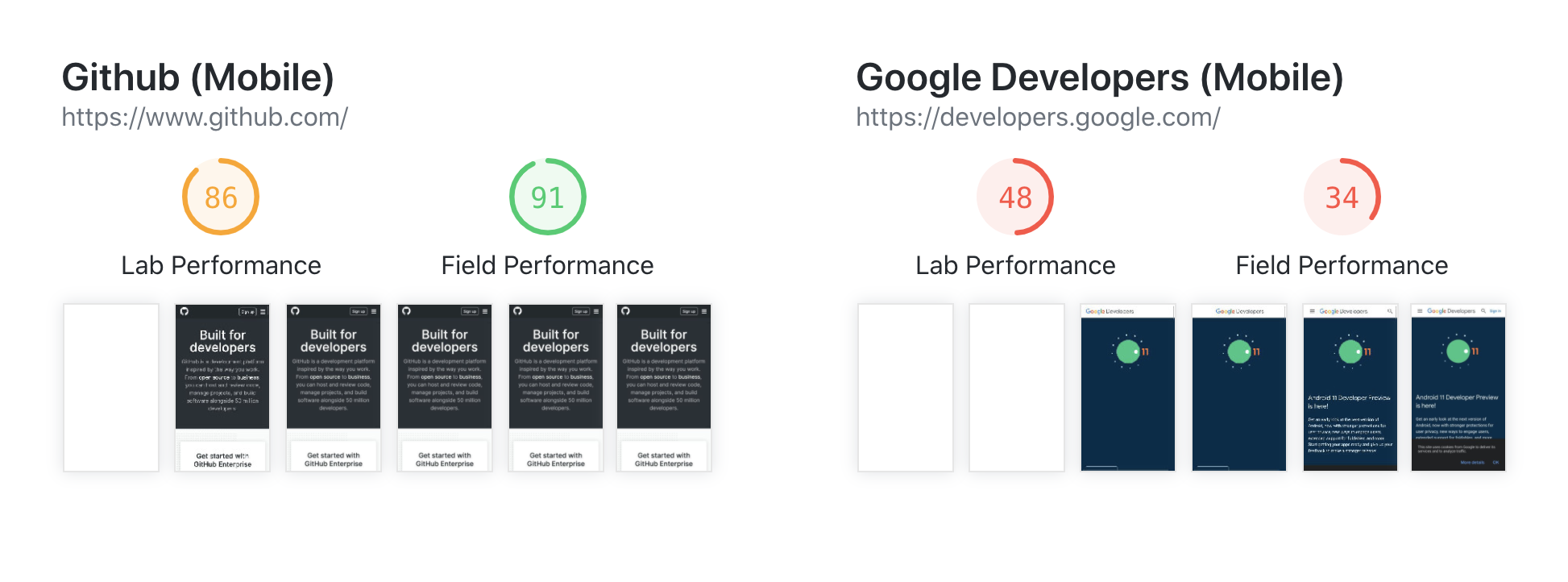
And on desktop:

Sometimes field data is missing because a URL doesn't have enough anonymous traffic. In this case, the lab data is the only available measurement.
## Install
Requires Node.js `20+` and Lighthouse `10+`.
```bash
$ npm install lighthouse lighthouse-plugin-crux
```
## Usage
Use the plugin with [Lighthouse CLI](https://github.com/GoogleChrome/lighthouse):
```bash
$ npx lighthouse https://www.apple.com/ --plugins=lighthouse-plugin-crux
```
If you are using the --only-categories option in the CLI, you need to add the `lighthouse-plugin-crux` category to it:
```bash
$ npx lighthouse https://www.apple.com/ --plugins=lighthouse-plugin-crux --only-categories=performance,lighthouse-plugin-crux
```
Provide your [Chrome User Experience Report token](https://developers.google.com/web/tools/chrome-user-experience-report/api/guides/getting-started) to run more requests (in production) with a custom config:
```bash
$ npx lighthouse https://www.apple.com/ --config-path=./config.js
```
`config.js`
```js
export default {
extends: 'lighthouse:default',
plugins: ['lighthouse-plugin-crux'],
settings: {
cruxToken: 'YOUR_REAL_TOKEN',
},
}
```
## Credits
Heavily based on the [lighthouse-plugin-field-data](https://github.com/treosh/lighthouse-plugin-field-performance)
[](https://npmjs.org/package/lighthouse-plugin-crux)
[](./LICENSE)