https://github.com/dwicao/react-native-login-screen
React Native Login Screen
https://github.com/dwicao/react-native-login-screen
login native react react-native screen
Last synced: over 1 year ago
JSON representation
React Native Login Screen
- Host: GitHub
- URL: https://github.com/dwicao/react-native-login-screen
- Owner: dwicao
- Created: 2016-12-29T02:32:07.000Z (over 9 years ago)
- Default Branch: master
- Last Pushed: 2023-01-25T14:05:06.000Z (over 3 years ago)
- Last Synced: 2024-12-18T19:03:16.312Z (over 1 year ago)
- Topics: login, native, react, react-native, screen
- Language: JavaScript
- Homepage:
- Size: 1.27 MB
- Stars: 511
- Watchers: 30
- Forks: 232
- Open Issues: 17
-
Metadata Files:
- Readme: README.md
Awesome Lists containing this project
README
# react-native-login-screen
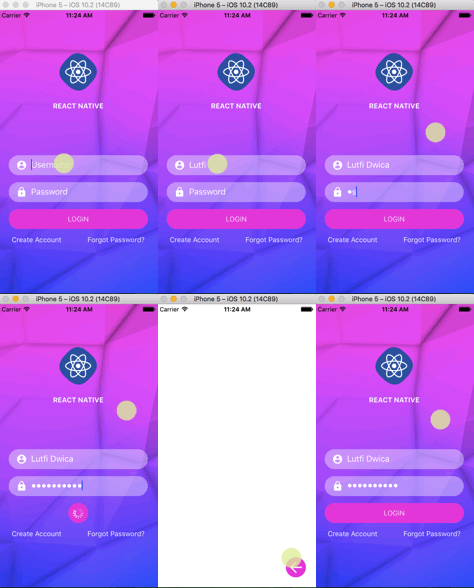
## Todo
- [x] ~~Make circle grow on Android more smooth~~
- [x] ~~Add animation on press back~~
- [x] ~~Add back button~~
- [x] ~~Fix circleGrow on Android~~
- [x] ~~Animated API~~
- [x] ~~Navigator (react-native-router-flux)~~
## Install at local
Open Terminal, then type command:
> git clone https://github.com/dwicao/react-native-login-screen.git
Go to project folder :
> cd react-native-login-screen
Type following command :
> npm install
You must have ANDROID_HOME environtment variable, to check if you already have, type in your terminal :
> echo $ANDROID_HOME
If blank, you can read at [HERE](https://goo.gl/XSBmwE)
Make sure you have already installed React Native globally by running this command :
> sudo npm install -g react-native-cli
At this point, you should be able to run the project.
To run your project on your device/emulator at Debug configuration, type :
> npm run android-dev
Or if you want to run at iOS simulator, run:
> npm run ios-dev
If you have error message like `Execution failed for task ':app:dexDebug'.` run this on your terminal :
> npm run android-clean
To build .apk file just type :
> npm run android-release
You must sign .apk with keystore, to do this just type in your terminal :
> npm run android-signer
The .apk file is located at `react-native-login-screen/android/app/build/outputs/apk/app-release-unsigned.apk`
## Available Command
| npm run ... | Description |
| --- | --- |
| adb-reverse | Reset port ADB to tcp:8081 |
| ios-dev| Run iOS project with Simulator set to "iPhone 5" |
| ios-bundle | Bundle with entry file index.ios.js |
| ios-build | Run ios project with “Release” configuration |
| android-clean | Fix building android if preDexDebug error |
| android-build-debug | Build android .apk with “Debug” configuration |
| android-release | Build android .apk with “Release” configuration |
| android-signkey | Generate keystore android |
| android-signer | To sign app-release-unsigned.apk with random keystore |
| android-dev | Run android development-mode on simulator |
| android-bundle | Bundle with entry file index.android.js |
## License
MIT