https://github.com/dy/settings-panel
Control panel for app, demo or tests
https://github.com/dy/settings-panel
Last synced: 9 months ago
JSON representation
Control panel for app, demo or tests
- Host: GitHub
- URL: https://github.com/dy/settings-panel
- Owner: dy
- License: mit
- Created: 2016-07-10T19:19:59.000Z (almost 10 years ago)
- Default Branch: master
- Last Pushed: 2023-03-01T15:17:19.000Z (over 3 years ago)
- Last Synced: 2024-12-28T06:41:39.956Z (over 1 year ago)
- Language: JavaScript
- Homepage: https://dy.github.io/settings-panel/
- Size: 7.85 MB
- Stars: 71
- Watchers: 6
- Forks: 3
- Open Issues: 15
-
Metadata Files:
- Readme: README.md
- License: LICENSE
Awesome Lists containing this project
README
# settings-panel [](http://github.com/badges/stability-badges)
Simple settings panel for your app, demo or tests.
[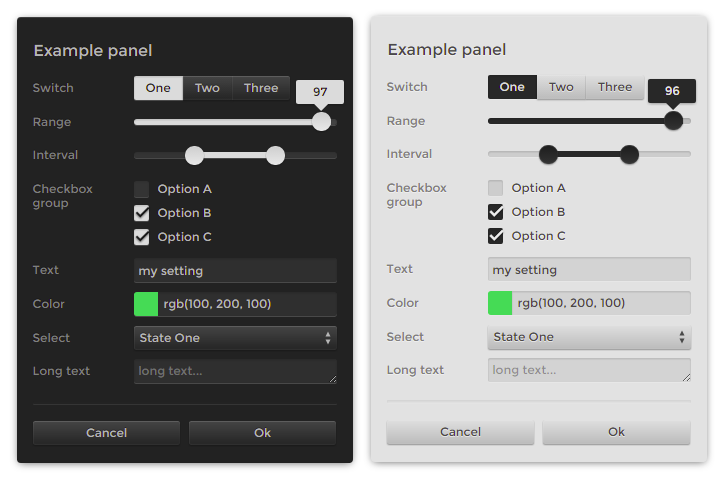](http://dy.github.io/settings-panel/)
In the preview there is a _typer_ theme, for other themes or customizations see [demo](http://dy.github.io/settings-panel/).
## Usage
[](https://npmjs.org/package/settings-panel/)
```javascript
var createPanel = require('settings-panel')
var panel = createPanel([
{type: 'range', label: 'my range', min: 0, max: 100, value: 20},
{type: 'range', label: 'log range', min: 0.1, max: 100, value: 20, scale: 'log'},
{type: 'text', label: 'my text', value: 'my cool setting', help: 'why this is cool'},
{type: 'checkbox', label: 'my checkbox', value: true},
{type: 'color', label: 'my color', format: 'rgb', value: 'rgb(10,200,0)', change: value => console.log(value)},
{type: 'button', label: 'gimme an alert', change: () => alert('hello!')},
{type: 'select', label: 'select one', options: ['option 1', 'option 2'], value: 'option 1'}
],
{
title: 'Settings',
style: 'position: absolute; right: 0; z-index: 1'
}
);
```
[**Run this in requirebin**](http://requirebin.com/?gist=21fc39f7f206ca50a4d5cd7298f8b9f8)
## API
`const Panel = require('settings-panel')`
**`let panel = new Panel(fields, options?)`**
The first argument is a list of fields or object with id/field pairs. Each field may have following properties:
* `type` one of `range` • `interval` • `checkbox` • `color` • `select` • `switch` • `raw` • `textarea` • `text` or any `` type. If undefined, type will be detected from the value.
* `id` used as key to identify the field. If undefined, the label will be used instead.
* `label` label for the input. If label is false, it will be hidden.
* `value` current value of the field.
* `default` explicitly defines default value, if differs from the initial value.
* `orientation` defines position of a label relative to the input, one of `top`, `left`, `right`, `bottom`. Redefines `options.orientation`.
* `style` appends additinal style to the field, can be a css object or css string.
* `hidden` defines whether field should be visually hidden, but present as a value.
* `disabled` just disables the input, making it inactive.
* `input` callback, invoked if value changed.
* `init` invoked once component is set up.
* `change` invoked each time the field value changed, whether through `input` or API.
* `before` and `after` define an html to display before or after the element, can be a string, an element or a function returning one of the two. That may come handy in displaying help, info or validation messages, separators, additional buttons, range limits etc - anything related to the element.
* `title` will display text in tooltip.
For example,
```javascript
{type: 'checkbox', label: 'My Checkbox', value: true, input: value => {}}
```
Some types have additional properties:
- `range` can specify a `min`, `max`, and `step` (or integer `steps`). Scale can be either `'linear'` (default) or `'log'`. If a log scale, the sign of `min`, `max`, and `value` must be the same and only `steps` is permitted (since the step size is not constant on a log scale). It also takes `precision` optional parameter for the displayed value.
- `interval` obeys the same semantics as `range` inputs, except the input and ouput is a two-element array corresponding to the low/high bounds, e.g. `value: [1, 7.5]`.
- `color` can specify a `format` as either `rgb` • `hex` • `array`
- `select`, `switch` and `checkbox` can specify `options`, either as an `Array` (in which case the value is the same as the option text) or as an object containing key/value pairs (in which case the key/value pair maps to value value/label pairs).
- `text` and `textarea` can specify `placeholder`.
- `raw` can define `content` method, returning HTML string, element or documentFragment.
#### options
```js
// element to which to append the panel
container: document.body,
// a title to add to the top of the panel
title: 'Settings',
// specifies label position relative to the input: `top` • `left` • `bottom` • `right`
orientation: 'left',
// collapse by clicking on title
collapsible: false,
// use a theme, see `theme` folder.
// available themes: typer, flat, control, dragon
theme: require('settings-panel/theme/none'),
//theme customization, can redefine theme defaults
palette: ['black', 'white'],
labelWidth: '9em',
inputHeight: '1.6em',
fontFamily: 'sans-serif',
fontSize: 13,
//additional css, aside from the theme’s one. Useful for custom styling
css: '',
//appends additional className to the panel element.
className: ''
```
**`panel.on(event, callback)`**
Attach callback to `change`, `input` or `init` event.
The callback will recieve `name`, `data` and `state` arguments:
```javascript
panel.on('change', (name, value, state) => {
// name === 'my checkbox'
// value === false
// state === {'my checkbox': false, 'my range': 75, ...}
});
```
**`panel.get(name?)`**
Get the value of a field defined by `name`. Or get full list of values, if `name` is undefined.
**`panel.set(name, value|options)`**
Update specific field, with value or field options. You can also pass an object or array to update multiple fields:
```js
panel.set({ 'my range': { min: -100, value: 200}, 'my color': '#fff' });
```
**`panel.update(options?)`**
Rerender panel with new options. Options may include values for the theme, like `palette`, `fontSize`, `fontFamily`, `labelWidth`, `padding` etc, see specific theme file for possible options.
## Spotted in the wild
> [plot-grid](https://dy.github.io/plot-grid)
> [app-audio](https://dy.github.io/app-audio)
> [gl-waveform](https://dy.github.io/gl-waveform)
## See also
> [control-panel](https://github.com/freeman-lab/control-panel) — original forked settings panel.
> [oui](https://github.com/wearekuva/oui) — sci-ish panel.
> [dat.gui](https://github.com/dataarts/dat.gui) — other oldschool settings panel.
> [quicksettings](https://github.com/bit101/quicksettings) — an alternative versatile settings panel.
> [dis-gui](https://github.com/wwwtyro/dis-gui) — remake on dat.gui.