https://github.com/dzimchuk/experimental-tools
A bunch of quality refactorings and code fixes that are going to improve your C# development experience in Visual Studio and remove some common pain.
https://github.com/dzimchuk/experimental-tools
refactorings roslyn visual-studio visual-studio-extension
Last synced: about 1 year ago
JSON representation
A bunch of quality refactorings and code fixes that are going to improve your C# development experience in Visual Studio and remove some common pain.
- Host: GitHub
- URL: https://github.com/dzimchuk/experimental-tools
- Owner: dzimchuk
- License: mit
- Created: 2016-08-15T17:42:14.000Z (almost 10 years ago)
- Default Branch: master
- Last Pushed: 2021-11-16T09:17:23.000Z (over 4 years ago)
- Last Synced: 2025-04-06T02:07:05.532Z (about 1 year ago)
- Topics: refactorings, roslyn, visual-studio, visual-studio-extension
- Language: C#
- Homepage:
- Size: 669 KB
- Stars: 23
- Watchers: 2
- Forks: 6
- Open Issues: 1
-
Metadata Files:
- Readme: README.md
- Changelog: CHANGELOG.md
- Contributing: CONTRIBUTING.md
- License: LICENSE
Awesome Lists containing this project
README
# Experimental Tools
[](https://ci.appveyor.com/project/dzimchuk/experimental-tools)
Download this extension from the [VS Marketplace](https://marketplace.visualstudio.com/items?itemName=AndreiDzimchuk.ExperimentalTools64bit)
or get the [CI build](http://www.vsixgallery.com/extension/4ea21f37-c749-42cc-9e24-7dfc4d26fca5/).
---------------------------------------
A bunch of quality refactorings and code fixes that are going to improve your C# development experience in Visual Studio and remove some common pain.
See the [change log](https://github.com/dzimchuk/experimental-tools/blob/master/CHANGELOG.md) for changes and road map.
### Note
As Visual Studio evolves more features get added to it and some of them start duplicating features from this extension. Duplicate features are disabled/removed from this extension to insure the best user experience possible with a given version of Visual Studio. A list of such features is provided near the end of this document.
## Features
- Add/Remove braces
- Change access modifier on type declarations
- Generate GUID (nguid)
- Initialize field in existing constructor
- Locate in Solution Explorer
- Make it a constructor (when copied from another class)
- Namespace vs file path analyzer
- Scaffold xunit data driven tests
- Settings page (ability to enable/disable individual features)
- Analyze if type name matches file name
### Add/Remove braces
Allows you to quickly add missing braces to single statements:
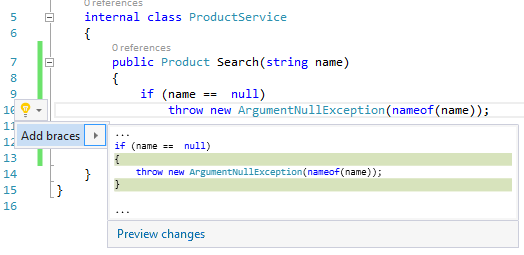
It works both ways and allows you to remove braces if you prefer so.
### Change access modifier on type declarations
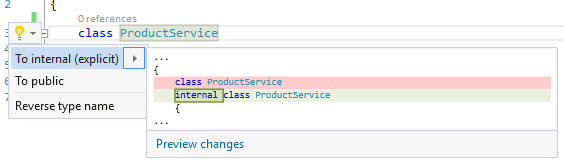
Ctrl+. on a type declaration (either top level or nested) and choose one of proposed options.
### Generate GUID (nguid)
Just type `nguid` where you want the new GUID to be inserted:
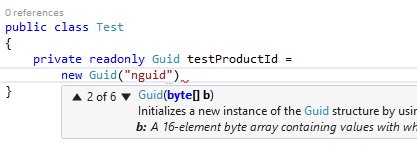
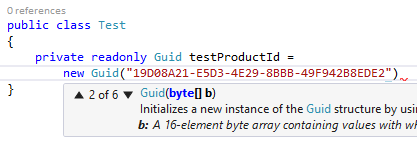
and press TAB:
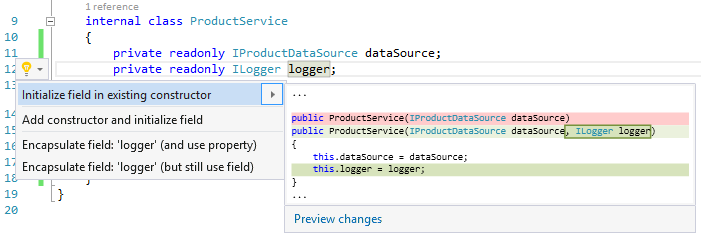
### Initialize field in existing constructor
Ctrl+. on a field and choose *Initialize field in existing constructor*.
### Locate in Solution Explorer
There is a standard command in Solution Explorer called 'Sync with Active Document'. People coming from ReSharper will appreciate its Shift+Alt+L equivalent. To avoid conflicts with some internal VS commands ALT+L key binding was chosen by default which can be changed in VS settings if needed.
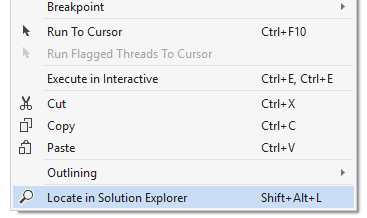
The command is available in the code editor either from the context menu or as a shortcut.
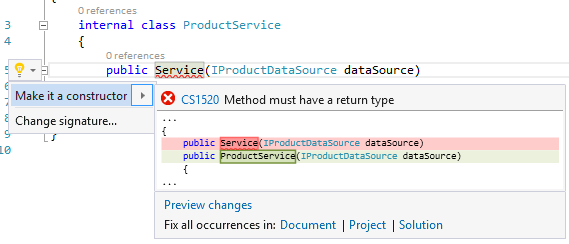
### Make it a constructor (when copied from another class)
Sometimes you copy code from another class into a new one and this quick fix allows you to update the constructor name.
### Namespace vs file path analyzer
Analyze if a top level namespace does not match the path of the file where it is declared or does not start with the project's default namespace.
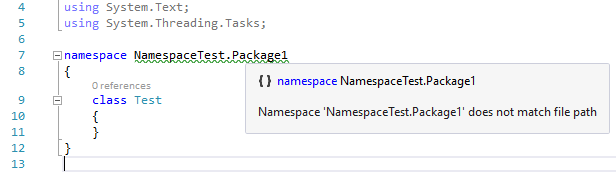
VS 2019 and above provide a corresponding code refactoring out of the box, hence only the analyzer part will remain enabled in this extension.
### Scaffold xunit data driven tests
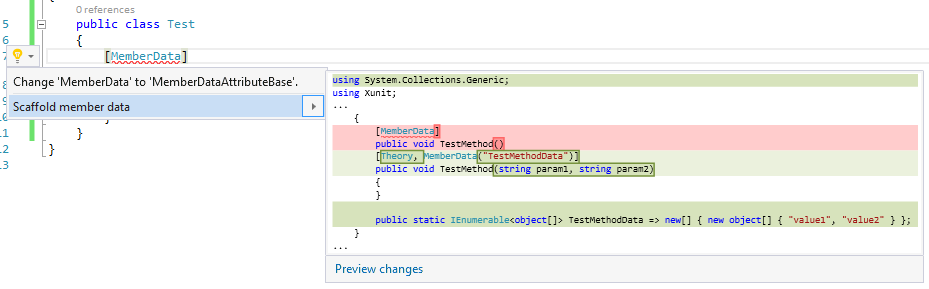
If you're a fan of Xunit data driven tests this one's going to be a little time saver for you. You can scaffold `MemberData`:
As well as `InlineData`:
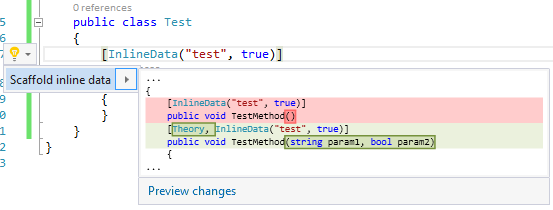
If your `InlineData` contains acceptable parameters they will be respected unless the test method already defines parameters (in which case neither of the scaffolding refactoring will work).
Note that this feature works with Xunit 2.x only.
### Settings page (ability to enable/disable individual features)
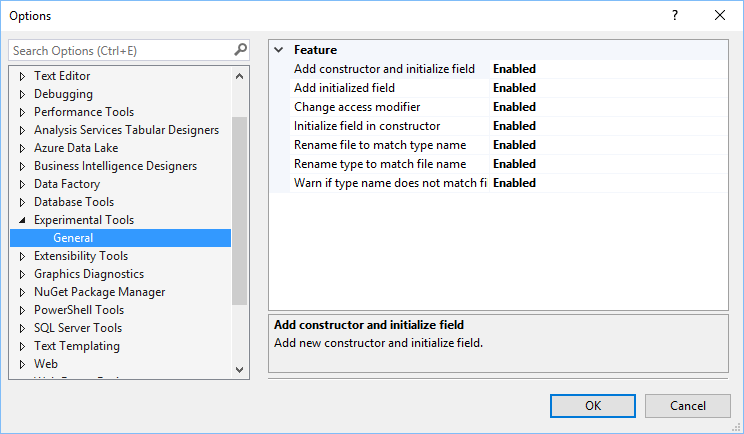
All features can be individually enabled or disabled.
### Analyze if type name matches file name
Analyzes if a top level type name matches the name of the file where it is declared and displays a warning if not.
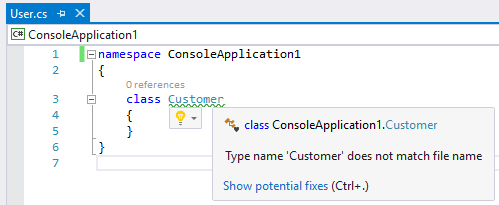
VS 2017 and above provide code refactorings to rename types and file names to match each other out of the box.
## Deactivated features
- Add constructor and initialize field (VS 2019 started to provide *Generate constructor ...* at some point)
- Field can be made readonly (VS 2017 version 15.7 and above provide a built-in analyzer and a code fix)
- Initialize field from constructor parameter (VS 2017 and above provide a similar refactoring out of the box)
- Namespace vs file path code fix (VS 2019 and above provide a corresponding code refactoring out of the box)
- Type name vs file name code fix (VS 2017 and above provide code refactorings to rename types and file names to match each other out of the box)
## Contribute
Check out the [contribution guidelines](https://github.com/dzimchuk/experimental-tools/blob/master/CONTRIBUTING.md)
if you want to contribute to this project.
## License
[MIT](https://github.com/dzimchuk/experimental-tools/blob/master/LICENSE)