https://github.com/eFaps/angular-onscreen-material-keyboard
Onscreen virtual keyboard for Angular ≥ 5 (https://angular.io/) using Angular Material (https://material.angular.io/).
https://github.com/eFaps/angular-onscreen-material-keyboard
Last synced: 6 months ago
JSON representation
Onscreen virtual keyboard for Angular ≥ 5 (https://angular.io/) using Angular Material (https://material.angular.io/).
- Host: GitHub
- URL: https://github.com/eFaps/angular-onscreen-material-keyboard
- Owner: eFaps
- Fork: true (Iris0905/angular-onscreen-material-keyboard)
- Created: 2022-08-20T06:20:14.000Z (almost 4 years ago)
- Default Branch: master
- Last Pushed: 2025-08-14T21:25:01.000Z (12 months ago)
- Last Synced: 2025-09-18T01:48:30.671Z (11 months ago)
- Language: TypeScript
- Homepage: https://ngx-material-keyboard.github.io/core/
- Size: 7.39 MB
- Stars: 1
- Watchers: 1
- Forks: 1
- Open Issues: 0
-
Metadata Files:
- Readme: README.md
Awesome Lists containing this project
- fucking-awesome-angular - angular-onscreen-material-keyboard - Onscreen virtual keyboard for Angular using Angular Material. (Third Party Components / Keyboard Mouse)
- awesome-angular - angular-onscreen-material-keyboard - Onscreen virtual keyboard for Angular using Angular Material. (Third Party Components / Keyboard Mouse)
README
# angular-onscreen-material-keyboard
Onscreen virtual keyboard for [Angular] using [Angular Material].
> Note that this is a fork of https://github.com/joskwanten/core
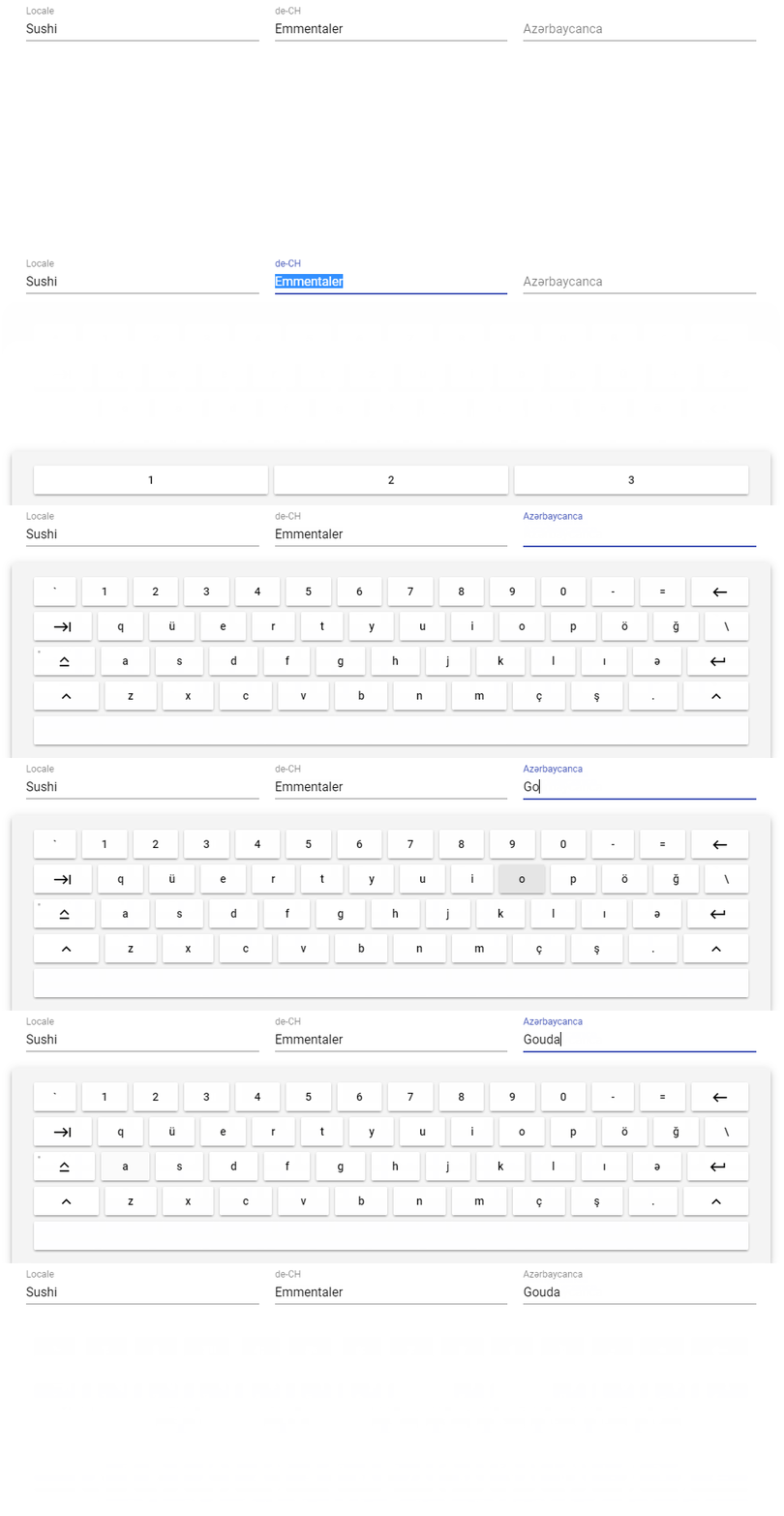
## Demo
A demo can be found [here][demo].
## Docs
Generated documentation can be found [here][docs].
## Getting started
1. Install with your prefered packet manager (we're using `npm` here):
`npm install --save angular-onscreen-material-keyboard`
> Be sure to fulfill the peer dependencies of this module, in particular [Angular] and [Angular Material].
2. Add the module to your project, e.g. `app.module.ts`:
```:typescript
import { NgModule } from '@angular/core';
import { FormsModule } from '@angular/forms';
import { BrowserModule } from '@angular/platform-browser';
import { BrowserAnimationsModule } from '@angular/platform-browser/animations';
import { MatButtonModule } from '@angular/material/button';
...
import { MatKeyboardModule } from 'angular-onscreen-material-keyboard';
@NgModule({
imports: [
// Angular modules
BrowserModule,
BrowserAnimationsModule,
FormsModule,
// Material modules
MatButtonModule,
MatKeyboardModule,
],
...
})
export class AppModule {}
```
3. Use the [`MatKeyboardDirective`][docs:MatKeyboardDirective] on your input elements or textareas and set the name or locale of the layout.
> If not provided the locale will be derieved from the `LOCALE_ID` or the browser.
```:angular2html
```
## Providing custom layouts
Most of the base configurations are provided as [injection tokens][InjectionToken]. Please read [the documentation][InjectionToken] to
understand how to handle it.
All layouts are based on (or directly inherited from) the [angular-virtual-keyboard][the-darc/angular-virtual-keyboard] which is based on
[GreyWyvern VKI]. For details on how to structure a layout see the [comment derived from the original source code][VKI Readme].
> Note that this will most likely be changed in the near future. But for now a huge range of layouts is already usable because of the
[great contribution][VKI Credits] back then.
But basicly you just provide the configuration of your new layout in your `AppModule`:
```:typescript
import { IKeyboardLayouts, keyboardLayouts, MAT_KEYBOARD_LAYOUTS, MatKeyboardModule } from 'angular-onscreen-material-keyboard';
const customLayouts: IKeyboardLayouts = {
...keyboardLayouts,
'Tölles Läyout': {
'name': 'Awesome layout',
'keys': [
[
['1', '!'],
['2', '@'],
['3', '#']
]
],
'lang': ['de-CH']
}
};
@NgModule({
...
providers: [
{ provide: MAT_KEYBOARD_LAYOUTS, useValue: customLayouts }
],
...
})
export class AppModule {}
```
## Development
This repository is managed by and layed out for [ng-packagr].
### Versioning
The application uses [semver][SemVer] and is developed with the [git flow branching model][Git-Flow].
[Angular]: https://angular.io/
[Angular Material]: https://material.angular.io/
[the-darc/angular-virtual-keyboard]: https://github.com/the-darc/angular-virtual-keyboard
[GreyWyvern VKI]: http://www.greywyvern.com/code/javascript/keyboard
[SemVer]: http://semver.org/
[Git-Flow]: http://nvie.com/posts/a-successful-git-branching-model/
[ng-packagr]: https://github.com/dherges/ng-packagr
[demo]: https://ngx-material-keyboard.github.io/demo/
[docs]: https://ngx-material-keyboard.github.io/core/
[docs:MatKeyboardDirective]: https://ngx-material-keyboard.github.io/core/directives/MatKeyboardDirective.html
[InjectionToken]: https://angular.io/guide/dependency-injection-in-action#injectiontoken
[VKI Readme]: https://goo.gl/fCDExr
[VKI Credits]: https://goo.gl/NYqTwc