https://github.com/eantcal/nubasic
nuBASIC is an implementation of a BASIC interpreter and IDE for Windows and Linux
https://github.com/eantcal/nubasic
android basic basic-programming-language c-plus-plus c-plus-plus-17 debugger gtk2 ide interpreter language linux macosx programming-language syntax-highlighting windows
Last synced: 4 months ago
JSON representation
nuBASIC is an implementation of a BASIC interpreter and IDE for Windows and Linux
- Host: GitHub
- URL: https://github.com/eantcal/nubasic
- Owner: eantcal
- License: mit
- Created: 2015-07-23T10:29:29.000Z (about 11 years ago)
- Default Branch: master
- Last Pushed: 2026-04-01T16:07:09.000Z (4 months ago)
- Last Synced: 2026-04-03T01:11:23.045Z (4 months ago)
- Topics: android, basic, basic-programming-language, c-plus-plus, c-plus-plus-17, debugger, gtk2, ide, interpreter, language, linux, macosx, programming-language, syntax-highlighting, windows
- Language: C++
- Homepage: https://www.eantcal.eu
- Size: 37.4 MB
- Stars: 43
- Watchers: 4
- Forks: 4
- Open Issues: 0
-
Metadata Files:
- Readme: README.md
- Changelog: ChangeLog
- License: COPYING
- Authors: AUTHORS
Awesome Lists containing this project
- awesome-basic - nuBASIC - nuBASIC is an implementation of a BASIC interpreter and IDE for Windows and Linux. (Dialects)
README
# nuBASIC
nuBASIC is a modern, open-source BASIC interpreter written in C++17, available for Windows, Linux, and macOS. It is designed to be both approachable for beginners and capable enough for real programs.
## Features
- **Structured programming** — `Sub`, `Function`, `For`, `While`, `Do…Loop While`, `If/ElIf/Else`; `Call` keyword; `ByRef` / `ByVal` parameter passing; `Include` / `#Include` for multi-file programs
- **Rich type system** — Integer, Double, Boolean, Long64, String, Byte, Any, user-defined `Struct`
- **Arrays and hash tables** built into the language
- **Full file I/O** — sequential, binary, and random access
- **Graphics** — lines, rectangles, ellipses, filled shapes, text, bitmaps, pixel access (Windows GDI / Linux X11)
- **Screen mode switching** — `Screen 0` (text/headless) / `Screen 1` (GDI graphics), like GW-BASIC `SCREEN`; `-t` CLI flag for CI/scripting
- **Flicker-free rendering** — `ScreenLock` / `ScreenUnlock` / `Refresh` for double-buffered animation
- **Mouse and keyboard input** — `GetMouse()` returns a `Mouse` struct (`x`, `y`, `btn`) in one call
- **Date/time** — `GetDateTime()` returns a `DateTime` struct with all fields in one call
- **UTF-8** string literals and console output
- **Built-in help** — `Help ` and `Apropos ` accessible from the REPL
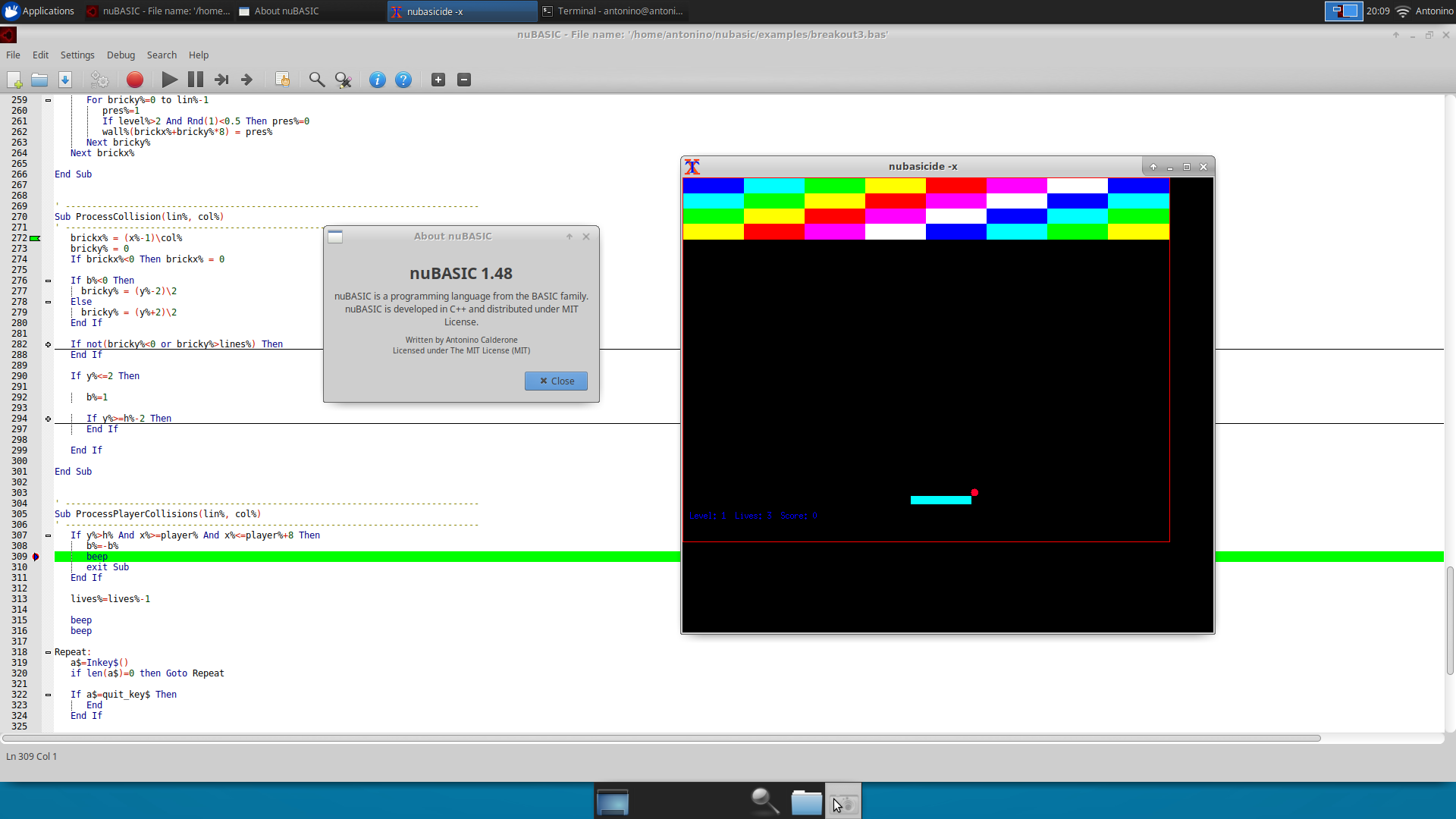
- **IDE** for Windows and Linux (GTK+2) with syntax highlighting, auto-completion, and integrated debugger
- **Tiny build** for headless/embedded systems (no graphics, no external dependencies)
- **MIT License**
## Documentation
- **[Wiki](https://github.com/eantcal/nubasic/wiki)** — full language reference, graphics API, IDE guide, interpreter internals, and build instructions
- **[User Guide](https://github.com/eantcal/nubasic/blob/master/docs/nubasic-guide.md)** — complete guide in a single document (v1.61)
- **[Examples](https://github.com/eantcal/nubasic/tree/master/examples)** — ready-to-run `.bas` programs covering games, graphics, fractals, animations, and more
## Quick Start
```bash
# Interactive REPL
nubasic
# Run a program file
nubasic myprogram.bas
```
```basic
Print "Hello, world!"
```
## Building from Source
nuBASIC builds with CMake 3.14+ and a C++20 compiler.
**Windows (Visual Studio 2022):**
```bat
git clone https://github.com/eantcal/nubasic.git
cd nubasic
mkdir build && cd build
cmake -G "Visual Studio 17 2022" ..
cmake --build . --config Release
```
**Linux:**
```sh
git clone https://github.com/eantcal/nubasic.git
cd nubasic
mkdir build && cd build
cmake ..
make -j$(nproc)
sudo make install
```
**Tiny build (no graphics, no IDE):**
```sh
cmake .. -DWITH_X11=OFF -DWITH_IDE=OFF
make -j$(nproc)
```
See the [Building from Source](https://github.com/eantcal/nubasic/wiki/Building-from-Source) wiki page for full details including macOS, iOS/iSH, CMake options, and installer creation.
## Running the Test Suite
Tests live in the `tests/` directory as `test_*.bas` files. They use
`Screen 0` (text mode) so output goes to stdout without needing a GUI.
**Windows (PowerShell):**
```powershell
.\tests\run_tests.ps1 -Interpreter .\build\release\Release\nubasic.exe
```
**From Visual Studio:** right-click the **RunTests** target → Build.
**Linux / macOS (Bash):**
```sh
./tests/run_tests.sh --interpreter ./build/release/nubasic
```
Or via CMake:
```sh
cmake --build build/release --target RunTests
```
## Platforms
| Platform | Interpreter | IDE |
|----------|-------------|-----|
| Windows | `nubasic.exe` | `NuBasicIDE.exe` (GDI console + Scintilla editor) |
| Linux | `nubasic` | `nubasicide` (GTK+2 + Scintilla editor) |
| macOS | `nubasic` | — |
| iOS (iSH) | `nubasic` (tiny) | — |
## License
nuBASIC is open source under the [MIT License](https://opensource.org/licenses/MIT).
Bug reports and feature requests: antonino.calderone@gmail.com