https://github.com/ebidel/filer.js
A wrapper library for the HTML5 Filesystem API what reuses UNIX commands (cp, mv, ls) for its API.
https://github.com/ebidel/filer.js
Last synced: about 1 year ago
JSON representation
A wrapper library for the HTML5 Filesystem API what reuses UNIX commands (cp, mv, ls) for its API.
- Host: GitHub
- URL: https://github.com/ebidel/filer.js
- Owner: ebidel
- License: other
- Created: 2011-06-22T19:35:18.000Z (about 15 years ago)
- Default Branch: master
- Last Pushed: 2019-04-11T12:59:23.000Z (about 7 years ago)
- Last Synced: 2025-05-07T20:54:11.985Z (about 1 year ago)
- Language: JavaScript
- Homepage:
- Size: 5.16 MB
- Stars: 1,485
- Watchers: 46
- Forks: 155
- Open Issues: 26
-
Metadata Files:
- Readme: README.md
- License: LICENSE
Awesome Lists containing this project
README
filer.js
=======
filer.js is a [well-tested](tests) wrapper library for the [HTML5 Filesystem API](http://dev.w3.org/2009/dap/file-system/pub/FileSystem/),
an API which enables web applications to read and write files and folders to
its own sandboxed filesystem.
Unlike other wrapper libraries [[1], [2]], filer.js takes a different approach
by reusing familiar UNIX commands (`cp`, `mv`, `ls`) for its API. The goal is to
make the HTML5 API more approachable for developers that have done file I/O in
other languages.
[1]: https://github.com/ajaxorg/webfs
[2]: http://code.google.com/p/closure-library/source/browse/trunk/closure/goog/fs/fs.js
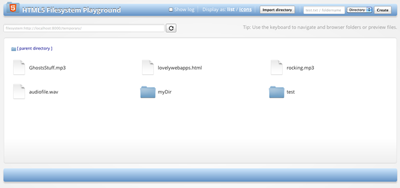
**Check out the [demo app](http://html5-demos.appspot.com/static/filesystem/filer.js/demos/index.html):**
Supported Browsers
------------------
* Chrome
The HTML5 Filesystem API is only supported in Chrome. Therefore, the library only works in Chrome.
Getting started
=======
I highly recommended that you familiarize yourself with the HTML5 Filesystem API.
I've written a book on the topic, ["Using the HTML5 Filesystem API"](http://shop.oreilly.com/product/0636920021360.do), and there are two great articles on HTML5 Rocks that walk you through all of its
different methods and capabilities:
1. [Exploring the FileSystem APIs](http://www.html5rocks.com/tutorials/file/filesystem/)
2. [The Synchronous FileSystem API for Workers](http://www.html5rocks.com/tutorials/file/filesystem-sync/)
Usage
-----
Install the polyfill:
npm install filer.js --save
Drop it on your page:
The underlying Filesystem API is asynchronous, therefore, the library calls are
mostly asynchronous. This means you'll be passing callbacks all over the place.
First, create a `Filer` object:
var filer = new Filer();
Next, initialize the library:
```javascript
filer.init({persistent: false, size: 1024 * 1024}, function(fs) {
// filer.size == Filer.DEFAULT_FS_SIZE
// filer.isOpen == true
// filer.fs == fs
}, onError);
```
The first argument is an optional initialization object that can contain two
properties, `persistent` (the type of storage to use) and `size`. The second and
third arguments are a success and error callback, respectively:
The success callback is passed a `LocalFileSystem` object. If you don't initialize
the the filesystem with a size, a default size of `Filer.DEFAULT_FS_SIZE` (1MB)
will be used. Thus, the previous call can be simplified to:
```javascript
filer.init({}, function(fs) {
...
}, onError);
filer.init(); // All parameters are optional.
```
**Error handling**
Many methods take an optional error callback as their last argument. It can be a
good idea to setup a global error handler for all methods to use:
```javascript
function onError(e) {
console.log('Error' + e.name);
}
```
Examples
============
## General rule of thumb
For versatility, the library accepts paths to files or directories as string
arguments (a path) or as filesystem URLs. It also can take the
`FileEntry`/`DirectoryEntry` object representing the file/directory.
ls()
-----
*List the contents of a directory.*
The first arg is a path, filesystem URL, or DirectoryEntry to return the contents
for. The second and third arguments, are success and error callbacks, respectively.
```javascript
// Pass a path.
filer.ls('/', function(entries) {
// entries in the root directory.
}, onError);
filer.ls('.', function(entries) {
// entries in the current working directory.
}, onError);
filer.ls('path/to/some/dir/', function(entries) {
// entries in "path/to/some/dir/"
}, onError);
// Pass a filesystem: URL.
var fsURL = filer.fs.root.toURL(); // e.g. 'filesystem:http://example.com/temporary/';
filer.ls(fsURL, function(entries) {
// entries in the root folder.
}, onError);
// Pass a DirectorEntry.
filer.ls(filer.fs.root, function(entries) {
// entries in the root directory.
}, onError);
```
df()
-----
*Displays disk space usage.*
The first and second arguments, are success and error callbacks. Used space, Free space and currently allocated total space are passed to the success callback.
```javascript
filer.df(function(used, free, cap) {
// used, free and capacity in bytes.
}, onError);
```
cd()
-----
*Allows you to change into another directory.*
This is a convenience method. When using `cd()`, future operations are treated
relative to the new directory. The success callback is passed the `DirectoryEntry`
changed into.
```javascript
// Passing a path.
filer.cd('/path/to/folder', function(dirEntry) {
...
}, onError);
// Passing a filesystem: URL.
var fsURL = filer.fs.root.toURL(); // e.g. 'filesystem:http://example.com/temporary/';
filer.cd(fsURL + 'myDir', function(dirEntry) {
// cwd becomes /myDir.
}, onError);
// Passing a DirectoryEntry.
filer.cd(dirEntry, function(dirEntry2) {
// dirEntry == dirEntry2
}, onError);
filer.cd('/path/to/folder'); // Both callbacks are optional.
```
create()
-----
*Creates an empty file.*
`create()` creates an empty file in the current working directory. If you wish
to write data to a file, see the `write()` method.
**Important Note** : Directory path leading to the file must exist before calling create!
```javascript
filer.create('myFile.txt', false, function(fileEntry) {
// fileEntry.name == 'myFile.txt'
}, onError);
filer.create('/path/to/some/dir/myFile.txt', true, function(fileEntry) {
// fileEntry.fullPath == '/path/to/some/dir/myFile.txt'
}, onError);
filer.create('myFile.txt'); // Last 3 args are optional.
```
The second (optional) argument is a boolean. Setting it to true throws an error
if the file you're trying to create already exists.
mkdir()
-----
*Creates an empty directory.*
```javascript
filer.mkdir('myFolder', false, function(dirEntry) {
// dirEntry.isDirectory == true
// dirEntry.name == 'myFolder'
}, onError);
```
You can pass `mkdir()` a folder name or a path to create. In the latter,
it behaves like UNIX's `mkdir -p`, creating each intermediate directory as needed.
For example, the following would create a new hierarchy ("music/genres/jazz") in
the current folder:
```javascript
filer.mkdir('music/genres/jazz/', false, function(dirEntry) {
// dirEntry.name == 'jazz' // Note: dirEntry is the last entry created.
}, onError);
```
The second argument to `mkdir()` a boolean indicating whether or not an error
should be thrown if the directory already exists. The last two are a success
callback and optional error callback.
rm()
-----
*Removes a file or directory.*
If you're removing a directory, it is removed recursively.
```javascript
filer.rm('myFile.txt', function() {
...
}, onError);
filer.rm('/path/to/some/someFile.txt', function() {
...
}, onError);
var fsURL = filer.pathToFilesystemURL('/path/to/some/directory');
filer.rm(fsURL, function() {
...
}, onError);
filer.rm(directorEntry, function() {
...
}, onError);
```
cp()
-----
*Copies a file or directory.*
The first argument to `cp()` is the source file/directory you wish to copy,
followed by the destination folder for the source to be copied into.
Note: The src and dest arguments need to be the same type. For example, if pass
a string path for the first argument, the destination cannot be a FileEntry.
It must be a string path (or filesystem URL) as well.
```javascript
// Pass string paths.
filer.cp('myFile.txt', '/path/to/other/folder', null, function(entry) {
// entry.fullPath == '/path/to/other/folder/myFile.txt'
}, onError);
// Pass filesystem URLs.
var srcFsURL = 'filesystem:http://example.com/temporary/myDir';
var destFsURL = 'filesystem:http://example.com/temporary/anotherDir';
filer.cp(srcFsURL, destFsURL, null, function(entry) {
// filer.pathToFilesystemURL(entry.fullPath) == 'filesystem:http://example.com/temporary/anotherDir/myDir'
}, onError);
// Pass Entry objects.
filer.cp(srcEntry, destinationFolderEntry, null, function(entry) {
...
}, onError);
// Mixing string paths with filesystem URLs work too:
filer.cp(srcEntry.toURL(), '/myDir', null, function(entry) {
...
}, onError);
```
If you wish to copy the entry under a new name, specify the third newName argument:
```javascript
// Copy myFile.txt to myFile2.txt in the current directory.
filer.cp('myFile.txt', '.', 'myFile2.txt', function(entry) {
// entry.name == 'myFile2.txt'
}, onError);
```
mv()
-----
*Moves a file or directory.*
The first argument to move is the source file or directory to move, the second
is a destination directory, and the third is an optional new name for the file/folder
when it is moved.
```javascript
// Pass string paths.
filer.mv('path/to/myfile.mp3', '/another/dir', null, function(fileEntry) {
// fileEntry.fullPath == '/another/dir/myfile.mp3'
}, onError);
// Pass a filesystem URL. This example renames file.txt to somethingElse.txt in
// the same directory.
filer.mv('filesystem:http://example.com/temporary/file.txt', '.', 'somethingElse.txt', function(fileEntry) {
// fileEntry.fullPath == '/somethingElse.txt'
}, onError);
// Pass a FileEntry or DirectoryEntry.
filer.mv(folderEntry, destDirEntry, function(dirEntry) {
// folder is moved into destDirEntry
}, onError);
filer.mv('myFile.txt', './someDir'); // The new name and both callbacks are optional.
```
open()
-----
*Returns a File object.*
```javascript
// Pass a path.
filer.open('myFile.txt', function(file) {
// Use FileReader to read file.
var reader = new FileReader();
reader.onload = function(e) {
...
}
read.readAsArrayBuffer(file);
}, onError);
// Pass a filesystem URL.
filer.open(fileEntry.toURL(), function(file) {
...
}, onError);
// Pass a FileEntry.
filer.open(fileEntry, function(file) {
...
}, onError);
```
write()
-----
*Writes content to a file.*
`write()` takes a `string` (path or filesystem URL) or `FileEntry` as it's first argument.
This is the file to write data to. If the does not exist, it is created. Otherwise,
the file's contents are overwritten if it already exists.
The second argument is an object with three properties:
- `data`: the content to write into the file.
- `type`: optional mimetype of the content.
- `append`: optional true if data should be appended to the file.
The success callback for this method is passed the `FileEntry` for the file that
was written to and the `FileWriter` object used to do the writing.
```javascript
// Write files from a file input.
document.querySelector('input[type="file"]').onchange = function(e) {
var file = e.target.files[0];
filer.write(file.name, {data: file, type: file.type}, function(fileEntry, fileWriter) {
...
}, onError);
};
// Create a Blob and write it out.
var bb = new BlobBuilder();
bb.append('body { background: red; }');
filer.write('styles.css', {data: bb.getBlob('text/css'), type: 'text/css'},
function(fileEntry, fileWriter) {
...
},
onError
);
// Create a typed array and write the ArrayBuffer.
var uint8 = new Uint8Array([1,2,3,4,5]);
filer.write(fileEntry, {data: uint8.buffer},
function(fileEntry, fileWriter) {
...
},
onError
);
// Write string data.
filer.write('path/to/file.txt', {data: '1234567890', type: 'text/plain'},
function(fileEntry, fileWriter) {
...
},
onError
);
// Append to a file.
filer.write('path/to/file.txt', {data: '1234567890', type: 'text/plain', append: true},
function(fileEntry, fileWriter) {
...
},
onError
);
```
Utility methods
============
The library contains a few utility methods to help you out.
```javascript
Util.fileToObjectURL(Blob|File);
Util.fileToArrayBuffer(blob, function(arrayBuffer) {
...
});
var blob = Util.arrayBufferToBlob((new Uint8Array(10)).buffer, opt_contentType);
Util.arrayBufferToBinaryString((new Uint8Array(10)).buffer, function(binStr) {
...
});
Util.strToObjectURL(binaryStr, opt_contentType);
Util.strToDataURL(binaryStr, contentType) // e.g. "data:application/pdf;base64,Ym9keSB7IG..."
// For plaintext (non-binary data):
// Util.strToDataURL('body { background: green; }', 'text/css', false) == data:text/css,body { background: green; }
Util.arrayToBinaryString(bytes); // bytes is an Array, each varying from 0-255.
Util.getFileExtension('myfile.txt') == '.txt'
// Util.toArray(DOMList/NodeList) == Array
document.querySelector('input[type="file"]').onchange = function(e) {
Util.toArray(this.files).forEach(function(file, i) {
// blah blah blah.
});
};
```
## Contributing
### Building
Install the dependencies and compile the library by running `gulp`:
npm install
gulp
This will output a built file to `dist/filer.min.js`.
### Releasing
To cut a new release, run:
npm version patch
Also update components.json with the new version. Then run:
gulp
npm publish
[](https://github.com/igrigorik/ga-beacon)