https://github.com/ebukaracer/ezsceneswitcher
Provides a handy overlay window for quickly and ezly switching between scenes in the Unity Editor.
https://github.com/ebukaracer/ezsceneswitcher
gamedev unity unity3d unityeditor unitypackage
Last synced: about 1 year ago
JSON representation
Provides a handy overlay window for quickly and ezly switching between scenes in the Unity Editor.
- Host: GitHub
- URL: https://github.com/ebukaracer/ezsceneswitcher
- Owner: ebukaracer
- Created: 2025-01-29T11:36:51.000Z (over 1 year ago)
- Default Branch: main
- Last Pushed: 2025-03-17T08:23:22.000Z (over 1 year ago)
- Last Synced: 2025-03-17T09:29:25.237Z (over 1 year ago)
- Topics: gamedev, unity, unity3d, unityeditor, unitypackage
- Language: C#
- Homepage: https://ebukaracer.github.io/EzSceneSwitcher/
- Size: 14.6 KB
- Stars: 2
- Watchers: 1
- Forks: 0
- Open Issues: 0
-
Metadata Files:
- Readme: README.md
Awesome Lists containing this project
README
# EzSceneSwitcher
[](http://makeapullrequest.com) [](https://ebukaracer.github.io/ebukaracer/md/LICENSE.html)
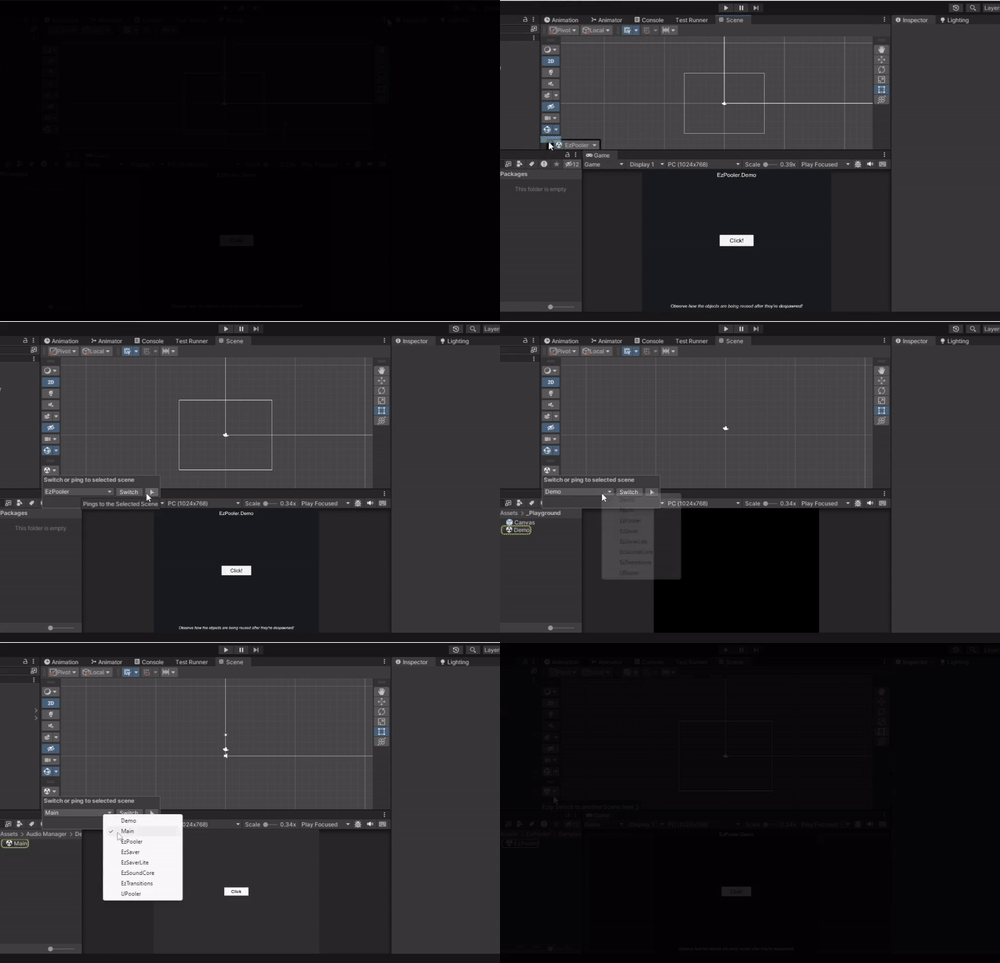
**EzSceneSwitcher** is a handy Unity Editor utility that simplifies scene navigation. It provides an editor overlay with a drop-down menu listing all scenes and some quick-action buttons for seamless scene switching.
## ✨ Features
- 📜 **Drop-down menu** – Lists all available scenes in the project.
- 🔄 **Toggle Scene Button** – Opens/closes the selected scene.
- 🎯 **Ping Scene Button** – Highlights the scene asset in the Project window.
- ⚡ **Overlay Menu** – Stays accessible within the scene window for quick scene management.
## Installation
- Hit `(+)` and select `Add package from Git URL(Unity 2019.4+)`
- Paste the `git URL` for this package: https://github.com/ebukaracer/EzSceneSwitcher.git#upm
- Hit `Add`
## Quick Usage
#### Setup:
Inside the Unity editor scene-view window, click on the three-dotted icon at the top right corner, click on the `Overlay Menu` option, and toggle on/off the `Scene Switcher` overlay. Alternatively, use the menu option: `Racer > EzSceneSwitcher > Toggle`
#### Actions:
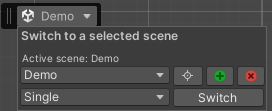
With the `Ez Scene Switcher` overlay menu open, you're able to:
- Use the **scene list drop-down** to select a scene.
- Use the **scene open-mode drop-down** to select an open scene mode(single, additive, etc)
- Click:
- **Ping** – Locates the selected scene in the **Project window**.
- **Activate** – Sets the selected scene active, assuming multiple **Loaded** scenes exist.
- **Close** – Closes the selected scene that is either additively loaded or unloaded.
- **Switch** – Opens the selected scene based on the selected mode.
- Hover over the options to display helpful tooltips.
#### Removing this Package:
Navigate to: `Racer > EzSceneSwitcher > Remove Package`
## Notes
- Developed with `v2022.3.11f1`.
- Most likely compatible with Unity version `2021.1+` and above.
- The scene-view window must be available and be in focus for the `Scene Switcher` overlay to work.
## Credits
- Inspired by this [GitHub gist](https://gist.github.com/alexanderameye/c1f99c6b84162697beedc8606027ed9c)
## [Contributing](https://ebukaracer.github.io/ebukaracer/md/CONTRIBUTING.html)
Contributions are welcome! Please open an issue or submit a pull request.