https://github.com/eces/debugs
🙈 UI for DEBUG=debug:*
https://github.com/eces/debugs
Last synced: over 1 year ago
JSON representation
🙈 UI for DEBUG=debug:*
- Host: GitHub
- URL: https://github.com/eces/debugs
- Owner: eces
- License: mit
- Created: 2017-10-25T01:38:33.000Z (almost 9 years ago)
- Default Branch: master
- Last Pushed: 2018-01-17T08:17:49.000Z (over 8 years ago)
- Last Synced: 2025-03-10T21:44:27.304Z (over 1 year ago)
- Language: JavaScript
- Homepage:
- Size: 28.3 KB
- Stars: 2
- Watchers: 1
- Forks: 0
- Open Issues: 0
-
Metadata Files:
- Readme: README.md
- License: LICENSE
Awesome Lists containing this project
README
# debugs 🙈
`npm install debugs -g`
 →
→ 
## Features
- No more remember debug scopes.
- Choose debug scopes on `debugs` with keyboard.
- Loaded from `package.json` and subdirectories.
- Replace `DEBUG=debug:*` to `DEBUG=${debugs -v}`.
- Configure bash/zsh/shell export by typing `debugs init`.
- See flatten debugs options over subdirectories.
## Usage
Use [debug](https://github.com/visionmedia/debug) for logging.
> peerDependencies `debug` must be installed.
```js
// Basic use of debug package.
const debug_api = require('debug')('api')
const debug_api_cache = require('debug')('api:cache')
// outputs only if environment variable DEBUG has 'api' scope.
debug_api('api.validate %O', doSomething())
/*
* outputs only if environment variable DEBUG has
* 'api:cache' or 'api:*' or 'api*'
* scope.
*/
debug_db('api.cache.validate %O', doSomething())
```
Add debug namespace items on `package.json`.
```
{
"name": "example",
"version": "1.0.0",
"main": "index.js",
"debugs": [
"api",
"api:cache"
]
}
```
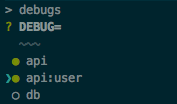
Type `debugs` will show below.
```bash
? DEBUG=
❯ ◯ api
◯ api:cache
```
> Press <space> to select, <a> to toggle all, <i> to inverse selection
Choose any and press enter(return).
```
? DEBUG=
◯ api
❯◉ api:cache
? DEBUG= api:cache
$
```
It's done. Apply changes by `$ DEBUG=$(debugs -v) npm start` or
```js
// any-file.js
// will load package.json at project directory root.
require('debugs/init')
```
> You may add `.debugs` to `.gitignore`.
## Advanced use
Running `debugs` with
- option `--c`, `-v` and `value` will partial output `api,api:cache`.
- option `--init`, `-i` and `init` will full output `export DEBUG=api,api:cache`.
Edit start script to pre-apply debug values,
```bash
"scripts": {
"start": "DEBUG=$(debugs -v) node index.js",
},
# DEBUG=$(debugs -v) nodemon index.js
```
prestart script either.
```bash
"scripts": {
"prestart": "$(debugs init)",
"start": "node index.js"
}
```
Without global install:
```bash
# shell
$ npm install --save-dev debugs
# package.json
"scripts": {
"start": "DEBUG=$(node ./node_modules/debugs -v) node index.js",
"debug": "node ./node_modules/debugs"
}
# shell
$ npm run debug
```
Include other json file or subdirectories.
```
{
"name": "example",
"version": "1.0.0",
"main": "index.js",
"debugs": [
"api",
"api:cache",
"lib/something/package.json"
]
}
```
NEW Group all peer debugs into one state over subdirectories. (flatten)
```
.
├── package.json
├── peer1
│ └── package.json
└── peer2
├── package.json
└── peer2a
└── package.json
```
Only one `.debugs` root state file will be saved, and readable from any current working directory.
## Authors
- Jin Lee
## License
- MIT