https://github.com/echobind/bisonapp-versions
A repo that contains unaltered code from a newly generated Bison app. Tagged by version.
https://github.com/echobind/bisonapp-versions
Last synced: 5 months ago
JSON representation
A repo that contains unaltered code from a newly generated Bison app. Tagged by version.
- Host: GitHub
- URL: https://github.com/echobind/bisonapp-versions
- Owner: echobind
- License: mit
- Created: 2020-10-14T20:16:29.000Z (almost 6 years ago)
- Default Branch: main
- Last Pushed: 2020-10-22T19:08:23.000Z (over 5 years ago)
- Last Synced: 2025-02-16T12:13:56.107Z (over 1 year ago)
- Language: TypeScript
- Size: 307 KB
- Stars: 0
- Watchers: 5
- Forks: 0
- Open Issues: 0
-
Metadata Files:
- Readme: README.md
- License: LICENSE
Awesome Lists containing this project
README

BisonVersions

## Conventions
- Don't copy/paste files, use generators and Hygen templates.
- Use a single command to run Next, generate Nexus types, and GraphQL types for the frontend.
- Don't manually type GraphQL responses... use the generated query hooks from GraphQL Codegen.
- All frontend pages are static by default. If you need something server rendered, just add `getServerSideProps` like you would in a any Next app.
## Tradeoffs
- To reduce complexity, Bison avoids yarn workspaces and separate top-level folders. Think of your app more like a traditional monolith, but with a separate frontend and API. This means that folders may be a little more "intermingled" than your used to.
---
# Getting Started
Clone this repo.
## Configure Vercel
Make sure you have a Vercel account.
To run the app locally:
1. Run `vercel` or `vc`
1. Choose the appropriate scope / organization. If you don't see the organization, ask someone to invite you.
1. If this is a new project, keep all the build defaults. If this is an existing project, choose "link to an existing project" when prompted.
1. If setting up an existing project, run `vc env pull`. This will sync your dev env vars and save them to .env.
## Setup the database
1. Setup your local database with `yarn db:setup`. You'll be prompted to create it if it doesn't already exist:

If you'd like to change the database name or schema, change the DATABASE_URL in `prisma/.env`.
# Run the app
From the root, run `yarn dev`. This:
- runs `next dev` to run the frontend and serverless functions locally
- starts a watcher to generate the Prisma client on schema changes
- starts a watcher to generate TypeScript types for GraphQL files
# Recommended Dev Workflow
You're not required to follow this exact workflow, but we've found it gives a good developer experience.
## API
1. Generate a new GraphQL module using `yarn g:graphql`.
1. Write a type, query, input, or mutation using [Nexus](https://nexusjs.org/guides/schema)
1. Create a new request test using `yarn g:test:request`
1. Run `yarn test` to start the test watcher
1. Add tests cases and update schema code accordingly
1. The GraphQL playground (localhost:3000/api/graphql) can be helpful to form the proper queries to use in tests.
1. `types.ts` and `api.graphql` should update automatically as you change files. Sometimes it's helpful to open these as a sanity check before moving on to the frontend code.
## Frontend
1. Generate a new page using `yarn g:page`
1. Generate a new component using `yarn g:component`
1. If you need to fetch data in your component, use a cell. Generate one using `yarn g:cell` (TODO)
1. To generate a typed GraphQL query, simply add it to the component or page:
```ts
export const SIGNUP_MUTATION = gql`
mutation signup($data: SignupInput!) {
signup(data: $data) {
token
user {
id
}
}
}
`;
```
5. Use the newly generated types from codegen instead of the typical `useQuery` or `useMutation` hook. For the example above, that would be `useSignupMutation`. You'll now have a fully typed response to work with!
```tsx
import { User, useMeQuery } from './types';
// adding this will auto-generate a custom hook in ./types
export const ME_QUERY = gql`
query me {
me {
id
email
}
}
`;
// an example of taking a user as an argument with optional attributes
function noIdea(user: Partial) {
console.log(user.email);
}
function fakeComponent() {
// use the generated hook
const { data, loading, error } = useMeQuery();
if (loading) return ;
// data.user will be fully typed
return
}
```
# Set up CI
This project uses GitHub actions for CI.
To ensure your project can run on CI for E2E tests, you need to add a few ENV vars to GitHub Secrets.
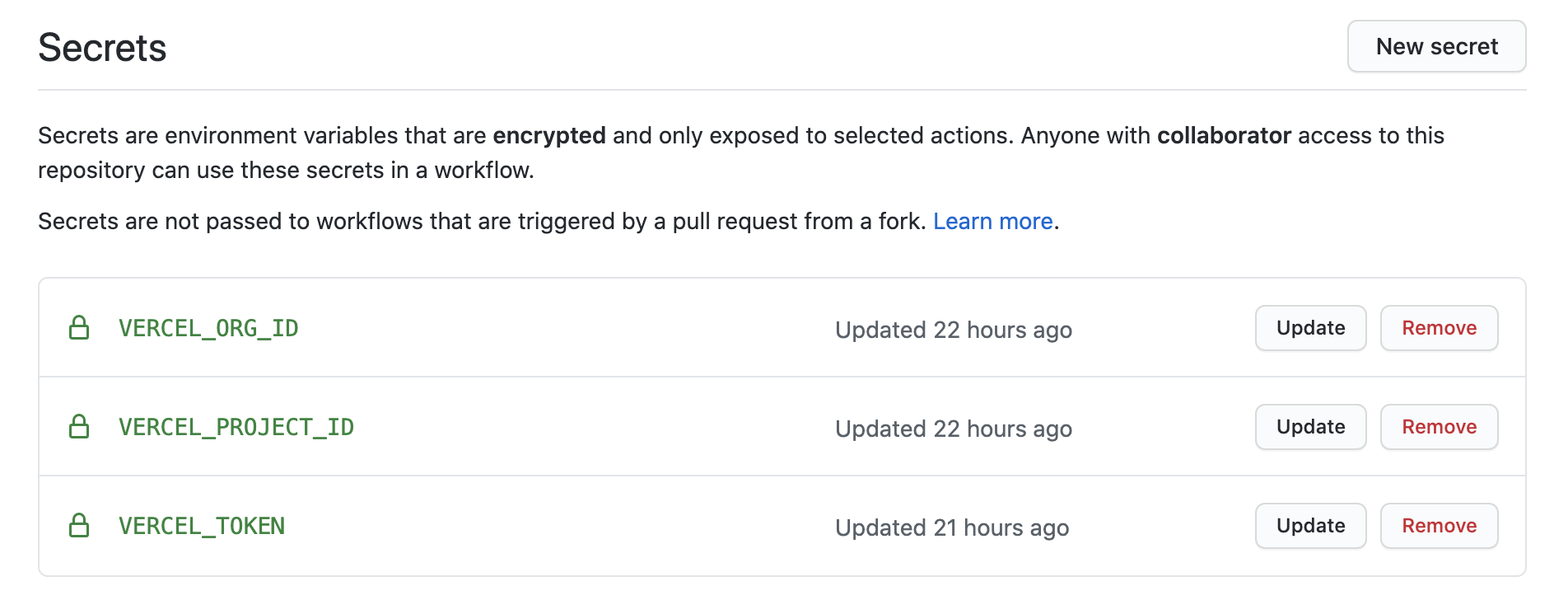
The Vercel project and org id, can be copied from `.vercel/project.json`. You can generate a token from https://vercel.com/account/tokens.
# Setup Preview / Production Deployments
After tests pass, the app will deploy to Vercel. By default, every push creates a preview deployment. Merging to the main branch will deploy to staging, and pushing to the production branch will deploy to production. To configure deployments:
- Make sure you've set the variables above
- Configure the branches in the workflow:
```
## For a typical JAMstack flow, this should be your default branch.
## For a traditional flow that auto-deploys staging and deploys prod is as needed, keep as is
if: github.ref != 'refs/heads/production' # every branch EXCEPT production
```
# FAQ
## Where are the generated types?
TypeScript Types for GraphQL types, queries, and mutations are generated automatically and placed in `./types.ts`. To use these in your code, import like so:
## My types aren't working, even though they are in ./types.ts
Try reopening VSCode.