https://github.com/edisdev/vue-i18n-service
vue-i18n single file component exporter/importer
https://github.com/edisdev/vue-i18n-service
Last synced: 4 months ago
JSON representation
vue-i18n single file component exporter/importer
- Host: GitHub
- URL: https://github.com/edisdev/vue-i18n-service
- Owner: edisdev
- Created: 2018-09-12T13:55:12.000Z (almost 8 years ago)
- Default Branch: develop
- Last Pushed: 2022-12-09T11:06:31.000Z (over 3 years ago)
- Last Synced: 2024-10-29T11:43:24.106Z (over 1 year ago)
- Language: JavaScript
- Homepage:
- Size: 1.26 MB
- Stars: 144
- Watchers: 5
- Forks: 16
- Open Issues: 7
-
Metadata Files:
- Readme: README.md
Awesome Lists containing this project
README
# vue-i18n-service
The translation team (not developers) wants **a** file with all the keys to translate. But I love to use translations in **Single File Components**.
And I found a solution to make everyone happy: `vue-i18n-service export|import`
Vue I18n Service makes to manage SFC translations easier in a file. It collects all the `` definitions in Single File Components and collects them into a file.
## What's the flow:
`Hello.vue`
```vue
{{ hello }}
{
"en": {
"hello": "Hi 🙁"
},
"tr": {
"hello": "Selam"
}
}
```
⬇️`npx vue-i18n-service export > translations.json`
```json
{
"src/components/Hello.vue": {
"en": {
"hello": "Hi 🙁"
},
"tr": {
"hello": "Selam"
}
}
}
```
✏️`translations.edited.json`
```json
{
"src/components/Hello.vue": {
"en": {
"hello": "Hello 🙂"
},
"tr": {
"hello": "Merhaba"
}
}
}
```
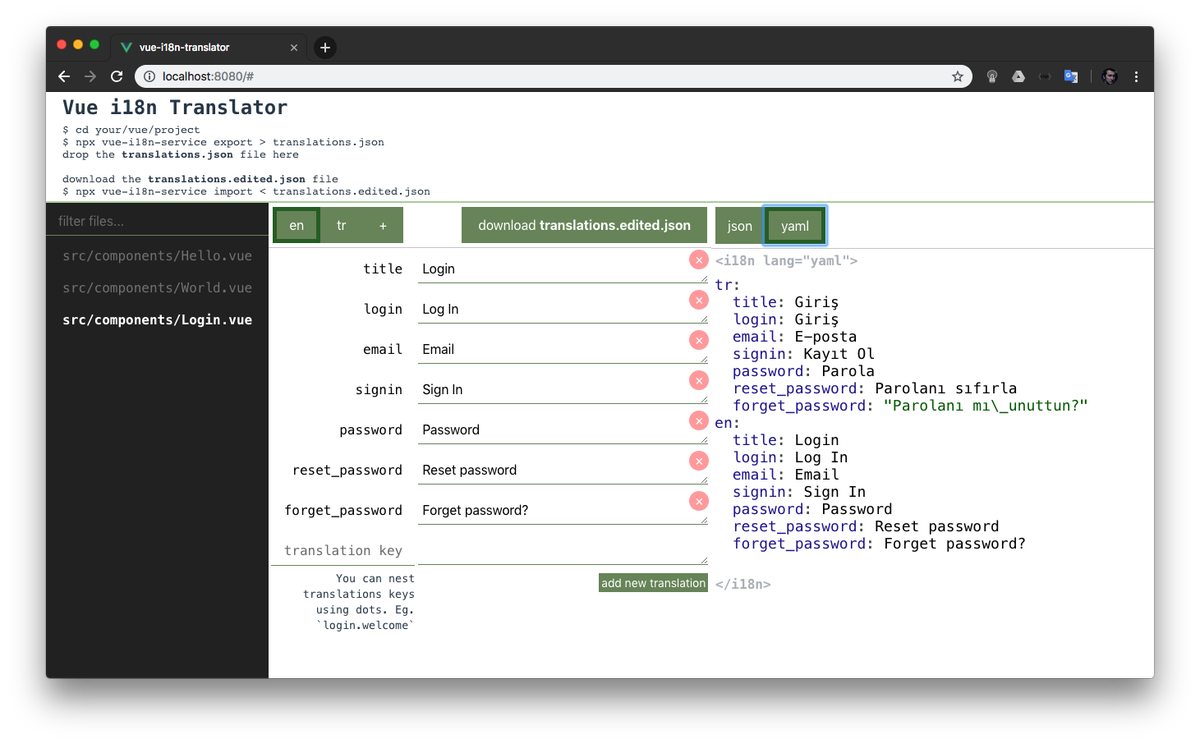
### Editing `translations.json` using Web UI
Open [https://edisdev.github.io/vue-i18n-translator/](https://edisdev.github.io/vue-i18n-translator/) and drop `translations.json` file which you've just generated. It will parse it and generate an useful interface to translate.
⬇️`npx vue-i18n-service import < translations.edited.json`
```
updating file src/components/Hello.vue
```
```vue
{{ hello }}
{
"en": {
"hello": "Hello 🙂"
},
"tr": {
"hello": "Merhaba"
}
}
```
And all is OK. Doesn't matter how many files you have, it simply distributes without any problem and any conflict.
## Exporting i18n's in SFCs
This will generate a `translations.json` file (or whatever you named).
```bash
npx vue-i18n-service export > translations.json
```
It has a simple format:
```json
{
"": {
"": {
"": ""
}
}
}
```
Here is an example:
```json
{
"src/components/Hello.vue": {
"en": {
"hello": "Hello"
},
"tr": {
"hello": "Merhaba"
}
},
"src/views/World.vue": {
"en": {
"world": "World"
},
"tr": {
"world": "Dünya"
}
}
}
```
### --dir
By default, `vue-i18n-service` looks for SFCs in the `src/` directory, if your components are in another directory, specify it by passing the `--dir` flag:
```bash
npx vue-i18n-service export --dir=client/ > translations.json
```
## Importing `translations.json` file to the SFCs
After bulk changing files, you can distribute import all the files calling `import` command.
```bash
npx vue-i18n-service import < translations.json
```
This will update `.vue` files and replace them with changes.
## Creating new locale from other locale
You can creating a new locale by copying another locale `create` command
```bash
npx vue-i18n-service create 'newlocale' 'extendedLocale'
```

## Contributors

Fatih Kadir Akın

Hatice Edis

Paul Gascou-Vaillancourt
## License
MIT.