https://github.com/ediwang/edi.routedebugger
ASP.NET Core Middleware to show current route info and all routes
https://github.com/ediwang/edi.routedebugger
asp-net-core
Last synced: about 1 year ago
JSON representation
ASP.NET Core Middleware to show current route info and all routes
- Host: GitHub
- URL: https://github.com/ediwang/edi.routedebugger
- Owner: EdiWang
- License: mit
- Created: 2020-04-29T06:29:41.000Z (about 6 years ago)
- Default Branch: master
- Last Pushed: 2025-01-26T05:32:47.000Z (over 1 year ago)
- Last Synced: 2025-04-28T02:38:20.509Z (about 1 year ago)
- Topics: asp-net-core
- Language: C#
- Homepage:
- Size: 152 KB
- Stars: 47
- Watchers: 2
- Forks: 8
- Open Issues: 2
-
Metadata Files:
- Readme: README.md
- License: LICENSE
Awesome Lists containing this project
README
# ASP.NET Core RouteDebugger Middleware

Show current route info and all routes in an ASP.NET Core application
## Background
Inspired by .NET Framework version of the origional RouteDebugger: https://haacked.com/archive/2008/03/13/url-routing-debugger.aspx/
We need something similar in .NET Core, with a few differences:
- Add route info in response header instead of append them in HTML
- Use JSON over HTML table for better tooling support
- Use Middleware to make it .NET Corelish
## Usage
### Install From NuGet
```bash
dotnet add package Edi.RouteDebugger
```
### Adding the Middleware
> Recommend use in development environment ONLY
> If you are using the Developer Exception Page middleware, put this middleware BEFORE the call to `app.UseDeveloperExceptionPage()` as the exception page would not work otherwise.
```csharp
if (env.IsDevelopment())
{
app.UseRouteDebugger();
}
```
You can also use an overload to specify custom path where the route debugger will be available, for example:
```csharp
if (env.IsDevelopment())
{
app.UseRouteDebugger("/tools/route-debugger");
}
```
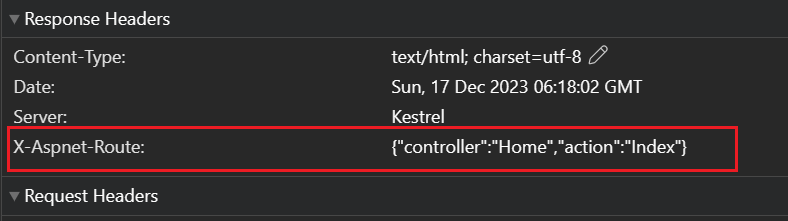
### View Current Route
- Open any page in your application
- View response header `x-aspnet-route`
### View All Routes
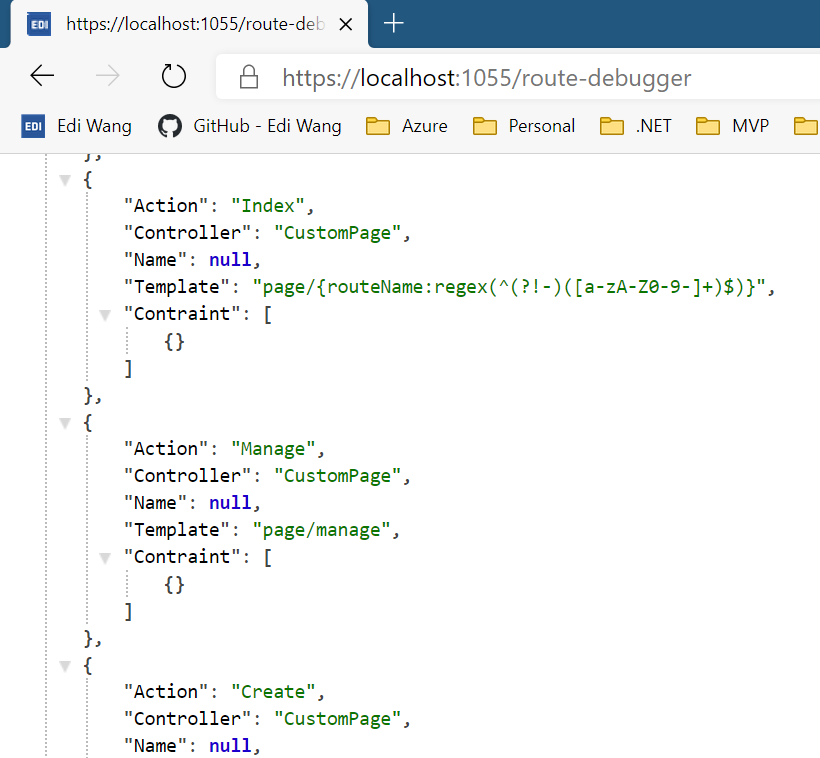
- Access `/route-debugger` or your custom path from browser or postman