https://github.com/eduardolat/kokoro-web
🔊 Kokoro Web: Free AI text-to-speech, online or self-hosted, OpenAI compatible!
https://github.com/eduardolat/kokoro-web
ai kokoro kokoro-82m kokoro-tts machine-learning text-to-speech tts voice voice-generation
Last synced: 5 months ago
JSON representation
🔊 Kokoro Web: Free AI text-to-speech, online or self-hosted, OpenAI compatible!
- Host: GitHub
- URL: https://github.com/eduardolat/kokoro-web
- Owner: eduardolat
- License: mit
- Created: 2025-02-09T18:54:22.000Z (over 1 year ago)
- Default Branch: main
- Last Pushed: 2025-03-16T05:09:11.000Z (over 1 year ago)
- Last Synced: 2025-03-16T05:24:44.496Z (over 1 year ago)
- Topics: ai, kokoro, kokoro-82m, kokoro-tts, machine-learning, text-to-speech, tts, voice, voice-generation
- Language: TypeScript
- Homepage: https://voice-generator.pages.dev
- Size: 3.88 MB
- Stars: 162
- Watchers: 1
- Forks: 9
- Open Issues: 0
-
Metadata Files:
- Readme: README.md
- License: LICENSE
Awesome Lists containing this project
README
🔊 Kokoro Web - Free AI Text to Speech
A powerful, browser-based AI voice generator that lets you create natural-sounding voices without installing anything.
Use it directly in your browser or self-host it for your own applications with OpenAI API compatibility!
## 🎬 Demo
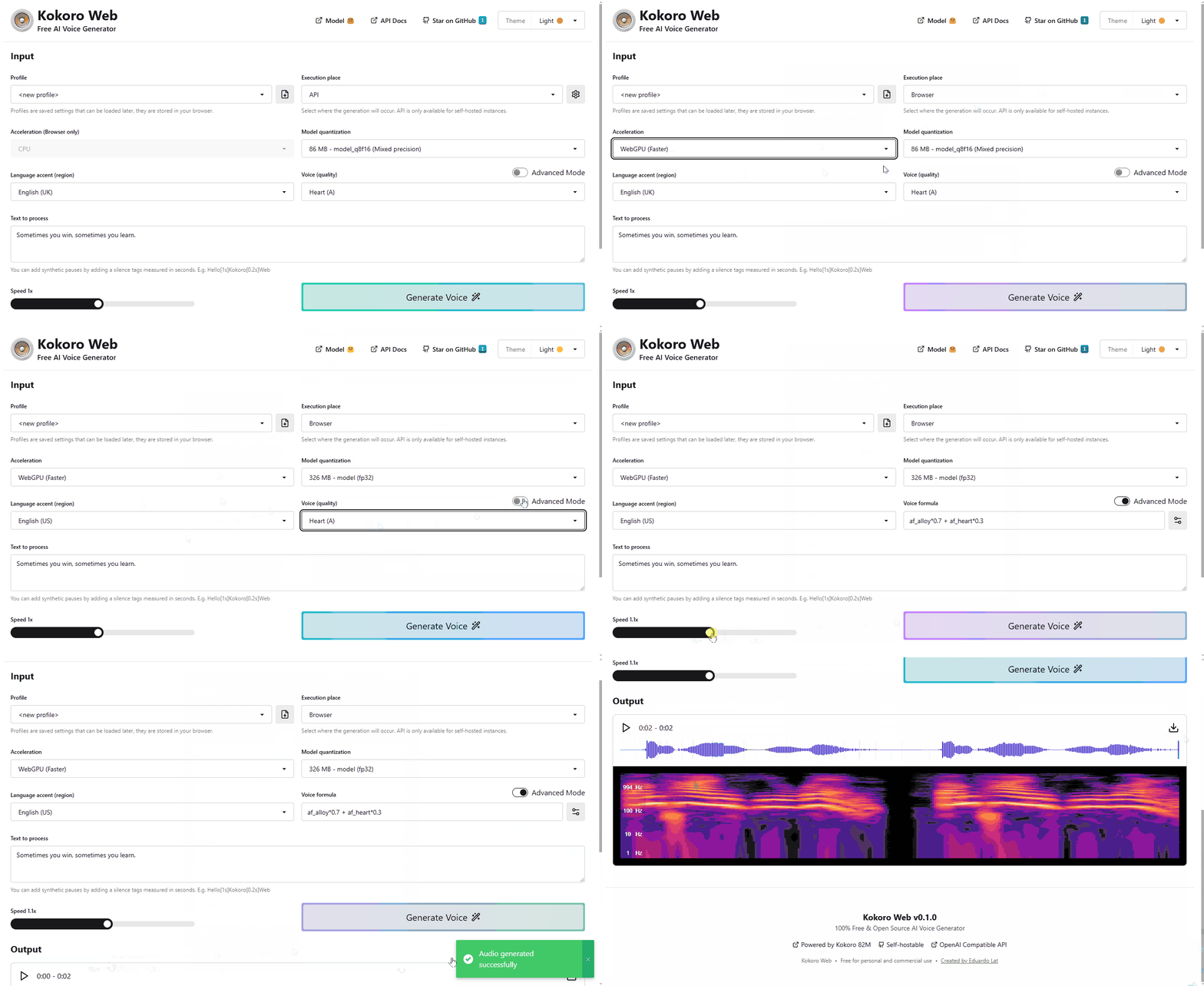
Try it now: https://voice-generator.pages.dev
## ✨ Key Features
- **Zero Installation** - Works directly in your browser, no downloads needed
- **Self Hostable** - If you need an OpenAI Compatible API
- **Free & Open Source** - 100% free for personal and commercial use
- **Multiple Languages** - Support for various language accents
- **Voice Customization** - Simple and advanced voice configuration options
- **WebGPU Acceleration** - Utilize your GPU for faster generation in supported browsers
## 🧠 Model
Kokoro Web is powered by [hexgrad/Kokoro-82M](https://huggingface.co/hexgrad/Kokoro-82M), an open-weight 82 million parameter Text-to-Speech model available on Hugging Face.
> Despite its lightweight architecture, it delivers comparable quality to larger models while being significantly faster and more cost-efficient. With Apache-licensed weights, Kokoro can be deployed anywhere from production environments to personal projects.
This is one of the top-ranked models in [TTS Arena](https://huggingface.co/spaces/TTS-AGI/TTS-Arena), just behind ElevenLabs.
Special thanks to the model creators for making this technology accessible.
## 🚀 Usage
### Option 1: Use it online
Visit the hosted version at [voice-generator.pages.dev](https://voice-generator.pages.dev) and start generating voices instantly!
### Option 2: Self-host with Docker
The self-hosted version includes an OpenAI-compatible API that works as a drop-in replacement for applications using [OpenAI's text-to-speech API](https://platform.openai.com/docs/guides/text-to-speech).
```yaml
services:
kokoro-web:
image: ghcr.io/eduardolat/kokoro-web:latest
ports:
- "3000:3000"
environment:
- KW_SECRET_API_KEY=your-api-key
volumes:
- ./kokoro-cache:/kokoro/cache # Cache downloaded models and voices
restart: unless-stopped
```
You can adjust the `compose.yaml` according to your needs or use docker run directly.
Then access the web UI at http://localhost:3000 and the API at http://localhost:3000/api/v1/index.html
## ⚙️ Environment variables
- **KW_SECRET_API_KEY** - Your API key for authentication. If left blank, authentication will not be activated
- **KW_PUBLIC_NO_TRACK** - Opt out of anonymous usage analytics
## 🔌 API Integration
Kokoro Web provides an OpenAI-compatible API that works as a drop-in replacement for applications using OpenAI's text-to-speech service:
```javascript
import fs from "fs";
import path from "path";
import OpenAI from "openai";
const openai = new OpenAI({
baseURL: 'http://your-kokoro-host/api/v1',
apiKey: 'your-kokoro-api-key',
});
const speechFile = path.resolve("./speech.mp3");
const mp3 = await openai.audio.speech.create({
model: "model_q8f16",
voice: "af_heart",
input: "Today is a wonderful day to build something people love!",
});
const buffer = Buffer.from(await mp3.arrayBuffer());
await fs.promises.writeFile(speechFile, buffer);
```
## 📜 License
Kokoro Web is [MIT Licensed](LICENSE)
---
Made with ❤️ by
Eduardo Lat