https://github.com/edwinabdonshayo/expiriobot
ExpirioBot an automated system that sorts products based on expiry dates using computer vision and OCR. It extracts expiry dates from images and controls a robotic arm to sort them. Key features include real-time image capture, efficient threaded processing, and robotic arm control. Developed by @saki3110, @ishan123310, @gt663 and @EdwinAbdonShayo
https://github.com/edwinabdonshayo/expiriobot
ai-vision aivision computer-vision dofbot ocr pytesseract python raspberry-pi robot robot-arm robotics tesseract threading yahboom yahboomtechnology
Last synced: 3 months ago
JSON representation
ExpirioBot an automated system that sorts products based on expiry dates using computer vision and OCR. It extracts expiry dates from images and controls a robotic arm to sort them. Key features include real-time image capture, efficient threaded processing, and robotic arm control. Developed by @saki3110, @ishan123310, @gt663 and @EdwinAbdonShayo
- Host: GitHub
- URL: https://github.com/edwinabdonshayo/expiriobot
- Owner: EdwinAbdonShayo
- Created: 2024-12-04T15:04:44.000Z (over 1 year ago)
- Default Branch: main
- Last Pushed: 2024-12-13T01:30:35.000Z (over 1 year ago)
- Last Synced: 2025-03-30T20:52:29.882Z (over 1 year ago)
- Topics: ai-vision, aivision, computer-vision, dofbot, ocr, pytesseract, python, raspberry-pi, robot, robot-arm, robotics, tesseract, threading, yahboom, yahboomtechnology
- Language: Python
- Homepage:
- Size: 12.8 MB
- Stars: 1
- Watchers: 1
- Forks: 0
- Open Issues: 0
-
Metadata Files:
- Readme: README.md
Awesome Lists containing this project
README
***
# The ExpirioBot
## Overview
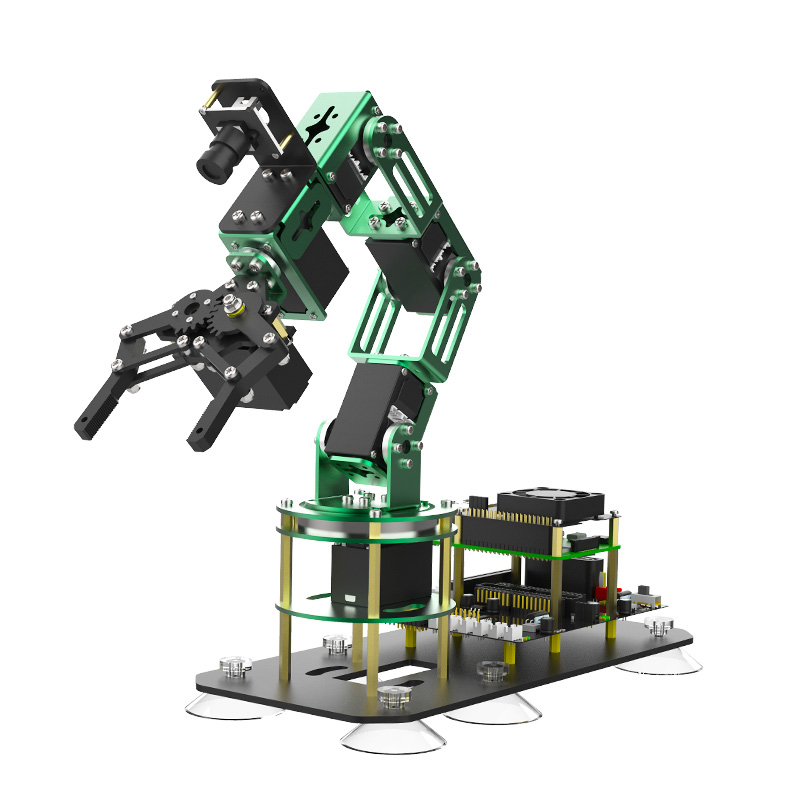
ExpirioBot is an automated robotic system designed to identify and sort products based on their expiry dates. The system utilizes computer vision to capture images of products, extract expiry dates using Optical Character Recognition (OCR), and control a robotic arm to move expired or valid products to designated locations.
## Features
- **OCR-Based Expiry Date Detection**: Extract expiry dates from product labels using `Tesseract OCR`.
- **Robotic Arm Sorting**: A robotic arm sorts products into `expired` and `valid` categories.
- **Real-Time Video Feed**: Displays a live feed of the camera input
- **Counters for Products**: Tracks the number of expired and valid products in real-time.
- **Threaded Architecture**: Ensures smooth operation with concurrent frame capturing and processing.
## Requirements
### Hardware
- DOFBOT-Pi robotic arm
- Processing Computer (Rasperry Pi 4 or equivalent recommended)
- Camera (USB or Pi Camera)
### Software
- `Python 3`
- `OpenCV (cv2)`
- `Pillow (PIL)`
- `Pytesseract`
- `tkinter`
- `threading`
- `queue`
- `re`
- `time`
- `datetime`
- `Arm_Lib` (custom library for controlling the robotic arm)
- `Tesseract OCR` installed on your system
## Installation
1. Clone the repository:
>bash code
```
git clone https://github.com/EdwinAbdonShayo/ExpirioBot.git
```
```
cd ExpirioBot
```
2. Install the required Python packages:
>bash code
```
pip install opencv-python pillow pytesseract tkinter
```
3. Install Tesseract OCR:
- For Linux, use your package manager:
>bash code
```
sudo apt-get install tesseract-ocr
```
- For Windows, download the installer from Tesseract at [UB Mannheim](https://github.com/UB-Mannheim/tesseract/wiki).
- For macOS, use Homebrew:
>bash code
```
brew install tesseract
```
4. Installing Arm Library: Ensure the py_install is in your project folder.
>bash code
```
cd py_install
sudo python3 setup.py install
```
## Repository Structure
ExpirioBot/
│
├── ExpirioBot.py # Main script for image capture, processing, and robotic arm movement.
│
├── py_install # Custom library for robotic arm control.
│ ├── Arm_Lib # Folder with robotic arm library dependencies.
│ └── setup.py # Arm_Lib library setup file.
│
├── ocr.py # Script with the optical character recognition (extracting text out of the images and gets date using patterns).
│
├── objectMover.py # Script for the robot arm movement.
│
├── image.jpg # Sample image captured from camera and preprocessed.
│
├── Learning Curve/ # Experimental scripts for trials and testing.
│ ├── Main
│ │ ├── ExpirioBot1.py # Experimental script 1.
│ │ ├── ExpirioBot2.py # Experimental script 2.
│ │ ├── ... # Additional experimental scripts.
│ │
│ ├── ... # Additional experimental scripts.
│
└── README.md # This README file.
## Usage
1. **Connect Hardware**:
- Attach the camera (in this case, the Raspberry Pi) and ensure it is accessible.
- Connect the DOFBOT robotic arm to the System.
2. **Run the Program**:
>bash code
```
python3 ExpirioBot.py
```
3. **Control Through the GUI**:
- `Start`: Begin capturing and processing frames.
- `Stop`: Pause the system.
- View live video feed and counters for expired and valid products.
### Key Functions
- `arm_clamp_block(enable)`: Controls the clamp of the robotic arm (servo 6).
- `arm_move(p, s_time)`: Moves the arm to specified positions.
- `preprocess_image(frame)`: Prepares the image for OCR processing.
- `extract_expiry_date(image_path)`: Extracts the expiry date from the image using OCR.
- `process_frames(frame_queue_container, processing_event, producer_allowed_event)`: Processes frames from the queue.
- `capture_frames(cap, frame_queue_container, producer_allowed_event)`: Captures frames from the camera.
## Customization
1. **Modify Predefined Arm Positions**:
- Update positions in the script (`p_front`, `p_left`, etc.) to match your setup.
2. **Change Thresholds for Image Preprocessing**:
- Edit the `preprocess_image` function to adjust grayscale or binary thresholds.
3. **Extend OCR Patterns**:
- Modify the `extract_expiry_date` function to handle additional date formats.
## Troubleshooting
- **Camera Not Detected**:
- Ensure the camera is connected and accessible through OpenCV.
- **Robotic Arm Not Responding**:
- Verify the arm is powered, correctly configured & arm library is installed.
- **OCR Not Extracting Dates**:
- Check the Tesseract installation and ensure the image has clear, legible text.
## Acknowledgments
- OpenCV for image processing.
- Tesseract OCR for text extraction.
- DOFBOT for providing a reliable robotic arm solution.
- tkinter for GUI development.
- Lastly, **Nivede** & **Karel** for their contributions (minimal) to the project.
## The Team
- [*Sakina*](https://github.com/saki3110)
- [*Ishan*](https://github.com/ishan23310)
- [*Hans*](https://github.com/gt663)
- [*Edwin*](https://edwinshayo.com)
*For any inquiries or issues, reach out to any of the above*
***