https://github.com/eepp/corr2
easy to use, Web-based grading tool
https://github.com/eepp/corr2
Last synced: 8 months ago
JSON representation
easy to use, Web-based grading tool
- Host: GitHub
- URL: https://github.com/eepp/corr2
- Owner: eepp
- License: gpl-3.0
- Created: 2013-12-09T07:22:11.000Z (over 12 years ago)
- Default Branch: master
- Last Pushed: 2013-12-16T07:33:26.000Z (over 12 years ago)
- Last Synced: 2024-12-26T11:07:19.068Z (over 1 year ago)
- Language: Python
- Size: 305 KB
- Stars: 4
- Watchers: 2
- Forks: 0
- Open Issues: 0
-
Metadata Files:
- Readme: README.md
- License: LICENSE
Awesome Lists containing this project
README
          cOrr2

=====

Grading is painful. It generally involves (at least in my case) repeating the

same thing hundreds of times in a row. This repetitive task is prone to human error

and may also lead to severe mental disorder.

**cOrr2** puts (more) fun into grading. [Try it here!](http://eepp.github.io/corr2)

cOrr2 is a Web-based grading tool. The input is an XML description (hopefully

a more visual editor will be built in the future) of a grade sheet (called *template*)

and the output is a Web template where you may easily fill grades in.

Here's a simple example of a template:

```xml


        ENG101: report #2


                    Include:
- Student name and ID
- School name
- Date
- Report title
]]>
Spelling (5), grammar (10), punctuation (5)
```
After running cOrr2, go to its URL and you get this:
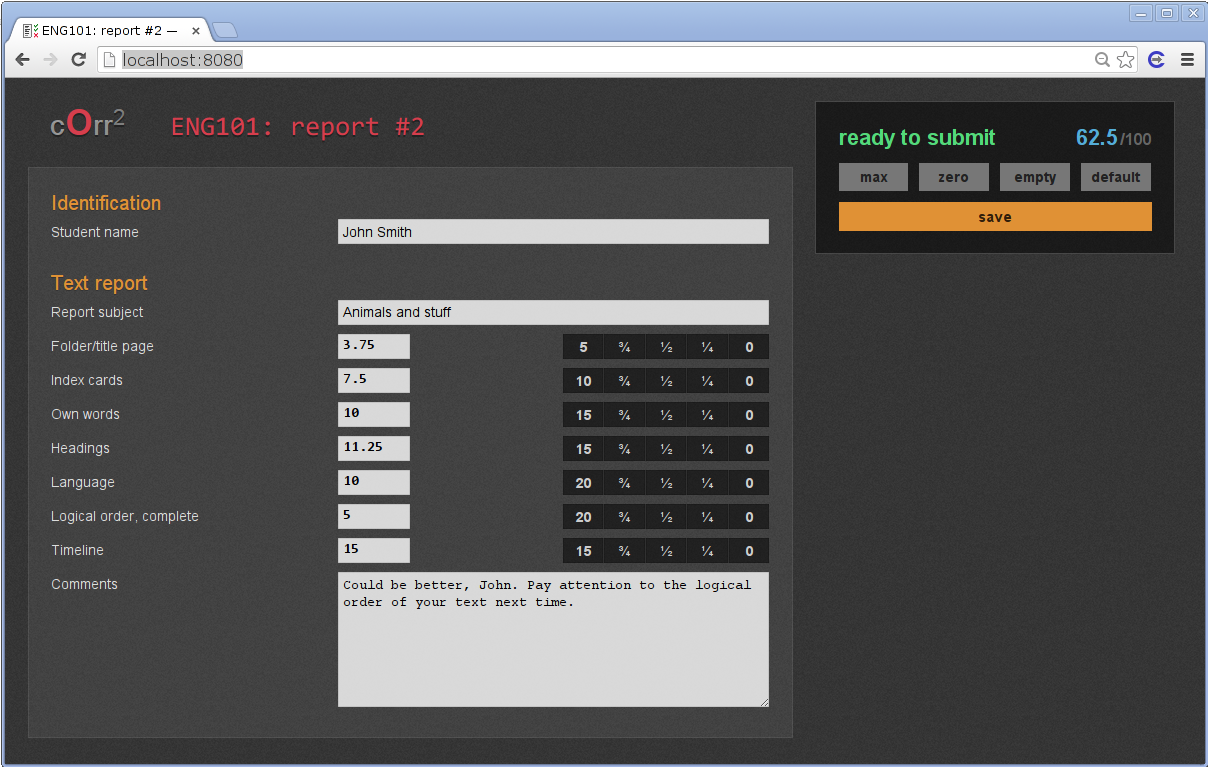
Once saved, the output is a JSON file which can later be processed to give back
results to students or a report to the school:
```javascript
{
"infos": {
"date": "2013-12-16 02:20:23",
"hostname": "eeppdesk",
"max": 100.0,
"output_filename": "/home/eepp/dev/corr2/John Smith.json",
"template_path": "/home/eepp/dev/corr2/examples/simple.xml",
"title": "ENG101: report #2",
"total": 62.5,
"version": "cOrr 2.0.0"
},
"sections": {
"id": {
"fields": {
"name": {
"result": "John Smith",
"title": "Student name",
"type": "gen"
}
},
"title": "Identification"
},
"report": {
"fields": {
"comments": {
"result": "Could be better, John. Pay attention to the logical order of your text next time.",
"title": "Comments",
"type": "gen"
},
"headings": {
"max": 15.0,
"result": 11.25,
"title": "Headings",
"type": "grade"
},
"indexc": {
"max": 10.0,
"result": 7.5,
"title": "Index cards",
"type": "grade"
},
"language": {
"max": 20.0,
"result": 10.0,
"title": "Language",
"type": "grade"
},
"order": {
"max": 20.0,
"result": 5.0,
"title": "Logical order, complete",
"type": "grade"
},
"ownwords": {
"max": 15.0,
"result": 10.0,
"title": "Own words",
"type": "grade"
},
"subject": {
"result": "Animals and stuff",
"title": "Report subject",
"type": "gen"
},
"timeline": {
"max": 15.0,
"result": 15.0,
"title": "Timeline",
"type": "grade"
},
"title": {
"max": 5.0,
"result": 3.75,
"title": "Folder/title page",
"type": "grade"
}
},
"title": "Text report"
}
}
}
```
dependencies
------------
cOrr2 is developed in Python 3 and needs the following packages to live:
* [lxml](http://lxml.de/)
* [Flask](http://flask.pocoo.org/docs/)
[`lessc`](http://lesscss.org/) is also needed to build the CSS file.
getting started
---------------
Clone:
$ git clone https://github.com/eepp/corr2 && cd corr2
Compile the CSS file using `lessc`:
$ make -C less
Make sure the project's root directory (where `example/` and `bin/` are) is in your
Python's path:
$ export PYTHONPATH=$(pwd)
Start cOrr2:
$ python bin/corr.py examples/simple.xml
You should see something like:
```
INFO:root:Starting cOrr2
INFO:root:Parsing template "examples/simple.xml"
INFO:root:Parsed template:
INFO:root: Title: ENG101: report #2
INFO:root: Sections:
INFO:root: Identification:
INFO:root: Student name [general field]
INFO:root: Text report:
INFO:root: Report subject [general field]
INFO:root: Folder/title page [grade field]
INFO:root: Index cards [grade field]
INFO:root: Own words [grade field]
INFO:root: Headings [grade field]
INFO:root: Language [grade field]
INFO:root: Logical order, complete [grade field]
INFO:root: Timeline [grade field]
INFO:root: Comments [general field]
INFO:root:Starting cOrr2 server
INFO:werkzeug: * Running on http://127.0.0.1:8080/
```
Point your browser to `http://127.0.0.1:8080/` and start grading! When saving,
JSON results files will be written to your current working directory. You may
change this output directory (and other stuff like the host address and port)
using options. Do
$ python bin/corr.py -h
to see the list of options.
keyboard shortcuts
------------------
Within the Web editor, the following keyboard shortcuts should work:
* `Down`: go to next field
* `Up`: go to previous field
* `Ctrl+Down`: go to next section
* `Ctrl+Up`: go to previous section
* specific to grade fields:
* `Z` or `Escape`: zero
* `X` or `Space`: max
* `A`: max × 0.25
* `S`: max × 0.5
* `D`: max × 0.75
* `Ctrl+Enter`: save (submit form)
Please note that, for obvious reasons, some keyboard shortcuts do not work
within multiline text areas. When stuck there, you can always use `Tab` and
`Shift+Tab` to get out.
todo
----
* cOrr2 visual template editor
* XML template RELAX NG validation
* edit already saved results
* prevent results file overwriting
* use setuptools
* try AngularJS?