https://github.com/eepp/eboxbw
Electronic Box cable Internet bandwidth usage
https://github.com/eepp/eboxbw
Last synced: 12 months ago
JSON representation
Electronic Box cable Internet bandwidth usage
- Host: GitHub
- URL: https://github.com/eepp/eboxbw
- Owner: eepp
- Created: 2014-09-06T16:22:48.000Z (almost 12 years ago)
- Default Branch: master
- Last Pushed: 2019-04-04T03:49:34.000Z (about 7 years ago)
- Last Synced: 2025-06-18T08:18:05.891Z (about 1 year ago)
- Language: Python
- Size: 30.3 KB
- Stars: 7
- Watchers: 1
- Forks: 3
- Open Issues: 2
-
Metadata Files:
- Readme: README.md
Awesome Lists containing this project
README
eboxbw
======
[](https://pypi.python.org/pypi/eboxbw)
**eboxbw** is a Python 3 package and a command line interface for
getting [Electronic Box](http://www.electronicbox.net/) cable Internet
bandwidth usage (Québec only). It is based on
[this tool](http://consocable.electronicbox.net/index.php?lng=en).
eboxbw supports Electronic Box's _Super off peak_ option.
reliability
-----------
Unfortunately, Electronic Box does not provide any sort of public API
to obtain a user's bandwidth usage data; eboxbw has to rely on parsing
the web interface's HTML output. This exact HTML output changes from
time to time, when Electronic Box decides so, which often results in
eboxbw not working anymore.
There have been several attempts to ask Electronic Box to create a
public API, but so far they won't.
installing
----------
### easy way
sudo pip install eboxbw
If Python 3 isn't the default Python of your setup:
sudo pip3 install eboxbw
You might want to install the Python dependencies with your distribution
package manager. They are:
* [beautifulsoup4](https://pypi.python.org/pypi/beautifulsoup4)
* [requests](https://pypi.python.org/pypi/requests)
* [termcolor](https://pypi.python.org/pypi/termcolor)
### manual way
Make sure you have Python 3 and
[setuptools](https://pypi.python.org/pypi/setuptools).
Clone using Git and run `setup.py`:
git clone https://github.com/eepp/eboxbw.git
cd eboxbw
sudo python3 setup.py install
using
-----
### command line interface (with colors!)
Simple lookup (current month summary):
eboxbw vlabcdef
Current month details:
eboxbw --details vlabcdef
eboxbw -d vlabcdef
Current month summary, MiB:
eboxbw --unit m vlabcdef
eboxbw -um vlabcdef
All options reference:
eboxbw --help
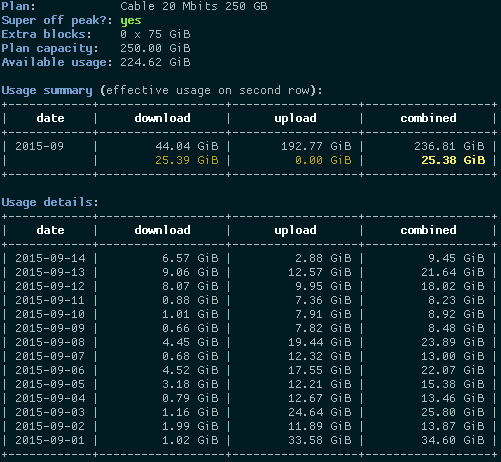
Detailed output example: