https://github.com/efck-chat-keyboard/efck
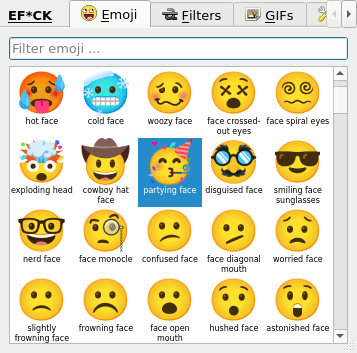
😃 ⌨ Emoji filter / Unicode chat keyboard, with GIFs
https://github.com/efck-chat-keyboard/efck
desktop-app emoji emoji-keyboard emoji-picker emoji-searcher emoticons gif-keyboard hacktoberfest linux macos memes on-screen-keyboard tenor unicode unicode-characters unicode-emoji virtual-keyboard windows
Last synced: 6 months ago
JSON representation
😃 ⌨ Emoji filter / Unicode chat keyboard, with GIFs
- Host: GitHub
- URL: https://github.com/efck-chat-keyboard/efck
- Owner: efck-chat-keyboard
- License: agpl-3.0
- Created: 2022-09-18T06:05:03.000Z (almost 4 years ago)
- Default Branch: master
- Last Pushed: 2025-09-14T19:29:46.000Z (10 months ago)
- Last Synced: 2025-11-16T05:04:15.063Z (8 months ago)
- Topics: desktop-app, emoji, emoji-keyboard, emoji-picker, emoji-searcher, emoticons, gif-keyboard, hacktoberfest, linux, macos, memes, on-screen-keyboard, tenor, unicode, unicode-characters, unicode-emoji, virtual-keyboard, windows
- Language: Python
- Homepage: https://efck-chat-keyboard.github.io
- Size: 532 KB
- Stars: 42
- Watchers: 4
- Forks: 3
- Open Issues: 15
-
Metadata Files:
- Readme: README.md
- Contributing: CONTRIBUTING.md
- Funding: .github/FUNDING.yml
- License: LICENSE.txt
Awesome Lists containing this project
README
 EF*CK Chat Keyboard
======
[](https://github.com/efck-chat-keyboard/efck/actions)
[](https://pypi.org/project/efck)
[](https://efck-chat-keyboard.github.io/download/)
[](https://github.com/sponsors/kernc)
[Emoji Filter / Unicode Chat Keyboard][www] — Official website
Find prebuilt downloads in the **Releases** sidebar.
[Contributing guidelines / hacking](CONTRIBUTING.md)
[www]: https://efck-chat-keyboard.github.io
Features
--------
* Fully cross-platform desktop on-screen emoji keyboard based on
Python and PyQt6/5+
* Keyboard-first navigation
* Built-in tabs for:
* Emoji filtering by emoji name and common marks
* Transforming input text into various segments of Unicode
(extendable with own scripts)
* Searching for meme GIFs with support for drag-and-drop
into your chosen window
* Extensible architecture with support for custom homemade tabs.
* The selected emoji/filter/gif/... is typed/pasted into the
previously active desktop window ...
* ... and/or saved into clipboard