https://github.com/efkan/rndrawer-implemented-rnrouter
A react-native-drawer implemented example and scaffolding for react-native-router-flux.
https://github.com/efkan/rndrawer-implemented-rnrouter
Last synced: over 1 year ago
JSON representation
A react-native-drawer implemented example and scaffolding for react-native-router-flux.
- Host: GitHub
- URL: https://github.com/efkan/rndrawer-implemented-rnrouter
- Owner: efkan
- Created: 2016-02-23T19:54:31.000Z (over 10 years ago)
- Default Branch: master
- Last Pushed: 2017-05-30T04:25:30.000Z (about 9 years ago)
- Last Synced: 2024-10-29T13:50:29.597Z (almost 2 years ago)
- Language: JavaScript
- Size: 23.4 MB
- Stars: 50
- Watchers: 4
- Forks: 12
- Open Issues: 0
-
Metadata Files:
- Readme: README.md
- Changelog: change_these_folders_with_their_originals.zip
Awesome Lists containing this project
- awesome-react-native - rndrawer-implemented-rnrouter ★50 - A react-native-drawer implemented example and scaffolding for react-native-router-flux (Open Source Apps / Other Platforms)
- awesome-react-native - rndrawer-implemented-rnrouter ★50 - A react-native-drawer implemented example and scaffolding for react-native-router-flux (Open Source Apps / Other Platforms)
- fucking-awesome-react-native - rndrawer-implemented-rnrouter ★50 - A react-native-drawer implemented example and scaffolding for react-native-router-flux (Open Source Apps / Other Platforms)
- awesome-react-native - rndrawer-implemented-rnrouter ★50 - A react-native-drawer implemented example and scaffolding for react-native-router-flux (Open Source Apps / Other Platforms)
- awesome-react-native - rndrawer-implemented-rnrouter ★50 - A react-native-drawer implemented example and scaffolding for react-native-router-flux (Open Source Apps / Other Platforms)
README
**Deprecated** - This repo uses obsolete versions of `react-native-router-flux` and `react-native-drawer`. I update the repo for now. But I may not update on someday.
**Recommendation** - Try [react-navigation](https://reactnavigation.org) module. It uses pure `react-native` components as much as possible.
rndrawer-implemented-rnrouter
--
An example for [react-native-drawer](https://github.com/root-two/react-native-drawer) and [react-native-router-flux](https://github.com/aksonov/react-native-router-flux). The example has been developed by using react-native-drawer 1.X and react-native-router-flux 2.X. The new versions of the libraries are not stable yet (2016-04-24). You might try to contribute them! Both of them welcome the new PR.
With this scaffolding you can create side menu (drawer) and navigate between your screens (pages) easily.
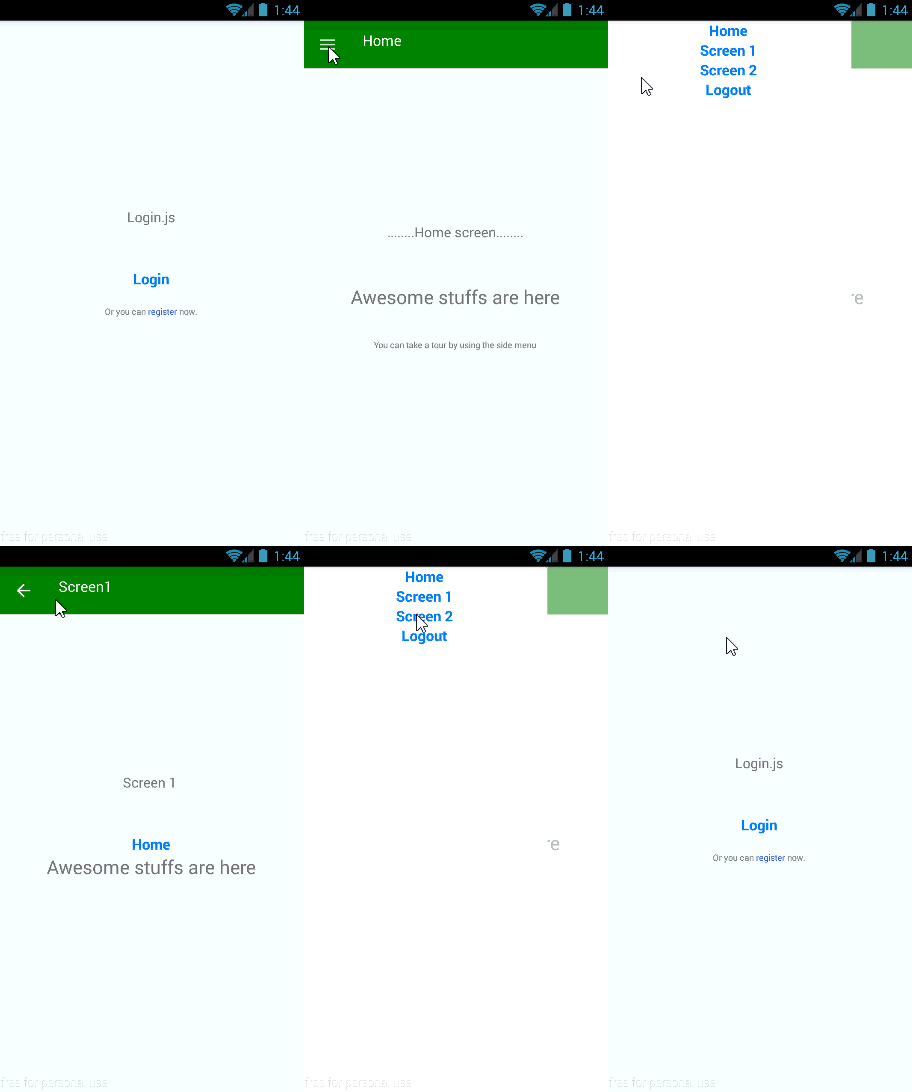
For the sake of example the screens below have been created;
* Login
* Register
* Home
* Screen 1
* Screen 2
The scenarios of the example;
* The user opens the app
* The user logins or registers
* The user navigates the screens by using drawer menu
* The user logs out
*The example has been shaped like an* ***Android*** *app. Actually, it is an* ***cross-platform*** *app and you could give shape like an* ***IOS*** *app.*
Installation
-------------
_Because of some breaking changes that've been made in React-Native in the past, some [node_modules files](https://github.com/efkan/rndrawer-implemented-rnrouter/blob/master/change_these_folders_with_their_originals.zip) must be changed with their originals._
**iOS**
1. Run the command of `react-native init reactNativeRouterFluxSample & cd reactNativeRouterFluxSample`
2. Then `npm i --save react-native-drawer@1.16.7 & npm i --save react-native-router-flux@2.2.7 & npm i --save react-native-button@1.4.2`
3. Then copy `src` folder and `index.ios.js` file of rndrawer-implemented-rnrouter into the new initiated project.
4. Finally, [official site](https://facebook.github.io/react-native/docs/getting-started.html#quick-start) says that; "Open ios/reactNativeRouterFluxSample.xcodeproj and hit run in Xcode".
**Android**
1. Run the command of `react-native init reactNativeRouterFluxSample & cd reactNativeRouterFluxSample`
2. Then `npm i --save react-native-drawer@1.16.7 & npm i --save react-native-router-flux@2.2.7 & npm i --save react-native-button@1.4.2`
3. Then copy `src` folder and `index.android.js` file of rndrawer-implemented-rnrouter into the new initiated project.
4. Finally, run the command of `react-native run-android & react-native start` and then click to the Reload button on the red screen.