https://github.com/eightyfive/eth-battleship
Battleship game on Ethereum
https://github.com/eightyfive/eth-battleship
Last synced: 23 days ago
JSON representation
Battleship game on Ethereum
- Host: GitHub
- URL: https://github.com/eightyfive/eth-battleship
- Owner: eightyfive
- Created: 2018-08-26T18:22:15.000Z (almost 8 years ago)
- Default Branch: master
- Last Pushed: 2022-12-07T23:43:00.000Z (over 3 years ago)
- Last Synced: 2025-10-18T07:54:06.507Z (10 months ago)
- Language: JavaScript
- Homepage:
- Size: 1.21 MB
- Stars: 2
- Watchers: 1
- Forks: 0
- Open Issues: 5
-
Metadata Files:
- Readme: README.md
Awesome Lists containing this project
README
# Battleship game on Ethereum
Simple battleship game implemented on the ethereum blockchain (solidity).
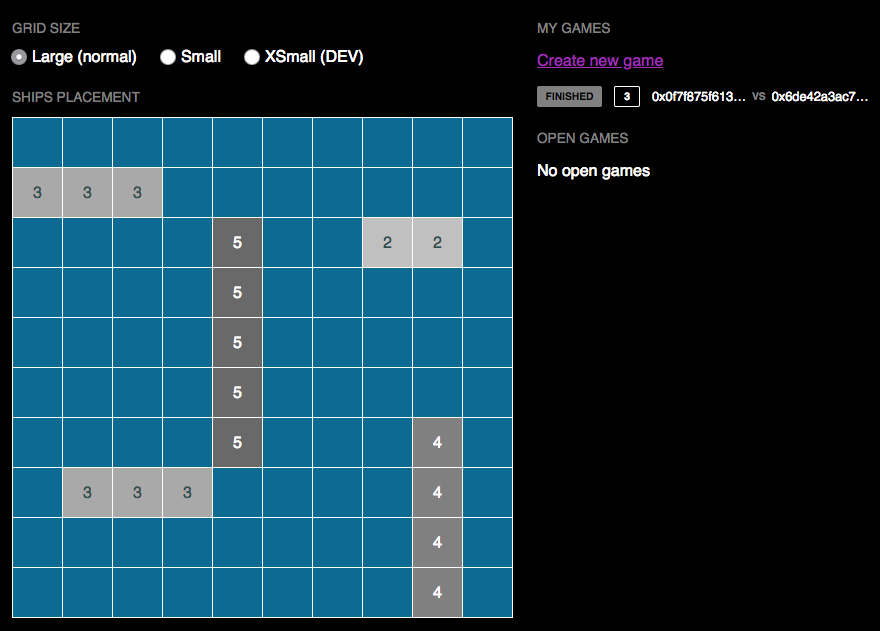
## What does it do?
- Player A can create a Battleship game (+ submit `secret` of Player A ships positions)
- Player B can join an open Battleship game (+ submit `secret` of Player B ships positions)
- Player A attacks Player B at position "C1" (example)
- Player B provides feedback on attack (can cheat)
- Player B attacks Player A at position "E1"...
- ... And so on.
- Player A wins the game / sinks entire fleet of Player B
- Player A "reveals" its initial ships positions
- Player A has cheated, it appears he misreported some of Player B attacks
- Player B is the new winner of the game
## Setup
### Requirements
In order to run this project locally, you will need:
- [Truffle](https://truffleframework.com/truffle)
- [Ganache](https://truffleframework.com/ganache)
- Mac OS (**not** tested on MS Windows)
- Modern browser with [Metamask](https://metamask.io) installed
### Install
```
$ git clone https://github.com/eightyfive/eth-battleship.git
$ cd eth-battleship
$ npm install
$ truffle compile
$ truffle migrate --network ganache
// NOTE: All compile warnings come from external libraries/contracts
# Optionally
$ truffle test
```
### `.env` file
Opposite to common practice, I *did commit* an `.env` file to the repository. This is for convenience (so one does not have to create the file after cloning), and most importantly because it is required for babel/node to compile successfully the JS app.
This allowed me to use `import` paths relative to the project root and avoid [node relative paths hell](https://www.coreycleary.me/escaping-relative-path-hell/).
### Run
```
// Assuming Ganache (Mac OS) is launched...
$ npm run start
// Head to http://localhost:3000
```
## Goodies for testers
I added a couple of settings to the web app (URL params), so that testers have a better experience completing games, testing various cases, etc.
### Force Ganache
Once you have confirmed that my app works with Metamask, you can ignore Metamask all together, so that when testing the app, you do not have to constantly "confirm" the transactions in Metamask.
- Activate: `http://localhost:3000?provider=ganache`
- De-activate: `http://localhost:3000?provider=metamask`
_Notes_:
- Feel free to ignore this setting and do all your tests using Metamask !
- Because `provider` is saved in a session cookie, if after forcing Ganache you want to go back to using Metamask, don't forget to reload the page with `provider=metamask` in URL.
### Choose Ganache account
Since there is no way in my web app UI to switch between available accounts (out of scope), you can switch between accounts via the URL.
- Force Ganache first: `http://localhost:3000?provider=ganache`
- Account 1: `http://localhost:3000?account=0`
- Account 2: `http://localhost:3000?account=1`
- Etc...
_Notes_:
- I don't check if the index provided is valid! So be sure to stay inbounds.
- Only works along with `provider=ganache` activated (Metamask returns only one account anyways).
- Same as `provider`, `account` parameter is saved in a session cookie, so switch accounts accordingly.
### Typical Test workflow
1. Open Chrome private window: http://localhost:3000?provider=ganache&account=0
1. Open another Chrome private window: http://localhost:3000?provider=ganache&account=1
1. Resize 50% width each window side-by-side
1. Create a game in `account=0` window
1. Join game in `account=1` window
1. Play as normal !
## `SafeMath` Library
Since my project did not require the use of a library, I created a dedicated unit test demonstrating `uint` overflows and how the `SafeMath` Zeppelin library can help.
- `Battleship.sol -> safeMath()`
- `Battleship.sol -> notSafeMath()`
- `test/battleship.js -> "...should +10 overflow (SafeMath)"`
## TODO
Unfortunately I did not have time to do the following, only UI stuff:
- Implement the **UI** for reveal phase (but "reveal" works in Tests !!)
- Implement the **UI** for betting (but "betting" works in Tests !!)