https://github.com/eiz/SynchronousAudioRouter
Low latency application audio routing for Windows
https://github.com/eiz/SynchronousAudioRouter
Last synced: about 1 year ago
JSON representation
Low latency application audio routing for Windows
- Host: GitHub
- URL: https://github.com/eiz/SynchronousAudioRouter
- Owner: eiz
- License: gpl-3.0
- Created: 2015-08-16T15:37:07.000Z (almost 11 years ago)
- Default Branch: master
- Last Pushed: 2024-05-15T09:11:39.000Z (about 2 years ago)
- Last Synced: 2024-11-04T21:11:32.031Z (over 1 year ago)
- Language: C++
- Homepage: http://sar.audio/
- Size: 4.24 MB
- Stars: 1,053
- Watchers: 49
- Forks: 138
- Open Issues: 84
-
Metadata Files:
- Readme: README.md
- License: COPYING-V2.txt
Awesome Lists containing this project
README
[](https://ci.appveyor.com/project/eiz/synchronousaudiorouter/branch/master)
# Synchronous Audio Router
Synchronous Audio Router is a Windows audio driver which allows you to route
application audio through your digital audio workstation software. It has a few
unique characteristics compared to similar virtual audio cable software:
* All virtual audio streams are synchronized to a physical audio interface to
mitigate clock drift/buffer underrun problems.
* Allows dynamic creation of an unlimited number of Windows audio devices with
custom names. You get exactly as many endpoints as you need with no useless
"Line 6" type names.
* Allows per-app override of Windows default audio device for apps which
don't include a way to select an audio device. Regex matching lets you set
rules for many apps simultaneously, e.g. route every app under your steamapps
directory to a specific endpoint.
* Designed for use with DAW software. Instead of treating all virtual audio
streams independently, they're mapped to a single multichannel ASIO interface
which also includes all channels from the physical audio device.
* Low latency. Since SAR is synchronous with the hardware audio interface and
uses WaveRT to transport audio to/from applications, it doesn't impact your
DAW's latency. It's practical to use 1-2ms buffer sizes on a cheap USB 2.0
interface.
* Extremely simple UI. Because the DAW is expected to do all the hard work of
audio processing, SAR doesn't need to include a complicated mixer interface or
extensive configuration options.
## Community
If you use SAR and would like to discuss issues related to it, please join the
Discord server at [https://discord.gg/9rwFdMW](https://discord.gg/9rwFdMW).
## System Requirements
* Windows 7 or later. If you are running a current version of Windows 10, Secure Boot is not supported.
* An audio interface which supports ASIO. If your hardware doesn't come with a
native ASIO driver, you may be able to use ASIO4ALL instead.
* Digital audio workstation software. SAR is mainly tested using [REAPER](http://www.reaper.fm/).
## HOWTO
See also: [the old website](https://str.rs/sar) / [manual](https://str.rs/sar/manual.html)
Once you've installed SAR, nothing will immediately happen.
To configure it, either:
* Start your DAW (for beta: as admin!) and open its audio configuration settings.
Select the Synchronous Audio Router ASIO driver and open the ASIO
configuration dialog.
* Start `SAR Configuration` tool from Windows' start menu (0.13.99.1 or later).
* Get [asioconfig](https://github.com/jprjr/asioconfig/releases) and choose `Synchronous Audio Router` (prior to 0.13.99.1).
The SAR Configuration dialog will open.
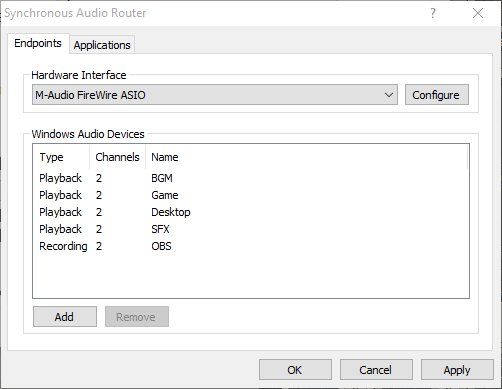
Under Hardware Interface, select the ASIO driver for your physical audio
device.
You can add an unlimited number of Windows audio endpoints from the SAR
configuration dialog.
* `Playback` endpoints allow Windows applications to play sound and show up
as corresponding input channels on your ASIO device.
* `Recording` endpoints allow Windows apps to record output sound and
correspond to ASIO output channels.
Once you've added your channels, make sure they're enabled in your DAW --
most have a dialog or dropdown where you can select which channels are to
be used.
SAR will expose more ASIO channels than the underlaying ASIO driver, like this:
* The first ASIO channels are the physical ones from the underlaying ASIO
driver.
* Then, the remaining ASIO channels are mapped to virtual endpoints.
If you receive errors initializing the SAR ASIO driver, make sure you are
running your DAW as admin. This is a requirement of the SAR beta build or
if you choose `Require Administrator privileges to access SAR` option in the
SAR installer.
Note that the endpoints created by SAR are only active while your DAW is
running and has started ASIO. They are automatically disconnected when the
ASIO driver is closed. If you're using REAPER, make sure "Close audio device
when stopped and application is inactive" in the Audio preferences is
disabled.
## Windows 7 Installation Note
Make sure you have Windows update [KB3033929](https://technet.microsoft.com/en-us/library/security/3033929.aspx)
installed prior to installing SAR, otherwise you will receive an error about
an unsigned driver.
## Unsigned prereleased drivers note
Prereleases of SAR are unsigned. That means that it is required to enable
`testsigning` boot option to make Windows load the driver. Else the driver
won't be loaded.
For more information about `testsigning` option, see here:
https://docs.microsoft.com/en-us/windows-hardware/drivers/install/the-testsigning-boot-configuration-option#enable-or-disable-use-of-test-signed-code